
PostgreSQL
ORDER BY
In PostgreSQL, the ORDER BY clause allows you to sort the result set of a query in either ascending (ASC) or descending (DESC) order, based on one or more columns. By default, sorting is done in ascending order. The ORDER BY clause can also be used with multiple columns, where sorting is done by the first column and then by subsequent columns if needed.
Here's a breakdown with syntax examples:
- Basic Syntax
The basic syntax for using the
ORDER BYclause:SELECT column1, column2 FROM table_name ORDER BY column1 [ASC|DESC], column2 [ASC|DESC]; - Ordering by a Single Column
- To order the data by a single column, specify the column in the
ORDER BYclause. - Syntax:
SELECT column1, column2 FROM table_name ORDER BY column_name [ASC|DESC];- Example:
SELECT customer_id, first_name, last_name FROM customers ORDER BY last_name ASC; - To order the data by a single column, specify the column in the
- Ordering by Multiple Columns
- You can order by multiple columns by separating them with commas. The data is first ordered by the first column, and if two rows are identical in that column, the second column is used for sorting.
- Syntax:
SELECT column1, column2 FROM table_name ORDER BY column1 [ASC|DESC], column2 [ASC|DESC];- Example:
SELECT account_id, account_type, balance FROM accounts ORDER BY account_type ASC, balance DESC; - Using Aliases in
ORDER BY- You can use column aliases in your
SELECTquery and reference those aliases in theORDER BYclause. - Syntax:
SELECT column1 AS alias1, column2 AS alias2 FROM table_name ORDER BY alias1 [ASC|DESC];- Example:
SELECT transaction_id, amount + fee AS total_amount FROM transactions ORDER BY total_amount DESC; - You can use column aliases in your
- Ordering by Column Index
- You can also use the position of the columns in the
SELECTlist to order the result, where the first column is referred to as1, the second as2, and so on. - Syntax:
SELECT column1, column2 FROM table_name ORDER BY column_position [ASC|DESC];- Example:
SELECT customer_id, first_name, last_name FROM customers ORDER BY 1 ASC; - You can also use the position of the columns in the
- Combining with Other Clauses
- You can combine the
ORDER BYclause with other clauses likeWHERE,LIMIT, orGROUP BYto filter and sort data efficiently. - Syntax:
SELECT column1, column2 FROM table_name WHERE condition ORDER BY column_name [ASC|DESC] LIMIT number;- Example:
SELECT transaction_id, amount, transaction_date FROM transactions WHERE amount > 1000 ORDER BY transaction_date DESC LIMIT 5; - You can combine the
To gain complete access, login with gmail or outlook, no need of signup. click here

TEST CODE
In PostgreSQL, to sort the "act_order" table data by the "order_date" column in ascending order (ASC), you can execute the following SQL statement:
SELECT *
FROM act_order
ORDER BY order_date ASC;In PostgreSQL, to select and sort data from the "act_order" table by the "order_date" column in ascending order (ASC), you would execute the following SQL statement:
SELECT *
FROM act_order
ORDER BY order_date ASC;In PostgreSQL, to select and sort data from the "act_order" table by the "order_date" column in descending order (DESC), you would execute the following SQL statement:
SELECT *
FROM act_order
ORDER BY order_date DESC;In PostgreSQL, to select and sort data from the "prd_product" table by the "product_name" column in ascending order (A to Z), you would execute the following SQL statement:
SELECT *
FROM prd_product
ORDER BY product_name ASC;In PostgreSQL, to select and sort data from the "prd_product" table by the "product_name" column in descending order (Z to A), you would execute the following SQL statement:
SELECT *
FROM prd_product
ORDER BY product_name DESC;In PostgreSQL, to select and sort data from the "act_order_detail" table by the computed column (quantity * unit_rate) in ascending order (smaller amounts at the top), you would execute the following SQL statement:
SELECT order_detail_id, product_id, quantity, unit_rate, (quantity * unit_rate) AS total_price
FROM act_order_detail
ORDER BY (quantity * unit_rate) ASC;In PostgreSQL, to select and sort data from the "act_order_detail" table by the computed column (quantity * unit_rate) in descending order (higher amounts at the top), you would execute the following SQL statement:
SELECT order_detail_id, product_id, quantity, unit_rate, (quantity * unit_rate) AS total_price
FROM act_order_detail
ORDER BY (quantity * unit_rate) DESC;In PostgreSQL, to select data from the "prd_product" and "act_order_detail" tables, specifying product names and total units sold with the most sold items at the top, you would execute the following SQL statement:
SELECT a.product_name, SUM(b.quantity) AS units_sold
FROM prd_product a
INNER JOIN act_order_detail b ON b.product_id = a.product_id
GROUP BY a.product_name
ORDER BY SUM(b.quantity) DESC;In PostgreSQL, to select data from the "org_client" and "act_order" tables, specifying client names and order numbers with recent orders listed first, you would execute the following SQL statement:
SELECT a.first_name AS client_name, b.order_number
FROM org_client a
INNER JOIN act_order b ON b.client_id = a.client_id
ORDER BY b.order_date DESC;In PostgreSQL, to select data from the "org_client" table and sort it first by birth year in descending order (younger clients first), and then alphabetically by first name and last name in ascending order, you would execute the following SQL statement:
SELECT client_id, birth_year, first_name, last_name
FROM org_client
ORDER BY birth_year DESC, first_name ASC, last_name ASC;Example 1:
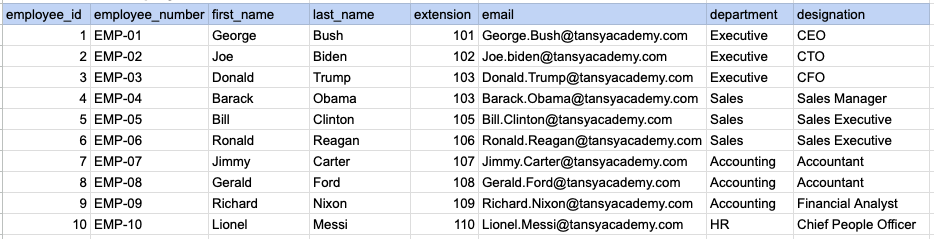
Let's understand the process of extracting data from employee table using ORDER BY sql clause. In this case, we aim to sort the data by employee's last name.
Example 1 - Raw data from employee table
Example 1 - Query
SELECT employee_number, first_name, last_name
FROM org_employee
ORDER BY first_name;
Example 1 - Query data mapping
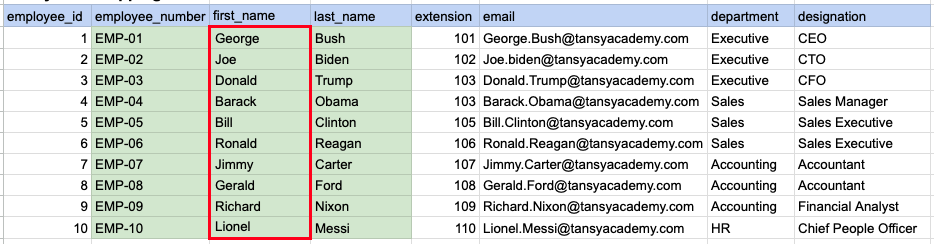
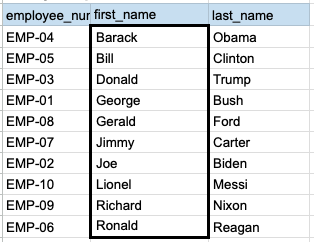
In the depicted illustration, the data highlighted in green represents the selected information that aligns with our query criteria. Additionally, the red box signifies the column requiring alphabetical sorting prior to generating the ultimate output.
Example 1 - Query Output
Example 2:
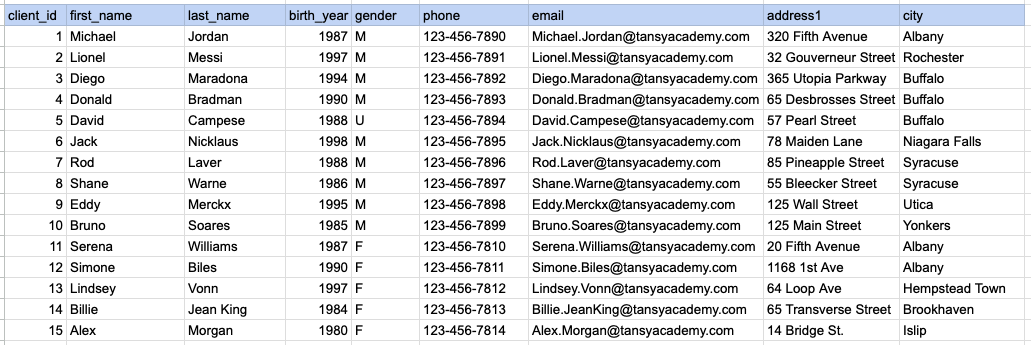
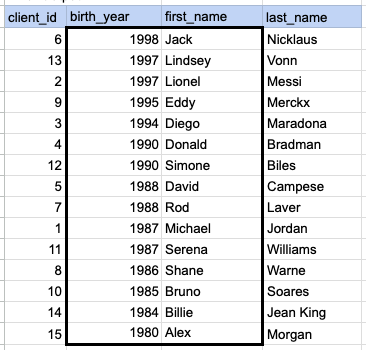
Let's explore the procedure of retrieving data from the client's table using the SQL ORDER BY clause. In this example, our initial objective is to arrange the data in descending order based on the year of birth. Following that, we proceed to sort the output from step 1 based on the first name in ascending order.
Example 2 - Raw data from client table
Example 2 - Query
SELECT client_id, birth_year, first_name, last_name
FROM org_client
ORDER BY birth_year DESC, first_name ASC;
Example 2 - Query data mapping
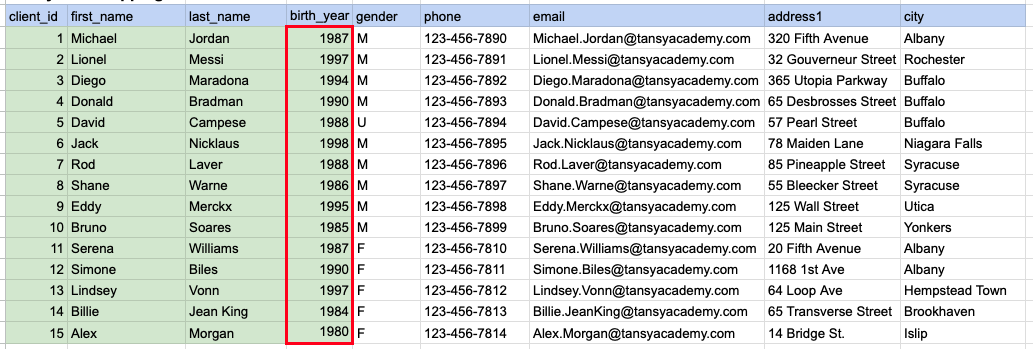
In the image above, the green color indicates the data that has been chosen or meets the criteria for our query. Red box indicates that as step1 we need to sort the data by year of birth in descending order.
Example 2 - Step 2
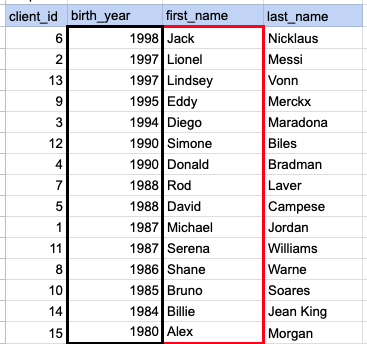
In the depicted image, the data has been arranged in descending order based on the specified year of birth, and an additional sorting is necessary based on the first name in ascending order.
Example 2 - Query Output
Comments Not Found