
PostgreSQL
IN Operator
In PostgreSQL, DQL (Data Query Language) is used to query and retrieve data from the database. One of the powerful operators within DQL is the IN operator, which allows you to check if a value matches any value in a list of values or subquery results. It's highly useful when you want to filter data based on multiple criteria without using multiple OR conditions. The IN operator simplifies your SQL queries and enhances readability.
Here’s a basic breakdown of how you can use the IN operator in PostgreSQL:
- Basic Syntax of the IN Operator
The general syntax for using the
INoperator in a SQL query is as follows:SELECT column_name FROM table_name WHERE column_name IN (value1, value2, value3, ...); - Example with a Banking Database (Customer Table)
Suppose you have a
customerstable with customer details, and you want to retrieve the customers who are located in certain cities. Here's how you can use theINoperator:SELECT customer_id, customer_name, city FROM customers WHERE city IN ('New York', 'Los Angeles', 'Chicago');In this example, the query will return all customers whose city is either "New York," "Los Angeles," or "Chicago."
- Using IN with Numeric Values (Accounts Table)
You can also use
INwith numeric values. Let's say you want to find accounts with specific IDs from theaccountstable:SELECT account_id, account_type, balance FROM accounts WHERE account_id IN (101, 102, 203, 405);This query retrieves data for accounts with IDs 101, 102, 203, and 405.
- Using a Subquery with IN (Transactions Table)
The
INoperator can also be used with a subquery to fetch results based on another query. For example, if you want to find transactions for customers who live in "New York" or "Chicago," you can write:SELECT transaction_id, amount, transaction_date FROM transactions WHERE customer_id IN (SELECT customer_id FROM customers WHERE city IN ('New York', 'Chicago'));This query first retrieves the
customer_idof customers who live in the specified cities and then finds all related transactions. - Advantages of Using the IN Operator
- Simplifies query structure when dealing with multiple values.
- Enhances readability compared to using multiple
ORconditions. - Can be combined with subqueries to handle dynamic lists of values.
By understanding and utilizing the
INoperator effectively, you can streamline your queries and retrieve data more efficiently in PostgreSQL. To gain complete access, login with gmail or outlook, no need of signup. click here
TEST CODE
In PostgreSQL, the IN operator is used to filter rows based on a list of string values. This query retrieves all rows from the "org_employee" table where the designation column corresponds to any of the specified values ('Sales Manager', 'Financial Analyst', 'CFO'):
SELECT * FROM org_employee WHERE designation IN ('Sales Manager', 'Financial Analyst', 'CFO');In PostgreSQL, the IN operator is used to filter rows based on a list of numeric values. This query retrieves all rows from the "org_client" table where the birth year column matches any of the specified values (1990, 1980):
SELECT * FROM org_client WHERE birth_year IN (1990, 1980);In PostgreSQL, the IN operator is used to filter rows based on a list of datetime values. This query retrieves all rows from the "act_order" table where the desired_date column matches any of the specified values ('2023-12-09', '2023-12-10', '2023-12-18', '2023-12-25'):
SELECT * FROM act_order WHERE desired_date IN ('2023-12-09'::DATE, '2023-12-10'::DATE, '2023-12-18'::DATE, '2023-12-25'::DATE);Example 1:
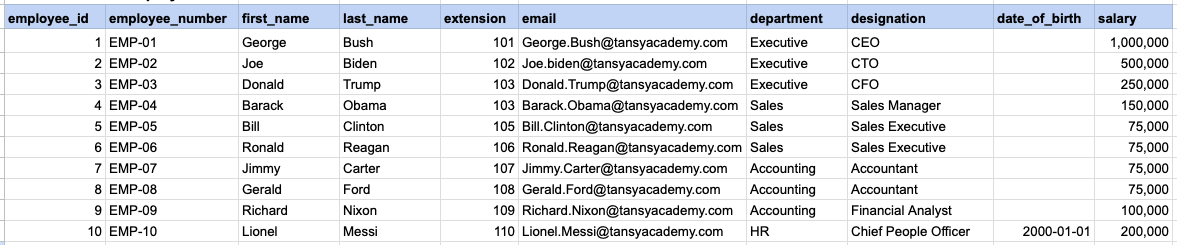
Let's explore the procedure of extracting information from a designated table using the IN SQL operator with string data. This query retrieves all rows from the employees table where the designation column corresponds to any of the specified values ('Sales Manager', 'Financial Analyst', 'CFO').
Example 1 - Raw data from employee table
SELECT *
FROM org_employee
WHERE designation IN ('Sales Manager', 'Financial Analyst', 'CFO');
Example 1 - Query data mapping
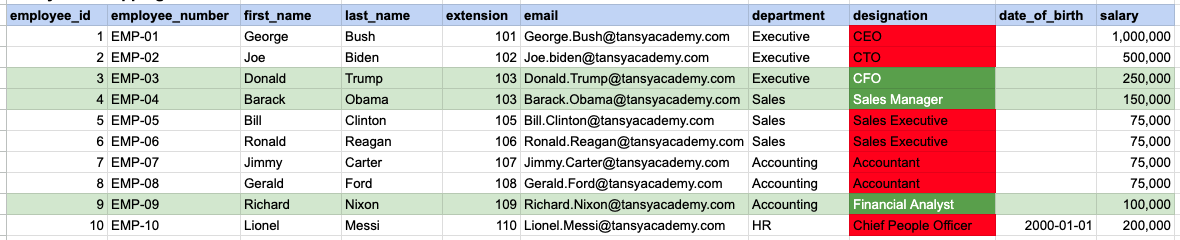
In the provided image, the green color signifies the data that has been selected or satisfies the conditions specified in our query. Data points in red indicate information that does not meet the criteria set by the query.
Example 1 - Query Output

Example 2:
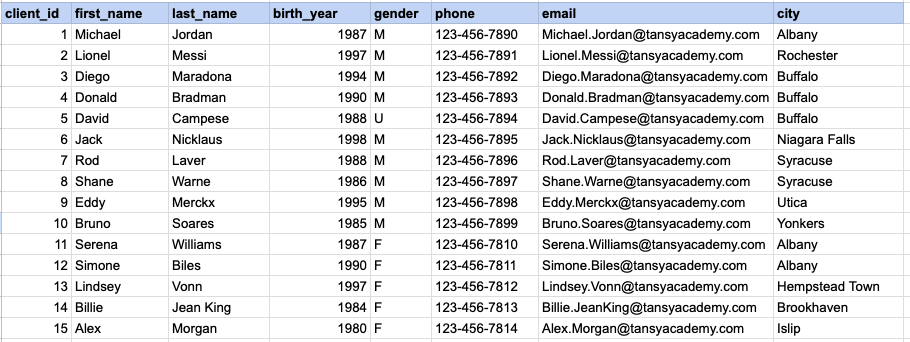
Let's explore the procedure for extracting information from a designated table using the IN SQL operator on integer data. The query fetches all rows from the clients table where the birth year column matches any of the specified values (1990, 1980).
Example 2 - Raw data from client table
Example 2 - Query
SELECT *
FROM org_client
WHERE birth_year IN (1990, 1980);
Example 2 - Query data mapping
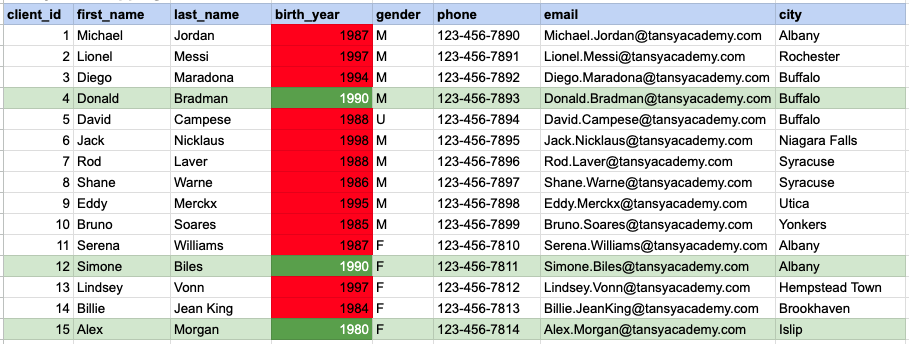
In the provided image, the green color signifies the data that has been selected or satisfies the conditions specified in our query. Data points in red indicate information that does not meet the criteria set by the query.
Example 2 - Query Output

Example 3:
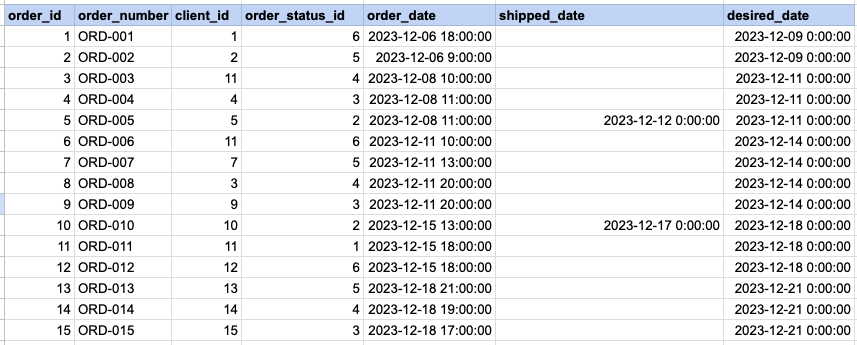
Let's explore the procedure for extracting information from a designated table using the IN SQL operator on date time data. This query retrieves all rows from the orders table where the desired ship date column corresponds to any of the specified values ('2023-12-09', '2023-12-10', '2023-12-18', '2023-12-25').
Example 3 - Raw data from order table
Example 3 - Query
SELECT *
FROM act_order
WHERE desired_date IN ('2023-12-09', '2023-12-10', '2023-12-18', '2023-12-25');
Example 3 - Query data mapping
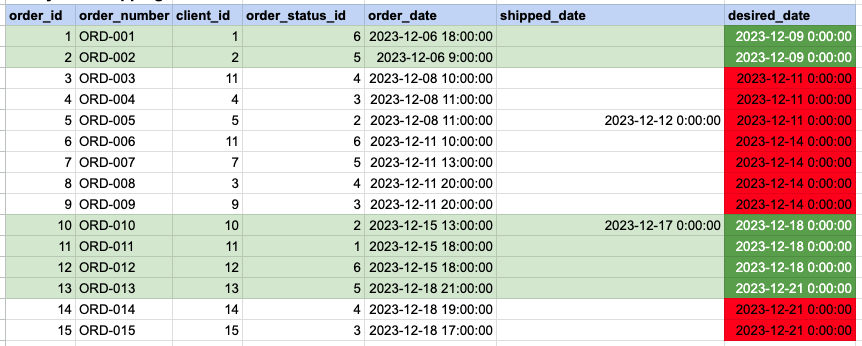
In the provided image, the green color signifies the data that has been selected or satisfies the conditions specified in our query. Data points in red indicate information that does not meet the criteria set by the query.
Example 3 - Query Output


Comments Not Found