
PostgreSQL
'AND' and 'OR' Operators
In PostgreSQL, the DQL (Data Query Language) allows us to retrieve data from the database using the SELECT statement. While querying, it's often necessary to apply conditions to filter the rows we want. This is where the AND and OR operators come into play. The AND operator ensures that all conditions specified must be true for a row to be included in the results. On the other hand, the OR operator allows any one of the conditions to be true for the row to be included. These operators are used in the WHERE clause of SQL queries to refine data selection.
Here’s how the AND and OR operators work:
- Using
ANDOperatorThe
ANDoperator combines two or more conditions. Rows are returned only when all the specified conditions evaluate to true.- Example:
Let's consider a table named
customerswith columnscustomer_id,first_name,last_name, andbalance. If we want to retrieve customers whosebalanceis greater than5000and theirlast_namestarts with'S', we would write:SELECT customer_id, first_name, last_name, balance FROM customers WHERE balance > 5000 AND last_name LIKE 'S%'; - Explanation:
- Condition 1:
balance > 5000 - Condition 2:
last_name LIKE 'S%' - Both conditions must be true for a row to be included in the result.
- Condition 1:
- Example:
- Using
OROperatorThe
ORoperator allows any one of the conditions to be true for the row to be included. This is helpful when you want to retrieve rows that meet one or more alternative conditions.- Example:
Suppose we want to retrieve customers who either have a
balanceless than1000or whosefirst_nameis'John':SELECT customer_id, first_name, last_name, balance FROM customers WHERE balance < 1000 OR first_name = 'John'; - Explanation:
- Condition 1:
balance < 1000 - Condition 2:
first_name = 'John' - A row is returned if either of these conditions is true.
- Condition 1:
- Example:
- Combining
ANDandOROperatorsYou can also combine the
ANDandORoperators in the same query to create complex filtering conditions. It's important to use parentheses to clearly define the precedence of conditions.- Example:
If we want to find customers who either have a
balancegreater than5000and thelast_namestarts with'S', or thefirst_nameis'John', we can write:SELECT customer_id, first_name, last_name, balance FROM customers WHERE (balance > 5000 AND last_name LIKE 'S%') OR first_name = 'John'; - Explanation:
- The conditions inside the parentheses will be evaluated first.
- Either the combined condition inside the parentheses (
balance > 5000 AND last_name LIKE 'S%') orfirst_name = 'John'must be true for a row to be included.
- Example:
- Practical Example with a Banking Scenario
Let’s imagine we have a
transactionstable with columnstransaction_id,account_id,transaction_date,amount, andtransaction_type(creditordebit). We might want to find transactions that are eitherdebittransactions greater than5000orcredittransactions made after'2023-01-01'.- Example:
SELECT transaction_id, account_id, transaction_date, amount, transaction_type FROM transactions WHERE (transaction_type = 'debit' AND amount > 5000) OR (transaction_type = 'credit' AND transaction_date > '2023-01-01'); - Explanation:
- This query returns rows where either:
- The
transaction_typeis'debit'and theamountis greater than5000, or - The
transaction_typeis'credit'and thetransaction_dateis after'2023-01-01'.
- The
- This query returns rows where either:
- Example:
These examples show how the AND and OR operators can be used to filter data effectively, especially in complex queries involving multiple conditions.
To gain complete access, login with gmail or outlook, no need of signup. click here

TEST CODE
To choose male customers located in the state of New York, you can use the AND clause to filter records based on both gender and state.
SELECT *
FROM org_client
WHERE gender = 'M'
AND state = 'NY';In PostgreSQL, you can retrieve customers who are either from the state of Pennsylvania or the city of Miami by using the OR clause. This clause helps in filtering records based on either condition being true.
SELECT *
FROM org_client
WHERE city = 'Miami'
OR state = 'PA';In PostgreSQL, to select customers from the state of New York who, at the secondary level, have a credit limit greater than 7000 or reside in the city of Albany, use the following query:
SELECT *
FROM org_client
WHERE state = 'NY'
AND (city = 'Albany' OR credit_limit > 7000);SQL's AND and OR operators
Here are examples illustrating the use of SQL's AND and OR operators.
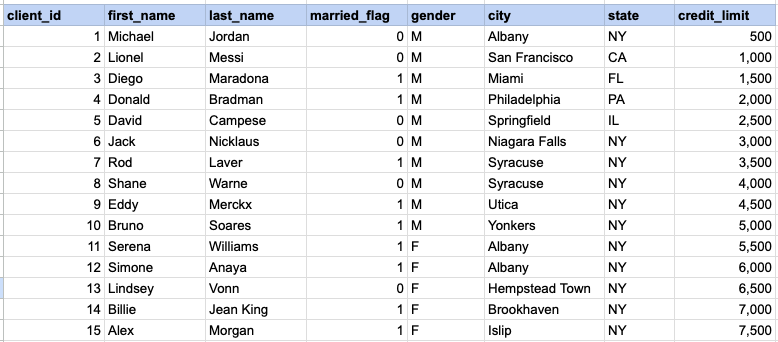
Example 1 - Raw data from client table
Example 1 - AND operator
SELECT *
FROM org_client
WHERE gender = 'M'
AND state = 'NY';
Example 1 - Query data mapping
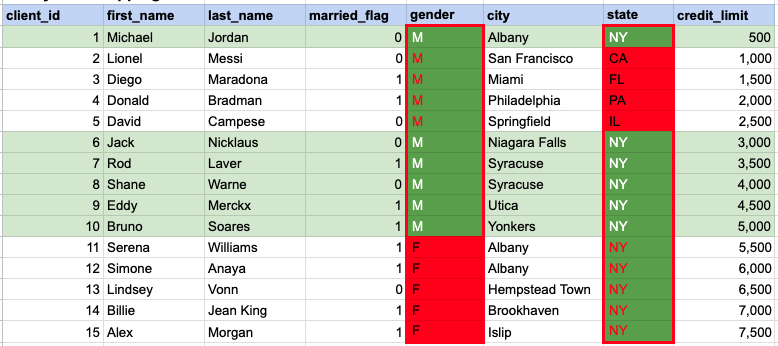
In the given image, the green hue indicates the data that has been chosen or meets the criteria specified in our query. When using the AND operator, both column values must satisfy the specified criteria.
Example 1 - Query Output

Example 2 - OR operator
SELECT *
FROM org_client
WHERE city = 'Miami'
OR state = 'PA';
Example 2 - Query data mapping
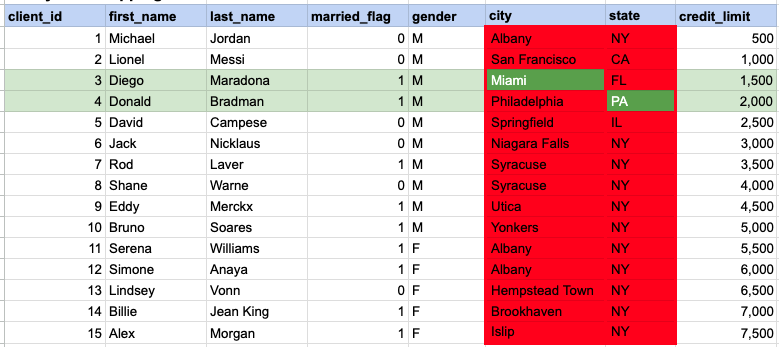
In the given image, the green hue indicates the data that has been chosen or meets the criteria specified in our query. In the case of the OR operator, at least one of the column values needs to meet the specified criteria.
Example 2 - Query Output

Example 3 - AND operator
SELECT *
FROM org_client
WHERE state = 'NY'
AND (city = 'Albany' OR credit_limit > 7000);
Example 3 - Query data mapping
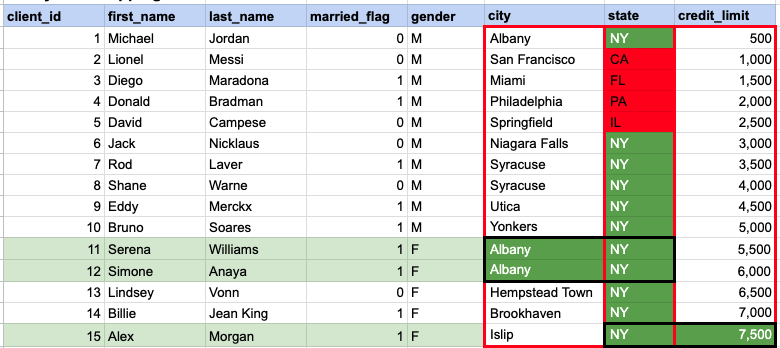
In the given image, the green hue indicates the data that has been chosen or meets the criteria specified in our query. In this instance, a specific row must satisfy the conditions based on the state, and subsequently, there should be a match in at least one value between the city and credit limit.
Example 3 - Query Output

Comments Not Found