
PostgreSQL
ROWs and COLUMNs
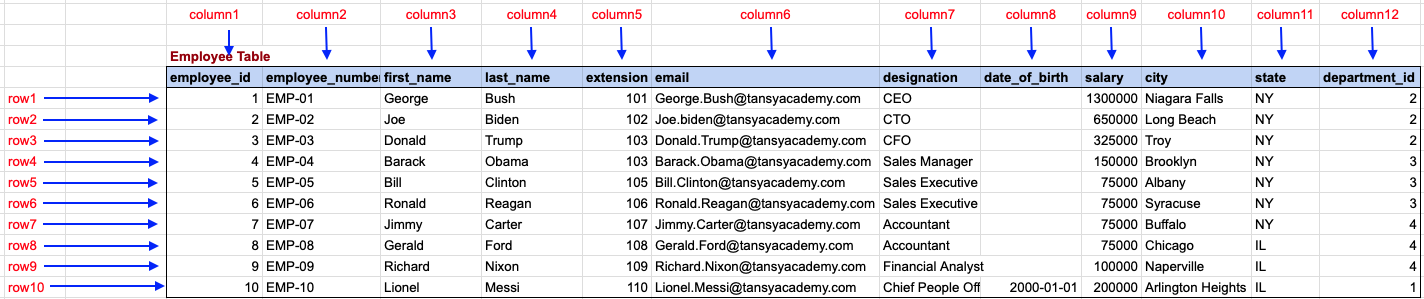
In PostgreSQL, data is stored in tables, where the structure consists of columns and rows. Each column defines a specific field or attribute, while each row a single entry or record in the table. Think of a table as a grid, where columns are the vertical divisions (each with a distinct name and data type), and rows are the horizontal records that hold the actual data.
To help beginners, let’s explore the concept of tables, rows, and columns through practical examples related to a banking system, including customers, accounts, and transactions.
1. Defining a Table for "Customers"
- Create a Table A table in PostgreSQL is created using the
CREATE TABLEstatement. This table will store customer information.CREATE TABLE customers ( customer_id SERIAL PRIMARY KEY, first_name VARCHAR(50) NOT NULL, last_name VARCHAR(50) NOT NULL, email VARCHAR(100) UNIQUE, phone VARCHAR(15), address TEXT ); - Columns:
customer_id: A unique identifier for each customer (auto-incremented).first_name: Stores the customer’s first name.last_name: Stores the customer’s last name.email: Email, which must be unique for each customer.phone: Phone number (optional).address: Stores the customer’s address.
- Rows: Each row in the
customerstable represents a unique customer record.
2. Defining a Table for "Accounts"
- Create a Table This table will store account details for the customers.
CREATE TABLE accounts ( account_id SERIAL PRIMARY KEY, customer_id INT REFERENCES customers(customer_id), account_type VARCHAR(20) CHECK (account_type IN ('Savings', 'Checking')), balance DECIMAL(10, 2) DEFAULT 0.00, created_at TIMESTAMP DEFAULT CURRENT_TIMESTAMP ); - Columns
account_idA unique identifier for each account.customer_id: A foreign key that links the account to a specific customer.account_type: The type of account, such as 'Savings' or 'Checking'.balance: The current balance in the account, with a default of 0.00.created_at: The date and time when the account was created.
- Rows: Each row represents an account held by a customer, linked to the
customerstable through thecustomer_id.
3. Defining a Table for "Transactions"
- Create a Table This table will store the transactions for each account.
CREATE TABLE transactions ( transaction_id SERIAL PRIMARY KEY, account_id INT REFERENCES accounts(account_id), transaction_type VARCHAR(20) CHECK (transaction_type IN ('Deposit', 'Withdrawal')), amount DECIMAL(10, 2) NOT NULL, transaction_date TIMESTAMP DEFAULT CURRENT_TIMESTAMP ); - Columns:
transaction_id: A unique identifier for each transaction.account_id: A foreign key that links the transaction to a specific account.transaction_type: The type of transaction, either 'Deposit' or 'Withdrawal'.amount: The transaction amount.transaction_date: The date and time when the transaction occurred.
- Rows: Each row represents a transaction that occurred for a particular account.
4. Data Relationships Between Tables
- Customer to Accounts Each customer can have multiple accounts, which are linked using the
customer_id. - Accounts to Transactions: Each account can have multiple transactions, which are linked using the
account_id.
This basic understanding of rows and columns in PostgreSQL, along with practical examples for a banking system, will help you get started. The rows represent individual records (such as a customer or a transaction), and the columns define the data structure for each record.
To gain complete access, login with gmail or outlook, no need of signup. click here

Understanding Rows and Columns in SQL Tables
Columns
Columns represent the attributes or fields of the data table, each designed to hold a specific type of information.
- DataType: Dictates the kind of data a column can store (e.g., integers, text, dates).
- Column Name: A unique name within the table that identifies the column.
Rows
Rows represent individual records or data entries, containing a unique instance of data for the columns.
- PrimaryKey: Uniquely identifies each row in the table.
- Uniqueness: Each row should have a unique combination of values.
Example Table: Employees
| EmployeeID | FirstName | LastName | HireDate | |
|---|---|---|---|---|
| 1 | John | Doe | john.doe@example.com | 2020-01-10 |
| 2 | Jane | Smith | jane.smith@example.com | 2020-02-15 |
SQL Operations on Rows and Columns
Inserting Data
Adds new rows to the table.
  INSERT INTO Employees (EmployeeID, FirstName, LastName, Email,
  HireDate) VALUES (3, 'Alice', 'Johnson',
  'alice.johnson@example.com', '2020-03-20');
Querying Data
Retrieves data from the table, potentially filtering both rows and columns.
SELECT FirstName, LastName FROM Employees WHERE HireDate > '2020-01-01';
Updating Data
Modifies existing rows in the table.
UPDATE Employees SET Email = 'new.email@example.com' WHERE EmployeeID = 1;
Deleting Data
Removes rows from the table.
DELETE FROM Employees WHERE EmployeeID = 2;
SQL Column Components
SQL column components define the structure, constraints, and behavior of data within a database table. Below are the key components and attributes for SQL columns:
1. Data Type
Specifies the kind of data a column can store. Common types include:
- INTEGER: For whole numbers.
- VARCHAR(n): For variable-length strings, where n defines the maximum length.
- CHAR(n): For fixed-length strings, with n defining the string length.
- DATE: For dates.
- FLOAT, DOUBLE: For floating-point numbers.
2. Default Value
Automatically assigns a specific value if no value is provided during row insertion.
Age INT DEFAULT 18
3. Not Null Constraint
Ensures a column cannot store a NULL value, requiring every row to have a value for this column.
Name VARCHAR(100) NOT NULL
4. Unique Constraint
Ensures all values in the column are unique across the table, important for non-primary key uniqueness.
Email VARCHAR(100) UNIQUE
5. Primary Key Constraint
A unique identifier for each row, cannot be NULL and must be unique. Can be a single column or a combination of columns.
CustomerID INT PRIMARY KEY
6. Foreign Key Constraint
Establishes a link between the data in two tables, referencing the primary key of another table to enforce data integrity.
OrderID INT FOREIGN KEY REFERENCES Orders(OrderID)
7. Check Constraint
Specifies a condition on a column that must be true for all rows, used to enforce domain integrity.
Age INT CHECK (Age >= 18)
8. Auto Increment
Automatically assigns a unique value to the column for each new row, commonly used for ID columns.
CustomerID INT AUTO_INCREMENT
Combining these components, here's an example of a table creation statement in SQL:
CREATE TABLE Customers (
    CustomerID INT AUTO_INCREMENT PRIMARY KEY,
    Name VARCHAR(100) NOT NULL,
    Email VARCHAR(100) UNIQUE,
    Age INT DEFAULT 18 CHECK (Age >= 18),
    Address VARCHAR(255)
);
Each column component plays a specific role in defining how data is stored, validated, and related to other tables' data.
Employee Table with Data
Comments Not Found