
PostgreSQL
SQL Aliases
PostgreSQL DQL (Data Query Language) – SQL Aliases
In PostgreSQL, SQL Aliases are temporary names assigned to tables or columns to make queries more readable and concise. Aliases are primarily used to simplify complex queries, particularly when using joins or nested queries. Aliases do not change the actual names in the database; they only exist during the execution of the query. They are extremely useful when dealing with large tables or when column names are long and descriptive.
Here's how aliases can be used in a query:
  SELECT customer_name AS name, account_balance AS balance
  FROM accounts;
In this example, the column names customer_name and account_balance are temporarily renamed to name and balance in the result set, making the output easier to read.
1. Column Aliases
- Column aliases are used to rename a column in the result set.
- The keyword
ASis optional but makes the query more readable.SELECT customer_id AS id, customer_name AS name FROM customers;- Here, the
customer_idis renamed toidandcustomer_nameis renamed tonamein the result.
2. Table Aliases
- Table aliases give a temporary name to a table in a query.
- This is especially useful when using joins or working with the same table multiple times in a query.
SELECT c.customer_name, a.account_balance FROM customers c JOIN accounts a ON c.customer_id = a.customer_id;- In this query,
customersis aliased asc, andaccountsis aliased asa, making the query more concise.
3. Using Aliases in Complex Queries
- Aliases make queries with subqueries or multiple joins much easier to read and manage.
SELECT t.transaction_id, c.customer_name, t.amount FROM transactions t JOIN customers c ON t.customer_id = c.customer_id WHERE t.amount > 1000; - In this query,
transactionsis aliased ast, andcustomersis aliased asc, simplifying the query structure.
4. Key Points about SQL Aliases
- Aliases exist only during query execution and do not affect the actual table or column names in the database.
- Aliases are primarily for readability and convenience.
- They can help shorten long table or column names in queries, making them easier to write and understand.
By using SQL Aliases effectively, your PostgreSQL queries can become more readable and maintainable, especially when working with complex joins or subqueries in a real-world database like those in banking systems with customers, accounts, and transactions.
To gain complete access, login with gmail or outlook, no need of signup. click here
TEST CODE
In PostgreSQL, you can use the TO_CHAR function to format the time component of a date. Here is the equivalent query:
SELECT a.order_number AS "Order Number",
       TO_CHAR(a.order_date, 'YYYY-MM-DD') AS "Order Date",
       TO_CHAR(a.order_date, 'HH:MI:SS AM') AS "Order Time",
       b.order_status AS "Order Status"
FROM act_order a
INNER JOIN act_lkp_order_status b ON b.order_status_id = a.order_status_id;Example 1:Table and Column ALIAS
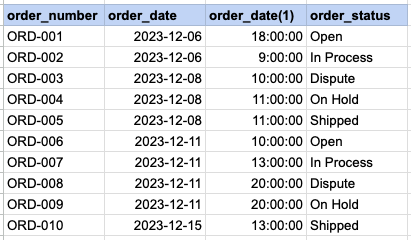
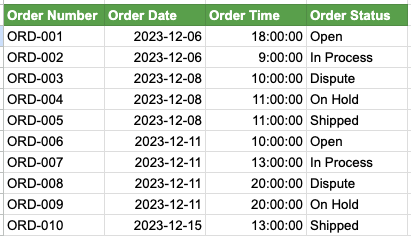
We have two SQL queries for comparison. In Query 1, SQL aliases are not used, leading to less clear output column names, particularly the one extracting time from the order date. In contrast, Query 2 employs SQL aliases, resulting in a more easily understandable column headers, such as Order Time. Additionally, it is evident that lengthy table names are extensively used throughout Query 1, whereas in Query 2, table aliases are employed to abbreviate these table names.
Example 1 - Query with no alias
SELECT act_order.order_number
    cast(act_order.order_date as date),
    cast(act_order.order_date as time),
    act_lkp_order_status.order_status
FROM act_order
INNER JOIN act_lkp_order_status on act_lkp_order_status.order_status_id = act_order.order_status_id ;
Example 1 - Query with alias
SELECT a.order_number as 'Order Number'
    cast(a.order_date as date) as 'Order Date',
    cast(a.order_date as time) as 'Order Time',
    b.order_status as 'Order Status'
FROM act_order a
INNER JOIN act_lkp_order_status b on b.order_status_id = a.order_status_id ;
Example 1 - Query output with no ALIASES
Example 1 - Query output using ALIASES
Comments Not Found