
PostgreSQL
WHERE Clause
In PostgreSQL, the WHERE clause is used to filter records in a SELECT statement based on a specified condition. The clause defines criteria that rows must meet to be included in the result set. Without the WHERE clause, a query will return all rows from the selected table(s). For example, if you want to retrieve all transactions above a certain amount or all accounts belonging to a specific customer, you would use the WHERE clause to define these conditions.
Here's a breakdown for beginners:
- Basic Usage of WHERE Clause
- The
WHEREclause is used to specify a condition for filtering rows. - The condition can include comparison operators like
=,>,<,>=,<=,<>(not equal). - Example:
SELECT *

FROM accounts

WHERE balance > 1000;
This query will return all accounts where the balance is greater than 1000.
- The
- Filtering Data Based on Multiple Conditions
- You can use logical operators like
AND,OR, andNOTto combine multiple conditions. - Example:
SELECT *

FROM customers

WHERE city = 'New York' AND status = 'active';
This query will return all active customers located in New York.
- You can use logical operators like
- Using WHERE with Different Data Types
- You can filter based on different data types like numbers, strings, or dates.
- For strings, use single quotes (
'). - For dates, use the date format supported by PostgreSQL (e.g.,
'YYYY-MM-DD').
- For strings, use single quotes (
- Example:
SELECT *

FROM transactions

WHERE transaction_date = '2024-01-01';
This query will return all transactions that occurred on January 1st, 2024.
- You can filter based on different data types like numbers, strings, or dates.
- Using Comparison Operators
- You can use a variety of comparison operators in the
WHEREclause to filter records:- = for equal to.
- <> for not equal to.
- > or < for greater or less than.
- >= or <= for greater than or equal to, or less than or equal to.
- Example:
SELECT *

FROM accounts

WHERE account_type = 'savings' AND balance >= 5000;
This query will retrieve all savings accounts with a balance of 5000 or more.
- You can use a variety of comparison operators in the
- Using WHERE with NULL Values
NULLrepresents missing or unknown data. You can't compareNULLusing standard comparison operators. Instead, you useIS NULLorIS NOT NULL.- Example:
SELECT *

FROM customers

WHERE phone_number IS NULL;
This query will return all customers who haven't provided a phone number.
- WHERE with Pattern Matching (LIKE Operator)
- You can use the
LIKEoperator for pattern matching when searching for strings.%represents any sequence of characters._represents a single character.
- Example:
SELECT *

FROM customers

WHERE name LIKE 'J%';
This query will return all customers whose names start with the letter 'J'.
- You can use the
These basic rules will help new students effectively filter records using the WHERE clause in PostgreSQL queries.
To gain complete access, login with gmail or outlook, no need of signup. click here

TEST CODE
To retrieve data in PostgreSQL using the equality operator (=) on a numeric column to identify clients who are married, assuming `married_flag` is a numeric column where 0 represents married clients:
SELECT *
FROM org_clients
WHERE married_flag = 0;To retrieve data in PostgreSQL using the equality operator (=) on a character column to identify female clients, assuming `gender` is a character column where 'F' represents female clients:
SELECT *
FROM org_clients
WHERE gender = 'F';To retrieve data in PostgreSQL using the greater than (`>`) comparison operator on a numeric column to identify clients with a credit limit greater than $1,000, assuming `credit_limit` is a numeric column:
SELECT *
FROM org_clients
WHERE credit_limit > 1000;To retrieve data in PostgreSQL using the less than (`<`) comparison operator on a numeric column to identify clients with a credit limit less than $1,000, assuming `credit_limit` is a numeric column:
SELECT *
FROM org_clients
WHERE credit_limit < 1000;To retrieve data in PostgreSQL using the greater than or equal to (`>=`) comparison operator on a numeric column to identify clients with a credit limit greater than or equal to $1,000, assuming `credit_limit` is a numeric column:
SELECT *
FROM org_clients
WHERE credit_limit >= 1000;To retrieve data in PostgreSQL using the greater than or equal to (`>=`) comparison operator on a numeric column to identify clients with a credit limit less than or equal to $1,000, assuming `credit_limit` is a numeric column:
SELECT *
FROM org_clients
WHERE credit_limit <= 1000;To retrieve data in PostgreSQL using the not equal to (`<>`) comparison operator on a numeric column to identify clients who are married, assuming `married_flag` is a numeric column where 0 represents clients who are not married:
SELECT *
FROM org_clients
WHERE married_flag <> 0;To retrieve data in PostgreSQL using the not equal to (`<>`) comparison operator on a character column to identify clients who are not males, assuming `gender` is a character column where 'M' represents male clients:
SELECT *
FROM org_clients
WHERE gender <> 'M';To retrieve data in PostgreSQL using the logical operator `AND` to identify unmarried male clients, assuming `married_flag` is a numeric column where 0 represents unmarried clients and `gender` is a character column where 'M' represents male clients:
SELECT *
FROM org_clients
WHERE married_flag = 0
AND gender = 'M';To retrieve data in PostgreSQL using the logical operator `OR` to find orders that are in OPEN status or orders that have not been shipped:
SELECT *
FROM act_order
WHERE order_status_id = 1 -- Open
OR shipped_date IS NULL;To retrieve data in PostgreSQL using the logical operator `LIKE` to find clients whose last name starts with 'MA':
SELECT *
FROM org_client
WHERE last_name LIKE 'MA%';To retrieve data in PostgreSQL using the logical operator `LIKE` to find clients whose last names contain the string 'MA' in any position:
SELECT *
FROM org_client
WHERE last_name LIKE '%ma%';To retrieve data in PostgreSQL using the logical operator `NOT LIKE` to find clients whose last names do not start with 'MA':
SELECT *
FROM org_client
WHERE last_name NOT LIKE 'MA%';To retrieve data in PostgreSQL using the logical operator `BETWEEN` to find clients whose credit limit is between 2000 and 5000 (inclusive):
SELECT *
FROM org_client
WHERE credit_limit BETWEEN 2000 AND 5000;To retrieve orders ordered between January 1st and December 31st in PostgreSQL using the logical operator `BETWEEN`:
SELECT *
FROM orders
WHERE order_date BETWEEN '2022-01-01'::DATE AND '2022-12-31'::DATE;To retrieve data in PostgreSQL using the `IN` operator to find clients whose city is either 'Albany', 'Buffalo', or 'Niagara Falls':
SELECT *
FROM org_client
WHERE city IN ('Albany', 'Buffalo', 'Niagara Falls');To retrieve data in PostgreSQL using the logical operator NOT IN to find clients who do not live in 'Albany' or 'Rochester':
SELECT *
FROM org_client
WHERE city NOT IN ('Rochester', 'Albany');To retrieve data in PostgreSQL using the logical operator IS NULL to list orders that are not yet shipped: plaintext
SELECT *
FROM act_order
WHERE shipped_date IS NULL;To retrieve data in PostgreSQL using the logical operator IS NOT NULL to list orders that have been shipped:
SELECT *
FROM act_order
WHERE shipped_date IS NOT NULL;To retrieve data in PostgreSQL for orders where the shipment status is not NULL (indicating they have been shipped) and the order date is within the last 30 days:
SELECT *
FROM act_order
WHERE shipped_date IS NOT NULL
AND order_date > CURRENT_DATE - INTERVAL '30 days';To retrieve data in PostgreSQL using the logical operator EXISTS to fetch clients who have placed orders, excluding clients who do not have any orders:
SELECT *
FROM org_client
WHERE EXISTS (SELECT * FROM act_order WHERE org_client.client_id = act_order.client_id);To retrieve data in PostgreSQL using the logical operator NOT EXISTS to fetch clients who do not have any associated orders:
SELECT *
FROM org_client
WHERE NOT EXISTS (SELECT * FROM act_order WHERE org_client.client_id = act_order.client_id);To retrieve data in PostgreSQL to find products that were sold with a quantity greater than one using the ANY operator:
SELECT *
FROM prd_product
WHERE product_id = ANY (SELECT product_id FROM act_order_detail WHERE quantity > 1);Example 1:
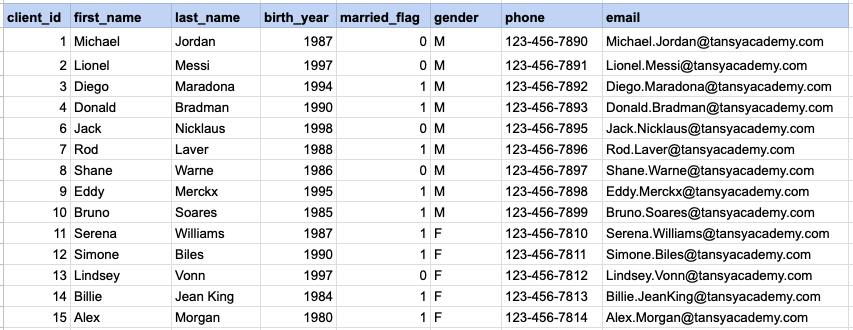
Let's explore the procedure of retrieving information from a designated table using the SQL WHERE cluase with string data. Fetch records for clients identified as females.
Example 1 - Raw data from client table
Example 1 - Query
SELECT *
FROM org_client
WHERE gender = 'F';
Example 1 - Query data mapping
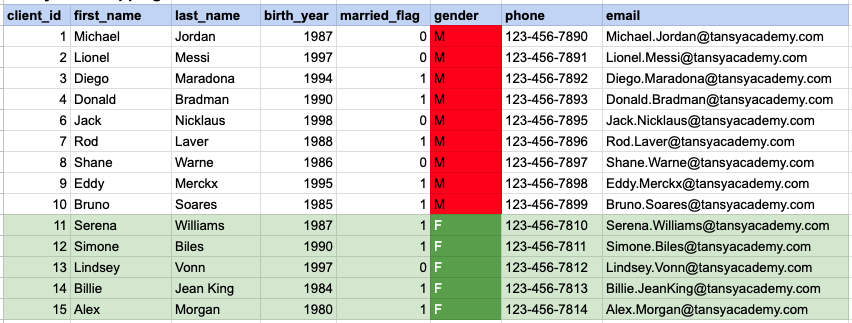
In the provided image, the green color signifies the data that has been selected or satisfies the conditions specified in our query. Data points in red indicate information that does not meet the criteria set by the query.
Example 1 - Query Output

Example 2:
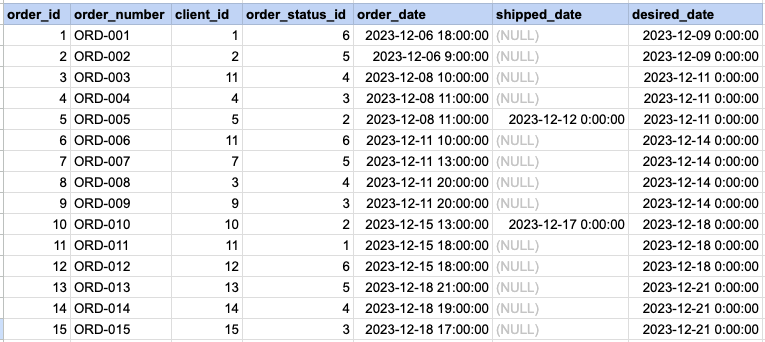
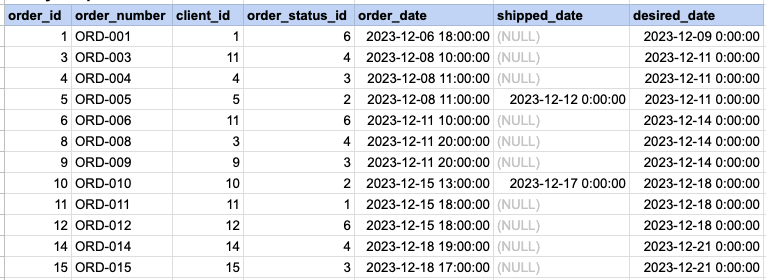
Let's explore the procedure of extracting information from a designated table using WHERE clause with numeric data. Fetch orders with statuses different from 5.
Example 2 - Raw data from orders table
Example 2 - Query
SELECT *
FROM act_order
WHERE order_status_id != 5;
Example 2 - Query data mapping
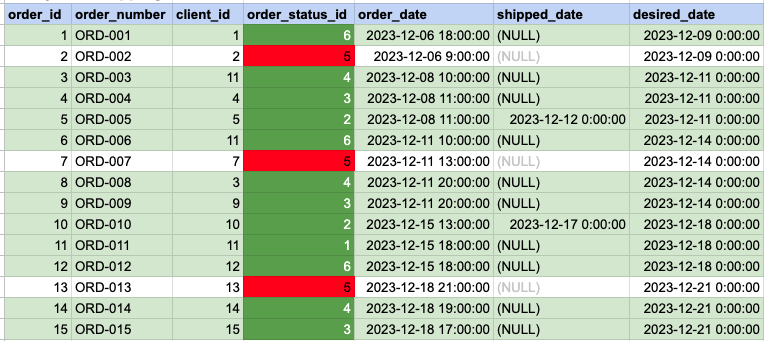
In the provided image, the green color signifies the data that has been selected or satisfies the conditions specified in our query. Data points in red indicate information that does not meet the criteria set by the query.
Example 2 - Query Output
Comments Not Found