
PostgreSQL
LEFT JOIN
In PostgreSQL, the LEFT JOIN clause is used to combine rows from two or more tables based on a related column between them. Unlike an inner join, which only returns rows with matching values in both tables, a left join returns all rows from the left table, and the matched rows from the right table. If there is no match, the result is NULL on the side of the right table.
Here's a step-by-step guide to using LEFT JOIN with example SQL code.
- Basic Syntax of
LEFT JOIN:SELECT column1, column2, ... FROM table1 LEFT JOIN table2 ON table1.common_column = table2.common_column;table1is the left table from which all rows are returned.table2is the right table from which matched rows are returned.common_columnis the column used to match rows between the two tables.
- Example Scenario
Let's consider a banking database with the following tables:
- customers: Stores customer information.
customer_id(Primary Key)name
- accounts: Stores account details for customers.
account_id(Primary Key)customer_id(Foreign Key)account_type
- transactions: Stores transaction details for accounts.
transaction_id(Primary Key)account_id(Foreign Key)amount
To list all customers and their accounts, including those who do not have any accounts, you would use:
SELECT customers.name, accounts.account_type FROM customers LEFT JOIN accounts ON customers.customer_id = accounts.customer_id;- This query retrieves all customers' names and their account types.
- If a customer has no accounts, the
account_typewill beNULL.
- customers: Stores customer information.
- Using LEFT JOIN with More Tables
You can chain multiple
LEFT JOINoperations to retrieve more detailed information. For example, to include transaction details along with the account information:SELECT customers.name, accounts.account_type, transactions.amount FROM customers LEFT JOIN accounts ON customers.customer_id = accounts.customer_id LEFT JOIN transactions ON accounts.account_id = transactions.account_id;- This query lists all customers, their account types, and the amounts of transactions.
- If there are no transactions, the
amountwill beNULL.
- Common Use Cases
- Finding unmatched rows: Use
LEFT JOINto find rows in the left table that have no corresponding match in the right table. - Combining data: Useful for combining data from multiple tables where you want to keep all records from the left table.
- Finding unmatched rows: Use
By using LEFT JOIN, you ensure that you retain all records from the primary table, even if there are no corresponding entries in the secondary table.
To gain complete access, login with gmail or outlook, no need of signup. click here

TEST CODE
In PostgreSQL, to retrieve product information along with the corresponding orders using a LEFT JOIN to include products that have not been ordered, you can use the following query:
SELECT prd_product.product_id,
prd_product.product_code,
prd_product.product_name,
act_order_detail.order_id
FROM prd_product
LEFT JOIN act_order_detail ON act_order_detail.product_id = prd_product.product_id
ORDER BY prd_product.product_id, act_order_detail.order_id;To choose orders that have not received any payments yet using a LEFT JOIN from the orders table into the payments table, where orders without any corresponding payment will be represented on the payments side as NULL, and apply a filter with IS NULL on the payment side to compile a list of orders lacking any payment, you can use the following query:
SELECT a.order_number,
a.order_date,
b.payment_id
FROM act_order a
LEFT JOIN act_payment b ON b.order_id = a.order_id
ORDER BY a.order_number;

-- To filter orders that have not received any payments yet
SELECT
    a.order_number,
    a.order_date
FROM act_order a
LEFT JOIN act_payment b ON b.order_id = a.order_id
WHERE b.order_id IS NULL;To present a thorough list of customers, including those without any orders, and showcase the total value of orders accumulated throughout their entire lifetime, you can use the following query:
SELECT org_client.client_id,
org_client.first_name AS client_name,
SUM(act_order.sub_total) AS lifetime_order_amount
FROM org_client
LEFT JOIN act_order ON act_order.client_id = org_client.client_id
GROUP BY org_client.client_id, org_client.first_name
ORDER BY org_client.client_id;EXAMPLE 1 - SQL LEFT JOIN
Here is a clear example of a LEFT JOIN. Retrieve information of all products along with their respective order details, including products that have not been associated with any orders.
EXAMPLE 1 - Tansy Academy Data Model
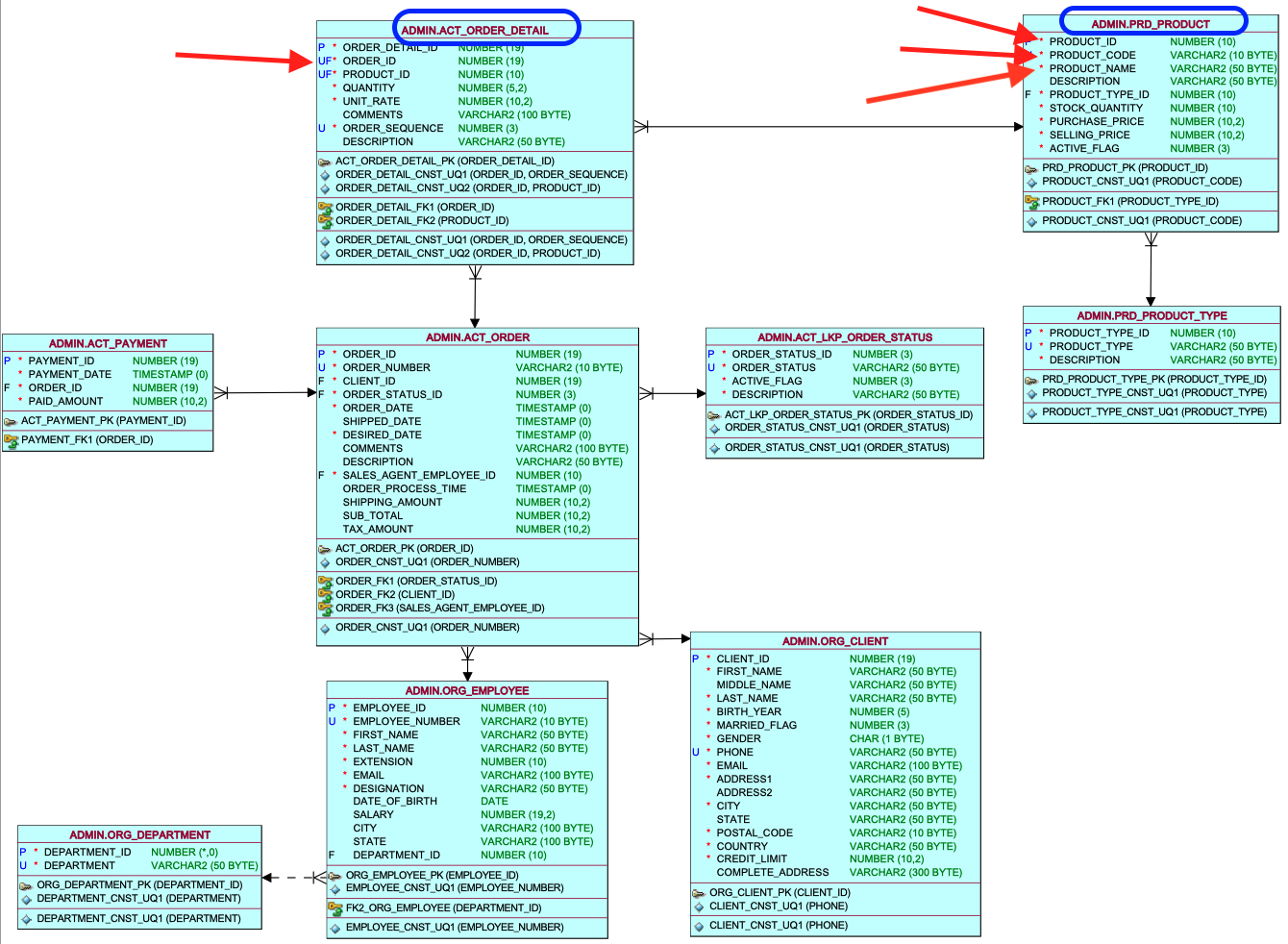
In this task, you will create a query involving two tables, named Products and Order details, marked are the columns necessary for the query.
EXAMPLE 1 - LEFT JOIN query
To achieve this, you need to execute a LEFT JOIN between the product table and the order detail table, utilizing the primary key and foreign key column, wherein the product ID column serves as the joining column. In this scenario, the product table functions as the left table, and the order detail table is considered the right table. The left table, which contains the essential primary business information, focuses on the product list as the primary requirement. At a secondary level, we seek order IDs, so we treat the order details as the secondary table, positioned on the right side of the join
SELECT
    prd_product.product_id, prd_product.product_code, prd_product.product_name,
    act_order_detail.order_id
FROM prd_product
LEFT JOIN act_order_detail ON act_order_detail.product_id = prd_product.product_id
ORDER BY prd_product.product_id, act_order_detail.order_id;
EXAMPLE 1 - Query Data Mapping
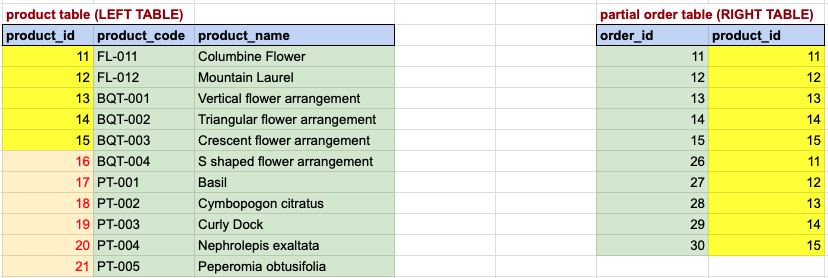
In this visual representation, a yellow background denotes a correspondence between the primary key and foreign key. Meanwhile, a light yellow background with red font on the left side signifies products lacking a corresponding row in the order details table. These products will be included in the final result, but with NULL values for order IDs. It's important to recognize that a LEFT JOIN incorporates all rows from the left table, which, in this case, is the product table.
EXAMPLE 1 - Final OUTput
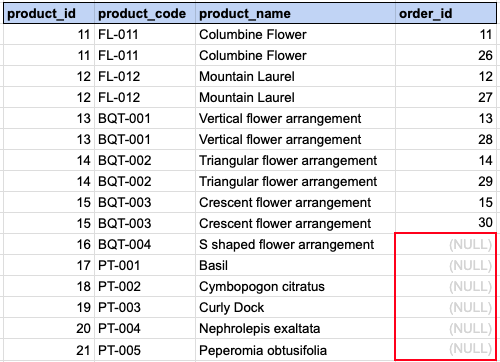
In this view, it's evident that certain product records from the left table have multiple corresponding rows on the right side. Consequently, the product information will be associated with each order entry from the right side.
Comments Not Found