
PostgreSQL
Chapter 7 - DQL (Data Query Language)
DQL ASSIGNMENT2 - Hospital Management System
Objective:
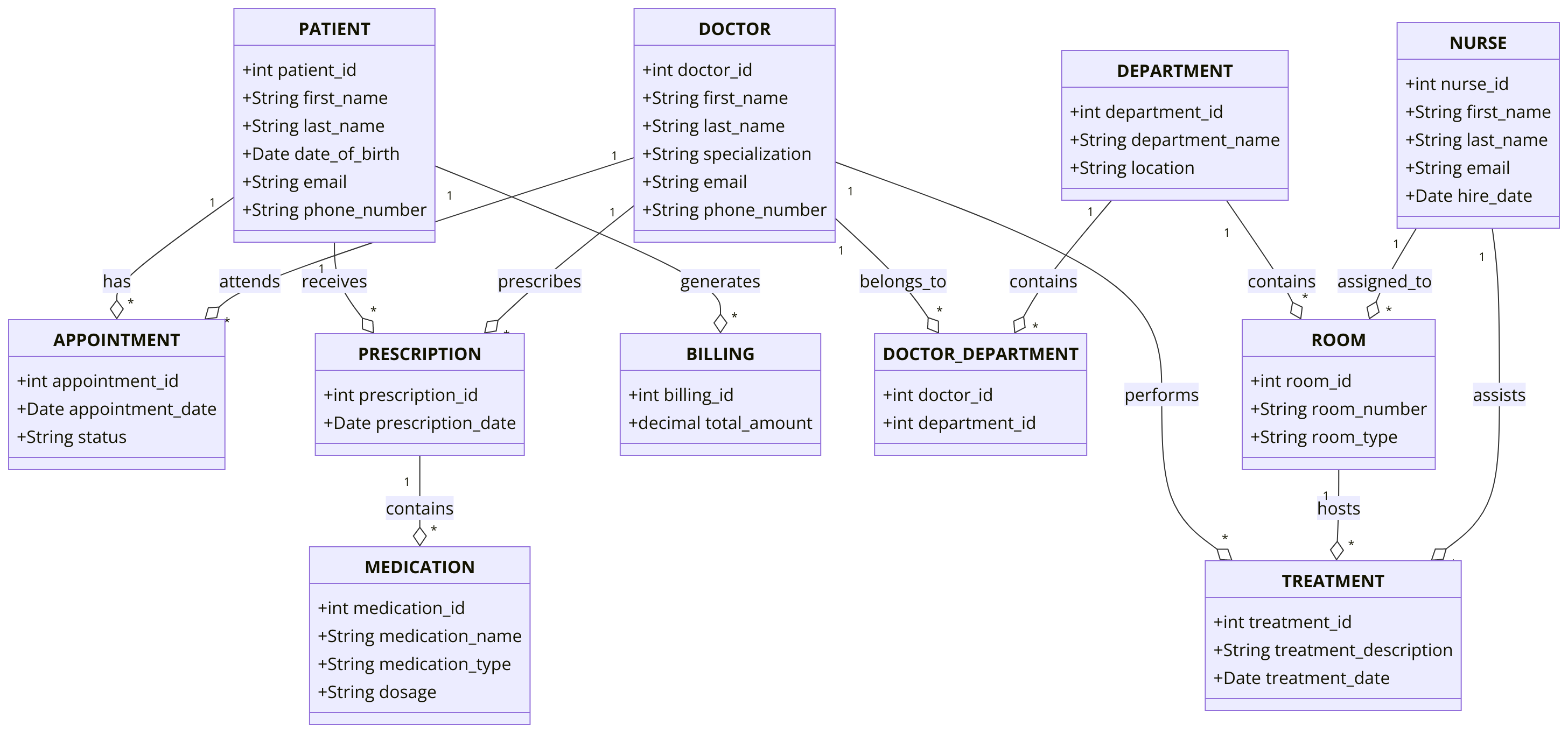
You are required to address a set of Data Query Language (DQL) tasks for a Hospital Management System using the tables provided. Each task focuses on different aspects of querying data from the system using SELECT statements with a variety of conditions, functions, and joins. Students are required to utilize the tables created during the Chapter 5 DDL assignment.
1. SELECT Command
- Select all columns from the
PATIENTtable. - Select the
first_name,last_name, andemailof all patients. - Select all
specializationfrom theDOCTORtable. - Select the
appointment_dateandstatusfrom theAPPOINTMENTtable.
2. WHERE Command
- Select all patients where
date_of_birthis before '1990-01-01'. - Select all doctors whose
specializationis 'Cardiology'. - Select all appointments where
statusis 'Scheduled'. - Select all patient admits where
treatment_start_dateis after '2022-01-01'.
3. ORDER BY Command
- Select all patients and order them by
last_namein ascending order. - Select all doctors and order them by
first_namein descending order. - Select all appointments and order them by
appointment_datein descending order. - Select all medications and order them by
medication_namein ascending order.
4. LIMIT Command
- Select the first 10 patients from the
PATIENTtable. - Select the first 5 doctors from the
DOCTORtable. - Select the top 3 appointments ordered by
appointment_date. - Select the first 5 prescriptions from the
PRESCRIPTIONtable.
5. DISTINCT Command
- Select distinct
specializationfrom theDOCTORtable. - Select distinct
statusfrom theAPPOINTMENTtable. - Select distinct
department_namefrom theDEPARTMENTtable. - Select distinct
last_namefrom thePATIENTtable.
6. GROUP BY Command
- Group by
specializationfrom theDOCTORtable and count the number of doctors per specialization. - Group by
statusin theAPPOINTMENTtable and count the number of appointments per status. - Group by
department_namefrom theROOMtable and calculate the number of rooms in each type. - Group by
medication_typein theMEDICATIONtable and calculate the total number of medications per type.
7. HAVING Command
- Select
specializationfrom theDOCTORtable and group by it, having more than 2 doctors per specialization. - Group by
department_nameand calculate the number of doctors in each department, having more than 3 doctors. - Group by
statusin theAPPOINTMENTtable and filter the groups having more than 5 appointments. - Group by
medication_typeand calculate the total medications, having more than 3 medications per type.
8. INNER JOIN Command
- Select all patients and their corresponding appointments using
INNER JOINbetweenPATIENTandAPPOINTMENT. - Select all treatments along with the corresponding doctor details using
INNER JOINbetweenPATIENT_ADMITandDOCTOR. - Select all prescriptions along with the corresponding medication details using
INNER JOINbetweenPRESCRIPTIONandMEDICATION. - Select all doctors and the departments they belong to using
INNER JOINbetweenDOCTORandDOCTOR_DEPARTMENT.
9. LEFT JOIN Command
- Select all doctors and their corresponding departments using
LEFT JOIN, including doctors without any departments. - Select all patients and their appointments using
LEFT JOIN, including patients without appointments. - Select all nurses and their assigned rooms using
LEFT JOIN, including nurses without assigned rooms. - Select all medication and the corresponding prescriptions using
LEFT JOIN, including medication without prescriptions.
10. COUNT, SUM, AVG Command
- Count the total number of patients in the
PATIENTtable. - Count the number of distinct
specializationin theDOCTORtable. - Calculate the sum of
total_amountin theBILLINGtable. - Calculate the average
dosagefor medications in theMEDICATIONtable.
11. CASE Command
- Select all appointments and use a
CASEstatement to show 'Upcoming' if theappointment_dateis after the current date, and 'Past' otherwise. - Select all patients and categorize them as 'Senior' if their
date_of_birthis before '1950-01-01', otherwise 'Adult'. - Use a
CASEstatement to categorize patient admits as 'Recent' if thetreatment_start_dateis within the last year, otherwise 'Old'. - Use a
CASEstatement in theAPPOINTMENTtable to label appointments as 'Critical' if the patient has undergone multiple doctor visits.
12. EXISTS and NOT EXISTS Command
- Select all patients where an appointment exists in the
APPOINTMENTtable usingEXISTS. - Select all doctors where no appointments exist in the
APPOINTMENTtable usingNOT EXISTS.
13. SUBQUERY Command
- Select all doctors whose
doctor_idis in the result of a subquery selectingdoctor_idfrom theAPPOINTMENTtable where status is 'Scheduled'. - Select all medications where the
medication_idis in the result of a subquery selectingmedication_idfrom thePRESCRIPTIONtable. - Select all patients who have not scheduled an appointment using a subquery.
- Select all patient admits where the patient has been admitted more than once using a subquery.
14. RANK and DENSE_RANK Command
- Rank patients based on the number of appointments using
RANK(). - Use
DENSE_RANK()to rank doctors based on their specialization. - Rank medications by their dosage using
RANK(). - Use
DENSE_RANK()to rank treatments bytreatment_date.
15. PIVOT and UNPIVOT
- Pivot the
APPOINTMENTdata bystatusandpatient_id. - Unpivot the treatment details to show the
treatment_descriptionanddoctor_idin a single row per patient. - Pivot the room data grouped by
room_typeanddaily_rate. - Unpivot medication data by
medication_nameanddosage.
16. UNION and UNION ALL Command
- Select all doctors from different departments using
UNION ALL. - Use
UNIONto combine scheduled and completed appointments. - Use
UNION ALLto select all patient admits from two different years.
17. COALESCE, IFNULL, NULLIF Command
- Select all patients and use
COALESCEto replace null emails with 'No Email'. - Use
IFNULLto replace nullphone_numbervalues in theDOCTORtable. - Use
NULLIFto comparetreatment_start_dateandappointment_datein thePATIENT_ADMITtable and return NULL if they are the same. - Select all nurses and replace null
hire_datewith 'Unknown' usingCOALESCE.
18. STRING Functions
- Select all patients'
first_namein uppercase using theUPPER()function. - Select all doctors'
specializationin lowercase using theLOWER()function. - Use
CONCAT()to combine thefirst_nameandlast_nameof doctors. - Select all patients'
last_nameand find the length of the name usingLENGTH().
19. DATE Functions
- Select all patients and show their
date_of_birthformatted as 'YYYY-MM-DD' usingTO_CHAR(). - Add 1 year to all
appointment_datevalues in theAPPOINTMENTtable usingAGE(). - Subtract 1 month from all
treatment_start_datevalues usingINTERVAL. - Select all nurses and extract the year from their
hire_dateusingEXTRACT().
20. NUMERIC Functions
- Select the
dosagefrom theMEDICATIONtable and round it to the nearest integer usingROUND(). - Select all
total_amountfrom theBILLINGtable and useCEIL()to round up. - Use
FLOOR()to round down thetotal_amountin theBILLINGtable. - Select the highest
total_amountfrom theBILLINGtable usingMAX().
21. CAST and CONVERT Command
- Select all patients and cast the
patient_idas a string usingCAST(). - Convert
total_amountin theBILLINGtable toDECIMALusingCONVERT(). - Cast
treatment_idin theTREATMENTtable toINTEGER. - Convert the
appointment_datefrom theAPPOINTMENTtable intoTEXT.
22. CONCAT and CONCAT_WS Functions
- Use
CONCAT()to joinfirst_nameandlast_namewith a space in between in theDOCTORtable. - Use
CONCAT_WS()to combine thedepartment_nameandlocationwith a comma in theDEPARTMENTtable. - Use
CONCAT()to combine theroom_numberandroom_typefrom theROOMtable. - Use
CONCAT_WS()to combinefirst_name,last_name, andemailfrom thePATIENTtable.
23. LIKE and NOT LIKE
- Select patients whose
emailends with 'hospital.com' usingLIKE. - Select doctors where
specializationcontains 'Surgery' usingLIKE. - Select patients whose
last_namedoes not start with 'J' usingNOT LIKE. - Select departments where
department_namecontains 'Oncology' usingLIKE.
24. EXISTS and NOT EXISTS
- Select doctors where appointments exist in the
APPOINTMENTtable usingEXISTS. - Select patients where no prescriptions exist using
NOT EXISTS. - Select rooms where treatments exist using
EXISTS. - Select departments where no doctors are assigned using
NOT EXISTS.
25. JOIN Commands
- Select all patients and their corresponding appointments using
INNER JOINbetween thePATIENTandAPPOINTMENTtables. - Select all prescriptions and their corresponding medications using
INNER JOINbetweenPRESCRIPTIONandMEDICATION. - Select all nurses and their assigned departments using
LEFT JOINbetweenNURSEandDEPARTMENT. - Select all treatments and their corresponding doctors using
INNER JOINbetweenTREATMENTandDOCTOR.
26. BETWEEN Command
- Select all appointments where the
appointment_dateis between '2023-01-01' and '2023-12-31'. - Select all treatments where the
treatment_dateis between '2022-01-01' and '2022-12-31'. - Select all patients where the
date_of_birthis between '1960-01-01' and '2000-12-31'. - Select all rooms where the
capacityis between 2 and 10.
27. IN and NOT IN Command
- Select all patients where the
patient_idis in (1, 2, 3). - Select all doctors where the
specializationis in ('Cardiology', 'Oncology'). - Select all appointments where the
statusis not in ('Cancelled', 'No Show'). - Select all departments where the
department_idis in (1, 2, 5).
28. UNION Command
- Select patients from
PATIENTandHOSPITAL_PATIENTusingUNION. - Select doctors from two different departments using
UNION. - Use
UNIONto combine appointments from two different years. - Use
UNION ALLto combine treatments from multiple departments.
29. ARRAY Command
- Select all
specializationand convert it into an array usingARRAY_AGG(). - Use
UNNEST()to expand arrays from theDEPARTMENTtable. - Convert patient names into an array using
ARRAY_AGG(). - Use
ARRAYfunctions to select and manipulate data from theTREATMENTtable.
GOOD LUCK WITH YOUR ASSIGNMENT!!!
Don't forget to contact us if you need any further assistance with your assignments, and most importantly, for a manual review and approval of your work.
Sample ERD Data Model for Hospital Management System
Comments Not Found