
PostgreSQL
Chapter 7 - DQL (Data Query Language)
DQL Assignment 4 - PostgreSQL Logic for Dashboard Reporting in a Hospital Management System
Objective:
This assignment focuses on creating SQL queries for dashboard reporting in a Hospital Management System using the provided DDL tasks. The goal is to retrieve insights related to patients, doctors, appointments, medications, treatments, and audits. Students are required to utilize the tables created during the Chapter 5 DDL assignment.
Requirements:
- Write SQL queries to extract data for various dashboard metrics.
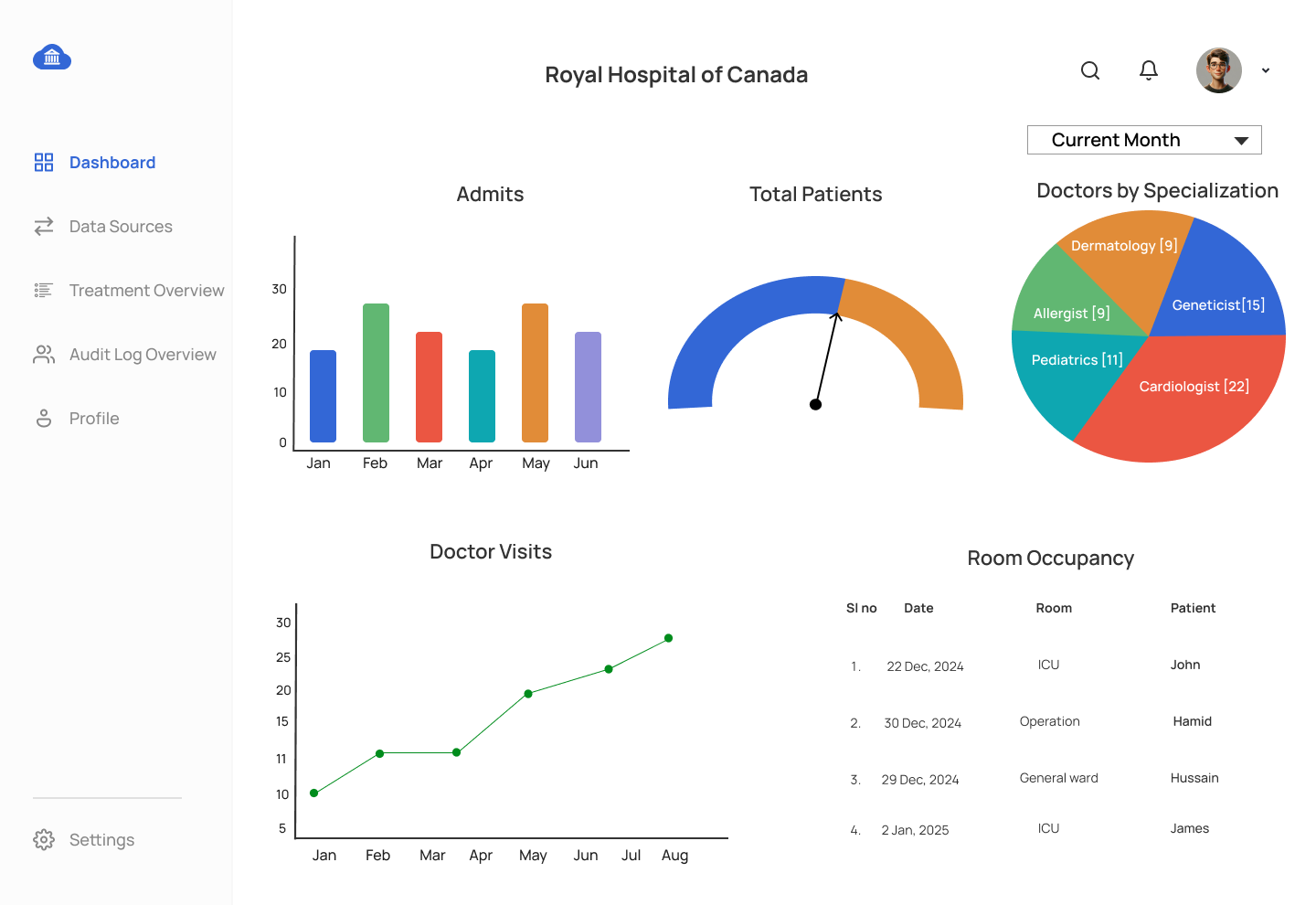
- The dashboard should feature key visuals such as bar charts, pie charts, and tables supported by SQL queries.
- Note: Students must complete their DDL and DML assignments from the previous chapter to use the tables and data required for this assignment.
Assignment Tasks:
1. Patient Overview
- Metrics:
- Total number of patients.
- List of patients with date of birth and email.
- Number of appointments per patient.
- Count total patients.
- Retrieve patient names, date of birth, and email.
- Retrieve the number of appointments per patient (join
PATIENTandAPPOINTMENT).
2. Doctor Overview
- Metrics:
- Total number of doctors.
- Doctors by specialization.
- Doctor assignments (how many departments per doctor).
- Count total doctors.
- Retrieve doctors grouped by specialization.
- List doctor assignments per department (join
DOCTOR,DOCTOR_DEPARTMENT, andDEPARTMENT).
3. Appointment Overview
- Metrics:
- Total appointments per doctor.
- Recent appointments (within the last 3 months).
- Appointments by status (Scheduled, Completed, Cancelled).
- Count total appointments per doctor.
- Retrieve recent appointments.
- Retrieve appointments grouped by status.
4. Room Overview
- Metrics:
- Room availability (by room type: General, ICU, Private).
- Rooms by department.
- Total number of rooms.
- Count total rooms grouped by room type.
- Retrieve rooms grouped by department (join
ROOMandDEPARTMENT). - Count total rooms available in the system.
5. Treatment Overview
- Metrics:
- Treatments by doctor.
- Patients receiving treatments (linked to doctors).
- Recent treatments (conducted within the last year).
- Retrieve treatments performed by each doctor (join
TREATMENT,DOCTOR, andPATIENT). - Retrieve treatments linked to patients and doctors.
- Retrieve treatments conducted in the last year.
6. Audit Log Overview
- Metrics:
- List of recent system changes.
- Changes made by doctors.
- Number of logs per day.
- Retrieve recent actions from the
AUDIT_LOGtable. - Retrieve actions performed by doctors (join
AUDIT_LOGwithDOCTOR). - Count the number of audit logs per day.
Key Visuals and Corresponding SQL Queries:
Note: All dashboard queries must work against current month or current year filters
Bar Chart - Patient Admits
- SQL Query: Retrieve admit counts grouped by month.
- X-Axis: Month.
- Y-Axis: Number of patient admits.
Pie Chart - Doctors by Specialization
- SQL Query: Retrieve doctors grouped by their specialization.
- Pie Sections: Number of doctors per specialization.
Line Graph - Doctor Visits by Month
- SQL Query: Retrieve doctor appointments conducted per month.
- X-Axis: Treatment date grouped by month.
- Y-Axis: Number of appointments.
Table - Occupancy Summary
- SQL Query: Retrieve patient names and room admit dates.
- Columns: Calendar Date, Room Name, Patient Name.
- Note: Retrieve data for a specified month across all rooms, including rooms without any patients.
Gauge - In Patient VS Out Patient
- SQL Query: Count the total number of in patient and out patient admits.
- Display: Total patient count.
Submission Details:
- Write all SQL queries in a single SQL file.
- Ensure each query is numbered sequentially for clarity.
- Name your file as:
dashboard_reporting_hospital_management_project.sql. - Submit the file in an organized format for easy review.
This assignment allows students to practice writing SQL queries to generate insights from the Hospital Management System database, extracting information related to patients, doctors, appointments, and treatments, suitable for dashboard reporting.
UX Screens for Hospital Management System Dashboard Mockup
Comments Not Found