
PostgreSQL
DISTINCT
In PostgreSQL, the DISTINCT keyword is used to remove duplicate rows from a result set. When you execute a query that selects data from a table, you might find that some rows have identical values in one or more columns. The DISTINCT keyword ensures that only unique combinations of the selected columns are returned. This is particularly useful when you want to avoid repetitive data or gather a list of unique entries from a column.
Here's how you can use DISTINCT in PostgreSQL, explained in steps for beginners:
- Basic Usage of DISTINCT
- The
DISTINCTkeyword is applied to specific columns in aSELECTquery. - It ensures that the result set contains only unique values for those columns.
SELECT DISTINCT customer_name FROM customers;- This query will return a list of unique customer names from the
customerstable.
- The
- DISTINCT on Multiple Columns
- You can use
DISTINCTon more than one column to get unique combinations of values across those columns.
SELECT DISTINCT customer_name, account_type FROM accounts;- This query will return unique combinations of
customer_nameandaccount_typefrom theaccountstable.
- You can use
- DISTINCT with WHERE Clause
- The
DISTINCTkeyword can be combined with aWHEREclause to filter data before applying uniqueness. - This can help in retrieving distinct results from a specific subset of data.
SELECT DISTINCT transaction_type FROM transactions WHERE amount > 1000;- This query will return distinct
transaction_typevalues where theamountis greater than 1000.
- The
- DISTINCT and ORDER BY
- When using
DISTINCT, you can still sort your results with theORDER BYclause. - Sorting happens after the distinct operation is applied.
SELECT DISTINCT account_number FROM accounts ORDER BY account_number DESC;- This will return unique
account_numbervalues from theaccountstable, ordered in descending order.
- When using
- DISTINCT and COUNT
- If you need to count the number of unique values in a column, you can combine
DISTINCTwithCOUNT.
SELECT COUNT(DISTINCT customer_id) FROM customers;- This query will count the number of unique
customer_idvalues in thecustomerstable.
- If you need to count the number of unique values in a column, you can combine
By understanding the DISTINCT keyword, you can write queries that efficiently remove duplicate results, helping you retrieve only the unique records from your PostgreSQL database.
To gain complete access, login with gmail or outlook, no need of signup. click here

TEST CODE
In PostgreSQL, to select distinct state names from the clients table, use the following query:
SELECT DISTINCT state
FROM clients
ORDER BY state;In PostgreSQL, to select distinct city names from the clients table, use the following query:
SELECT DISTINCT city
FROM clients
ORDER BY city;In PostgreSQL, to retrieve unique combinations of city and state names from the clients table, use the following query:
SELECT DISTINCT city, state
FROM clients
ORDER BY city, state;In PostgreSQL, you can retrieve unique order dates from the "act_order" table using the SELECT DISTINCT statement. The query below uses the TRUNC() function to truncate the time part of the order_date column, ensuring only distinct dates are selected.
SELECT DISTINCT DATE(order_date) AS order_date
FROM act_order
ORDER BY order_date;In PostgreSQL, to retrieve unique product type IDs from the "prd_product" table using the SELECT DISTINCT statement, execute the following query:
SELECT DISTINCT product_type_id
FROM prd_product
ORDER BY product_type_id;Example 1:
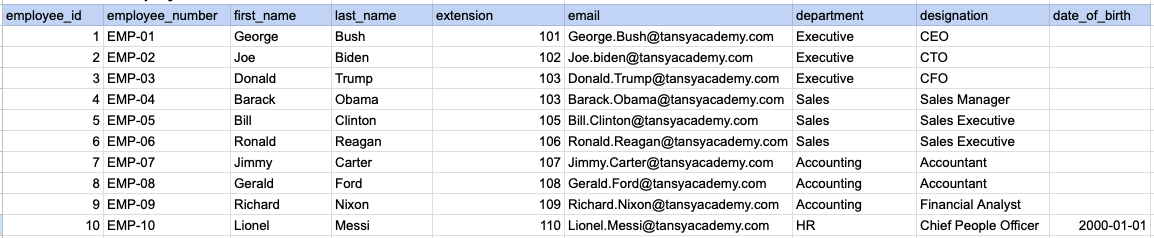
Let's understand the process of extracting data from a specified table using DISTINCT sql clause. In this case, we aim to retrieve distinct/unique department names from the employee table.
Example 1 - Raw data from employee table
Example 1 - Query
SELECT DISTINCT department
FROM org_employee
ORDER BY department;
Example 1 - Query data mapping
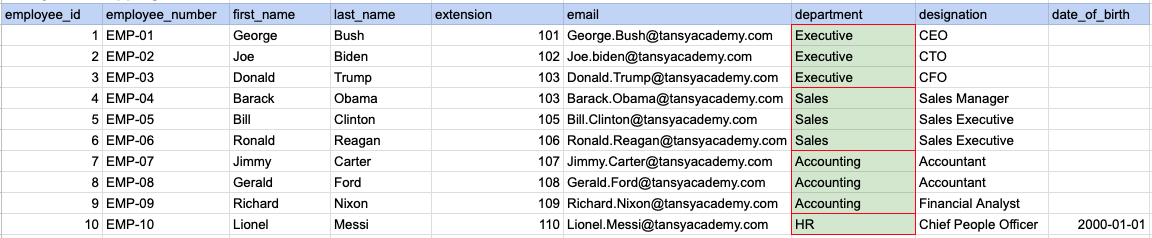
In the image above, the green color indicates the data that has been chosen or meets the criteria for our query.
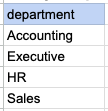
Example 1 - Query Output
Example 2:
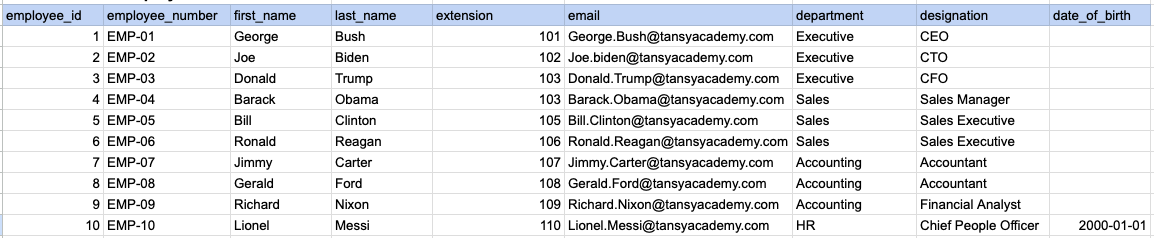
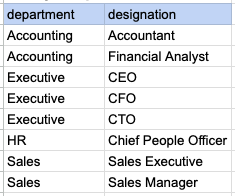
Let's understand the process of extracting multiple columns from a specified table using DISTINCT sql clause. Here, a row will be considered as distinct if all selected columns together form a unique combination.
Example 2 - Raw data from employee table
Example 2 - Query
SELECT DISTINCT department, designation
FROM org_employee
ORDER BY department, designation ;
Example 2 - Query data mapping
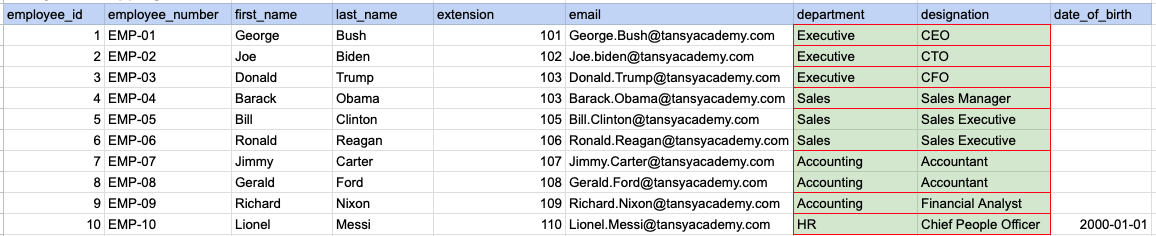
In the image above, the green color indicates the data that has been chosen or meets the criteria for our query.
Example 2 - Query Output
Example 3:
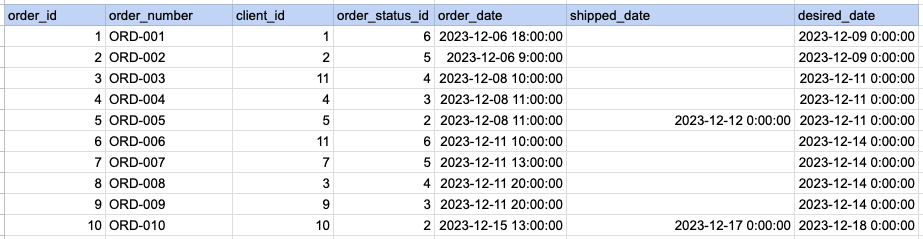
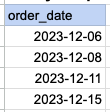
Let's understand the process of extracting order date using DISTINCT sql clause on timestamp column. Here we are trying to get distinct order dates.
Example 3 - Raw data from order table
Example 3 - Query
SELECT DISTINCT DATE(order_date) as order_date
FROM act_order
ORDER BY DATE(order_date);
Example 3 - Step 1 Extract date from order date and time column.
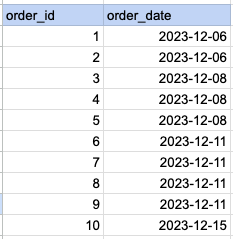
As step 1 first we have to extract date part alone from date and time.
Example 3 - Query data mapping
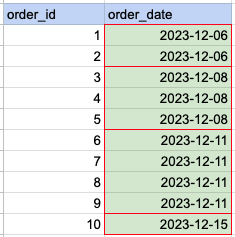
In the image above, the green color indicates the data that has been chosen or meets the criteria for our query.
Example 3 - Query Output
Comments Not Found