
PostgreSQL
LIMIT OFFSET
The LIMIT clause in PostgreSQL is used to restrict the number of rows returned by a query. This is particularly useful when dealing with large datasets, allowing you to only fetch a specific subset of the data. The LIMIT clause is often used with ORDER BY to control the specific rows being retrieved, but it can also be used by itself. Here's how it works:
- Basic Syntax
- The basic syntax of the
LIMITclause is:
SELECT column_name FROM table_name LIMIT number_of_rows;- For example, if you have a
customerstable and you only want to retrieve the first 5 customers:
SELECT * FROM customers LIMIT 5; - The basic syntax of the
- Usage with
ORDER BY- When used with the
ORDER BYclause, theLIMITcan help you get the "top N" rows after sorting:
SELECT * FROM accounts ORDER BY balance DESC LIMIT 10;- This query will fetch the 10 customers with the highest balance.
- When used with the
- Example Query with Banking Context
- Let's consider an example where we have a table
transactionswith details about bank transactions. If you want to get the 3 most recent transactions:
SELECT * FROM transactions ORDER BY transaction_date DESC LIMIT 3; - Let's consider an example where we have a table
- Combining
LIMITwithOFFSETOFFSETcan be used withLIMITto skip a certain number of rows before returning the results. This is useful for pagination.- Syntax:
SELECT * FROM table_name LIMIT number_of_rows OFFSET start_point;- Example:
SELECT * FROM accounts LIMIT 5 OFFSET 10;- This query will skip the first 10 accounts and then return the next 5.
- Use Case in Banking
- To retrieve the next 5 transactions after skipping the first 10:
SELECT * FROM transactions ORDER BY transaction_date DESC LIMIT 5 OFFSET 10;- This is useful if you're displaying paginated results on a banking app, for example.
Understanding how to use LIMIT with or without OFFSET is key when working with large tables, as it helps optimize performance and makes queries more manageable.
To gain complete access, login with gmail or outlook, no need of signup. click here

TEST CODE
Return first ten rows of a given table.
SELECT *
FROM act_order
LIMIT 10;Use the LIMIT clause with an offset, skip 3 rows and then return 6 rows.
SELECT *
FROM org_employee
LIMIT 6 OFFSET 3;Example 1:
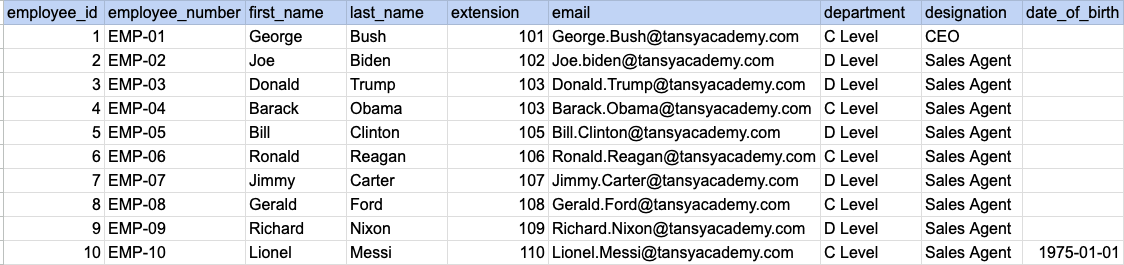
Let's understand the process of extracting data from a specified table using LIMIT clause. In this case, we aim to retrieve top 5 rows from the employee table.
Example 1 - Raw data from employee table
Example 1 - Query
SELECT *
FROM org_employee
LIMIT 5;
Example 1 - Query data mapping
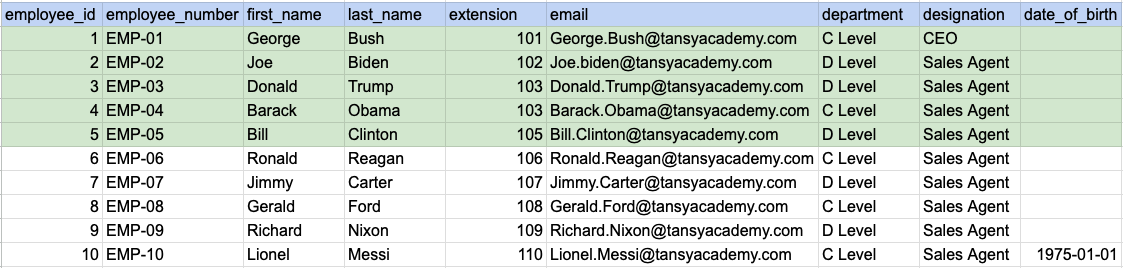
In the image above, the green color indicates the data that has been chosen or meets the criteria for our query.
Example 1 - Query Output

Example 2:
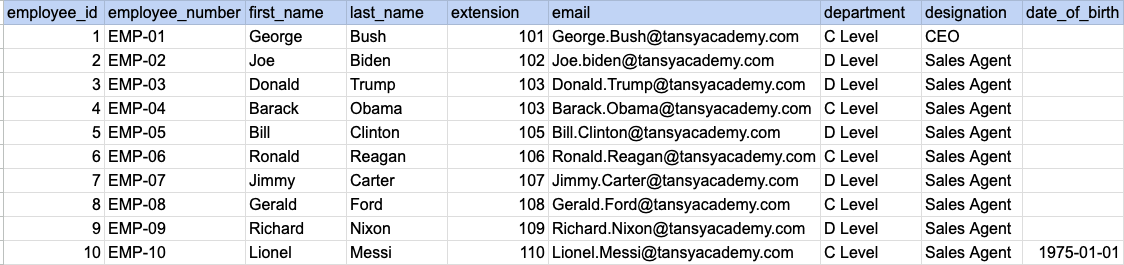
Let's understand the process of extracting data from a specified table using LIMIT clause in combination with offset. <SELECT column1, column2 FROM table_name LIMIT number_of_rows offset number_of_rows;>. Here, offset is the number of rows to skip. In this exmaple we are trying to skip 3 rows and retreive next 6 rows
Example 2 - Raw data from employee table
Example 2 - Query
SELECT *
FROM org_employee
LIMIT 6 OFFSET 3;
Example 2 - Query data mapping
In the image above, the green color indicates the data that has been chosen or meets the criteria for our query.
Example 2 - Query Output

Example 3:
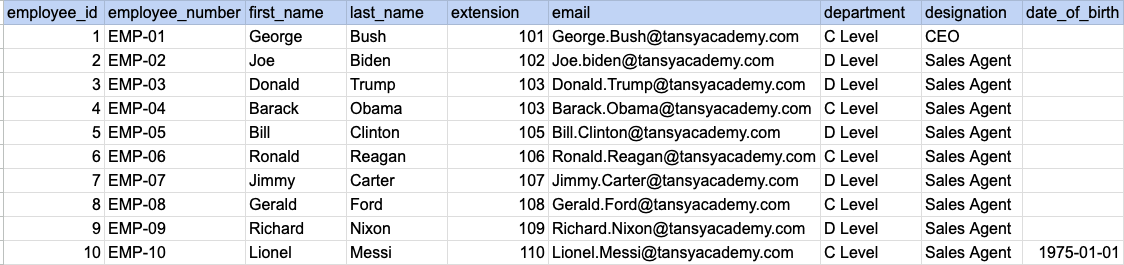
Let's understand the process of extracting data using LIMIT in combination with ORDER BY clause. Here we are trying to order the data by last name and then select top 4 rows.
Example 3 - Raw data from employee table
Example 3 - Query
SELECT *
FROM org_employee
ORDER BY last_name
LIMIT 4;
Example 3 - Step 1 Order the raw data by last name
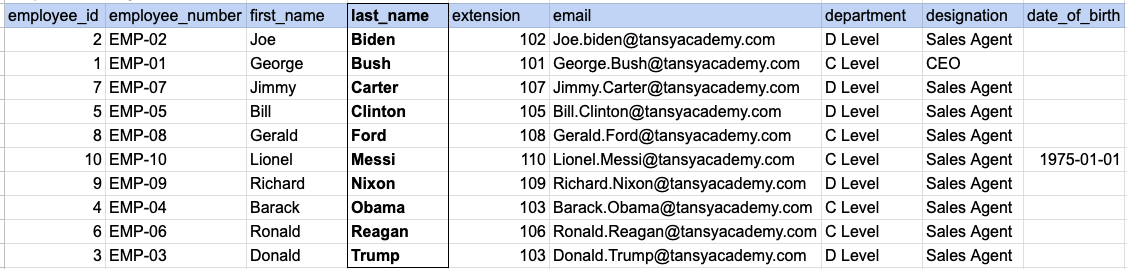
As step 1 first we have to order our raw data by last name as shown in above image.
Example 3 - Query data mapping
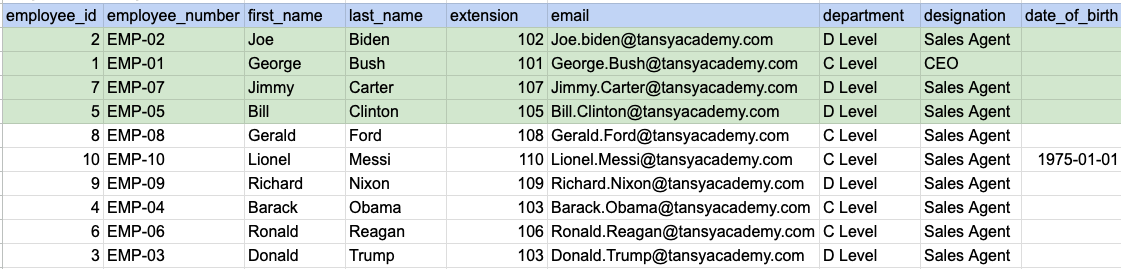
In the image above, the green color indicates the data that has been chosen or meets the criteria for our query.
Example 3 - Query Output

Comments Not Found