
PostgreSQL
CONCAT
In PostgreSQL, the CONCAT function is a part of Data Query Language (DQL) used to combine two or more strings into a single string. It is especially useful when you need to merge multiple fields or values in a query result, such as combining first names and last names from a customer database. The CONCAT function can accept multiple arguments and will return a single concatenated string. This function ensures that even if one or more values are NULL, the non-NULL values will still be concatenated.
Here's a basic example to illustrate how the CONCAT function works:
SELECT CONCAT('John', ' ', 'Doe') AS full_name;
In this case, the result would be 'John Doe'.
How to Use CONCAT in PostgreSQL (Step by Step)
- Basic Syntax of
CONCAT:- The basic syntax of the
CONCATfunction is:SELECT CONCAT(string1, string2, ..., stringN) AS alias_name; - Example:
SELECT CONCAT('Account Number: ', 12345) AS account_info;This will return
'Account Number: 12345'.
- The basic syntax of the
- Concatenating Column Values:
- You can concatenate column values from your database tables. This is useful for merging fields like customer first names and last names.
- Example:
SELECT CONCAT(first_name, ' ', last_name) AS full_name
FROM customers;
- Handling
NULLValues:- If any of the arguments to
CONCATisNULL, it still works by ignoring theNULLand concatenating the rest. - Example:
SELECT CONCAT(first_name, ' ', middle_name, ' ', last_name) AS full_name
FROM customers;
Even if
middle_nameisNULL, it will still return a validfull_name.
- If any of the arguments to
- Using
CONCATwith Numeric Values:- PostgreSQL automatically casts numeric values to strings when using
CONCAT. This means you can easily merge strings and numbers . - Example:
SELECT CONCAT('Transaction ID: ', transaction_id, ', Amount: $', amount) AS transaction_info
FROM transactions;
- PostgreSQL automatically casts numeric values to strings when using
- Combining
CONCATwith Other String Functions:- You can combine
CONCATwith other string functions likeUPPER,LOWER,TRIM, etc., to manipulate the output further. - Example:
SELECT CONCAT(UPPER(first_name), ' ', LOWER(last_name)) AS full_name
FROM customers;
- You can combine
- Ordering Results Based on Concatenated Values:
- Sometimes you might want to order your results based on the concatenated string, especially when displaying combined names.
- Example:
SELECT CONCAT(first_name, ' ', last_name) AS full_name
FROM customers
ORDER BY full_name;
Using CONCAT effectively in PostgreSQL helps you manage and present string data in a more organized way, particularly when working with customer or transaction records in a banking system.
To gain complete access, login with gmail or outlook, no need of signup. click here

TEST CODE
To combine the first name and last name into a full name in PostgreSQL, you can use the `||` operator:
SELECT employee_id, employee_number, first_name || ' ' || last_name AS employee_full_name
FROM org_employee;SQL CONCAT, combine multiple columns
Example 1 - Raw data from employee table
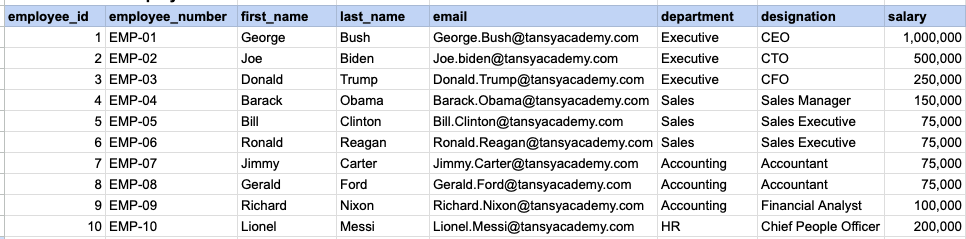
Example 1 - CONCAT employee first and last name
SELECT
    employee_id, employee_number,
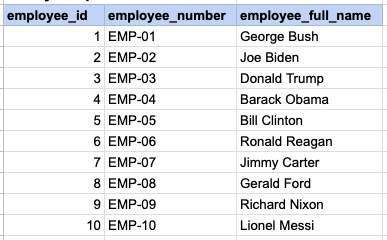
    concat(first_name , ' ' , last_name) as employee_full_name
FROM org_employee;
Example 1 - Query data mapping
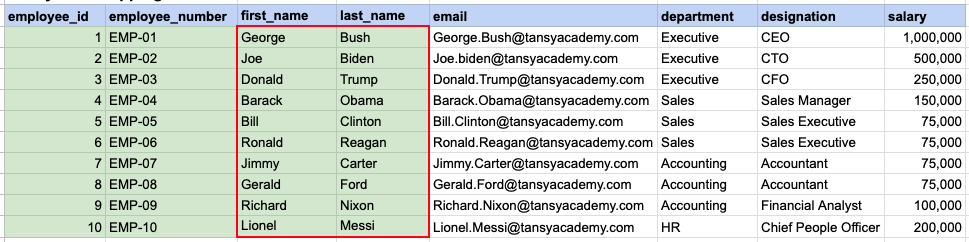
The contents of the first_name and last_name columns will be merged to create a unified column, separated by a space.
Example 1 - Query Output
Example 2 - Raw data from client table
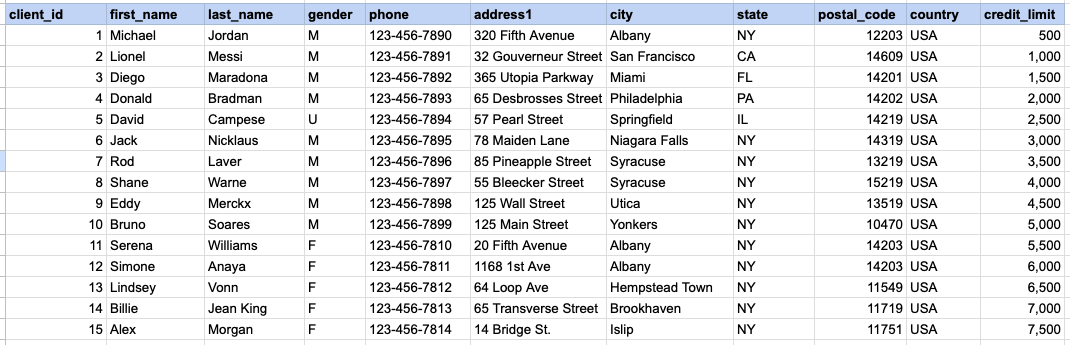
Example 2 - CONCAT client name and address
SELECT
    client_id,
    first_name || ' ' || last_name as client_full_name,
    address1 || ', ' || city || ', ' || state || ' '  || postal_code as client_address
FROM org_client
Example 2 - Query data mapping
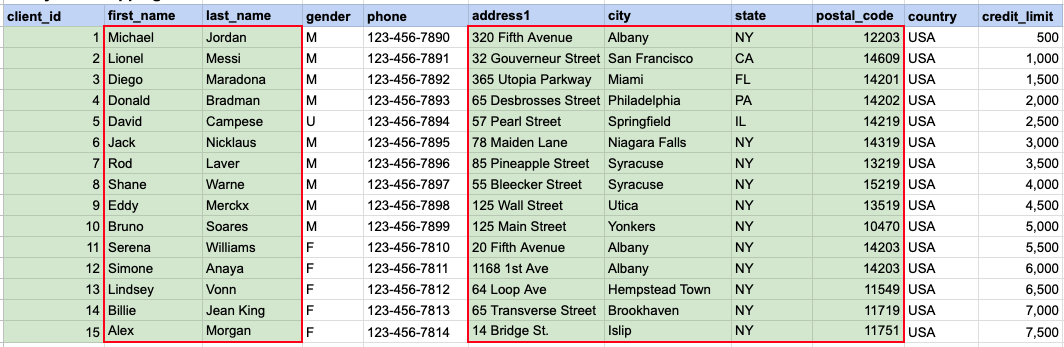
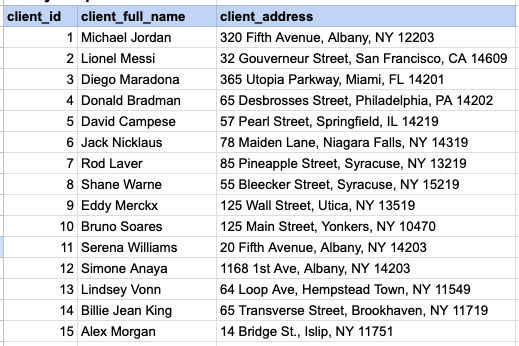
The first_name and last_name columns will be amalgamated to generate a consolidated column named 'client full name', with a space as the separator. Subsequently, the address, city, state, and zip will be amalgamated to produce the client's address.
Example 2 - Query Output
Comments Not Found