
PostgreSQL
DML ASSIGNMENT1 - Banking Application System
Objective:
You are required to address a set of Data Manipulation Language (DML) tasks for a Banking Application System. Each query focuses on distinct DML tasks, including inserting, updating, deleting, and working with JSON columns. This list includes no Data Query Language (DQL) tasks and focuses only on DML.
Requirements:
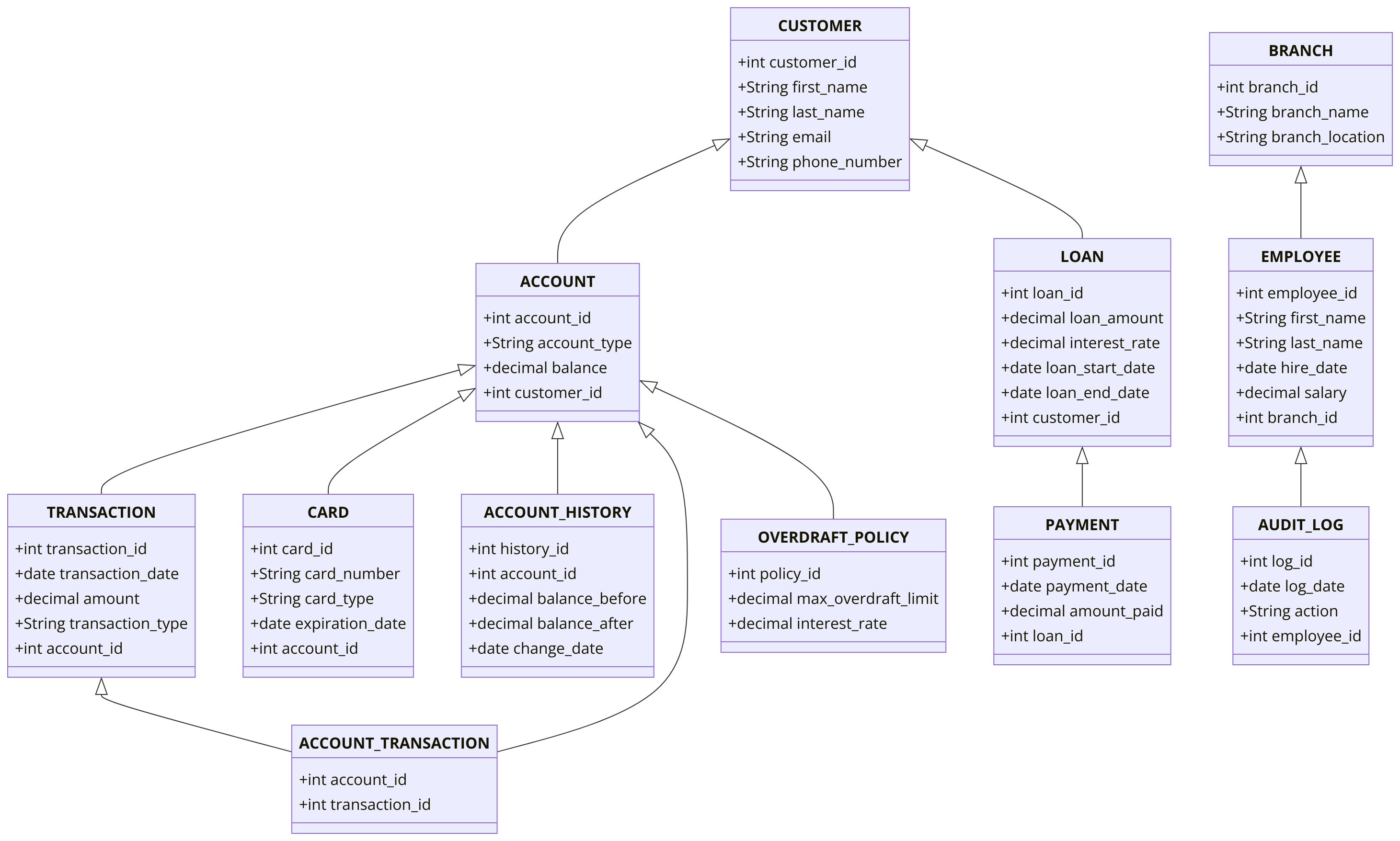
You must complete the Chapter 5 DDL assignment before starting this one. In this assignment, you will use the same tables from the DDL assignment to write your DML queries.
Question 1: Insert Data into all Tables
Write SQL queries to populate each table created in the Chapter 5 assignment with at least 10 rows of data.
Question 2: Insert a New City
Write multiple SQL statements to insert few records into the CITY table.
Question 3: Insert a New Customer
Write a DML SQL statement to insert a new record into the CUSTOMER table with the following details:
- first_name: 'John'
- last_name: 'Doe'
- email: 'john.doe@example.com'
- phone_number: '1234567890'
Question 4: Insert Multiple Accounts for a Customer using single sql statement
Insert two accounts for the customer with customer_id = 1into the ACCOUNT table with the following details:
- First account: account_type: 'savings', balance: 1000.00
- Second account: account_type: 'checking', balance: 500.00
Question 5: Insert Data Using Subquery
Write an SQL INSERT statement using a subquery to add a new customer into the CUSTOMER table. The customer should be added to a city that already exists in the CITY table without directly using the city_id.
Question 6: Insert Data Using Subquery
Assume the CITY, ACCOUNT, and CUSTOMER tables are already set up and populated. Write an SQL INSERT statement using a subquery that adds a new entry to the ACCOUNT table for an existing customer. The customer is identified by their last name and email, and the account should be created only if the customer lives in a specific city ('Los Angeles').
Question 7: Select Into
Write a SQL statement to create a backup of all rows in the TRANSACTION table into a new table TRANSACTION_BACKUP.
Question 8: Insert a Record into the AUDIT_LOG Table with Default Values
Insert a record into the AUDIT_LOG table using default values for all fields except action, which should be set to 'Data Cleanup'.
Question 9: Simple UPDATE
Write an SQL statement to update the country_name in the CITY table to "USA" where the city_name is "New York".
Question 10: Upsert (INSERT ON CONFLICT)
Write a SQL statement to insert a new CUSTOMER record or update the email if the customer_id already exists.
Question 11: Update with Subquery
Write a SQL statement to update the balance of an account based on the total of all transactions for that account.
Question 12: Update with Join
Write an SQL statement to update the balance in the ACCOUNTS table using the balance_after value from the ACCOUNT_HISTORY table. Ensure that the balance_after is taken from the most recent records where latest_record is true. Only perform the update when there is a discrepancy between the current balance in the ACCOUNTS table and the balance_after value from the ACCOUNT_HISTORY table.
Question 13: Delete Records
Write a SQL statement to delete all transactions where the amount is less than 50.
Question 14: Delete with Join
Write a SQL statement to delete all accounts of customers who have no transactions, using a join between ACCOUNT and TRANSACTION.
Question 15: Add a JSON Column to the CUSTOMER Table
Write a SQL statement to add a customer_info column of type JSON to the CUSTOMER table.
Question 16: Insert Data into JSON Column
Insert a new record into the CUSTOMER table and add JSON data into the customer_info column. Add designation, education and spouse_name as JSON elements.
Question 17: Update JSON Column
Write a SQL statement to update the spouse_name field in the customer_info JSON column of the CUSTOMER table to "Riley M" where the customer_id is 1.
Question 18: Update JSON Column with Nested Data
Write a SQL statement to update the meta_data field in the ACCOUNT table, adding a new key-value pair ("verified": true) into the existing JSON data.
Question 19: Truncate the AUDIT_LOG Table
Write a SQL statement to truncate the AUDIT_LOG table, removing all rows without generating individual delete triggers.
Question 20: Complex UPDATE.
Write an SQL statement to update the loan_end_datein the LOAN table based on the loan_amount, number_of_monthly_installments, and loan_start_date.
Question 21: SUPER Complex INSERT.
Write a single INSERT SQL statement to insert multiple loan installment records into the LOAN_INSTALMENTS table based on each loan record from the LOAN table.
- Create a DATE_DIM table with columns: date_id, calendar_date, year, month, day_of_the_month, week_day_number, week_day_name, yearly_week_number, month_start_date_flag, month_end_date_flag, year_start_date_flag, year_end_date_flag, holiday_flag
- The date_id should be populated in the YYYYMM format (e.g., 202401).
- Populate the DATE_DIM table with data for current year and the next year.
- Join the LOAN table with the DATE_DIM table to insert data into the LOAN_INSTALMENTS table, ensuring that each loan record is matched with the corresponding installment dates.
- Monthly instalment_amount must be calculated based on interest_rate from LOAN table.
- You can use online loan calculators, such as this one, to verify your final loan installment data.
Question 22: Project Data.
At the end of this assignment, ensure that each table you created in the Chapter 5 DDL assignment contains at least 5 records.
GOOD LUCK WITH YOUR ASSIGNMENT!!!
Don't forget to contact us if you need any further assistance with your assignments, and most importantly, for a manual review and approval of your work.
Sample ERD Data Model for Banking System
Comments Not Found