
PostgreSQL
BETWEEN Operator
In PostgreSQL, the BETWEEN operator is used in Data Query Language (DQL) to filter rows where a value lies within a given range. It simplifies queries that involve checking whether a value falls between two endpoints. This is useful in many scenarios, such as retrieving transactions that occurred between specific dates or finding customers with balances within a certain range. The range specified in a BETWEEN query includes both the lower and upper bounds.
Example PostgreSQL Query using BETWEEN
Let’s assume we have a table named transactions with the following fields:
transaction_idaccount_idtransaction_dateamount
Now, we want to retrieve all transactions that occurred between two dates, say January 1, 2023, and March 31, 2023.
SELECT transaction_id, account_id, transaction_date, amount
  FROM transactions
  WHERE transaction_date BETWEEN '2023-01-01' AND '2023-03-31';
Understanding the BETWEEN Operator
- Syntax: The basic syntax for using
BETWEENin a query is:SELECT column1, column2, ... FROM table_name WHERE column_name BETWEEN value1 AND value2; - Inclusive nature:
- The
BETWEENoperator includes both the start(value1)and the end(value2)values in the result. - If you're checking for dates, both the start and end dates are included in the range.
- The
- Working with Numbers:
You can use the
BETWEENoperator with numeric columns, like retrieving account balances between a certain range. For example:SELECT customer_id, account_balance FROM accounts WHERE account_balance BETWEEN 1000 AND 5000; - Date ranges: The
BETWEENoperator works particularly well with date ranges, allowing you to filter results that fall within a specific time frame. - Caution with data types:
- Make sure the data types in your columns match what you’re querying. For instance, when working with dates, ensure your column is of type
DATEorTIMESTAMP. - If you're comparing numeric ranges, the column should be of an appropriate numeric data type.
- Make sure the data types in your columns match what you’re querying. For instance, when working with dates, ensure your column is of type
Additional Example: Querying Transactions in a Range of Amounts
SELECT transaction_id, account_id, amount
  FROM transactions
  WHERE amount BETWEEN 500 AND 1000;
This query retrieves all transactions where the amount is between 500 and 1000, inclusive.
By using BETWEEN, you can write more readable queries for ranges and avoid using complex combinations of comparison operators like >= and <=.
To gain complete access, login with gmail or outlook, no need of signup. click here

TEST CODE
To retrieve clients from the "org_client" table in PostgreSQL whose birth year falls within the range of 1985 and 1995, you can use the following SQL query:
SELECT *
FROM org_client
WHERE birth_year BETWEEN 1985 AND 1995;
;To retrieve employees from the "org_employee" table in PostgreSQL whose salary falls within the range of $50,000 and $100,000, you can use the following SQL query:
SELECT *
FROM org_employee
WHERE salary BETWEEN 50000 AND 100000;To retrieve order data from the "act_order" table in PostgreSQL where the order date falls between '2023-12-10' and '2023-12-17', you can use the following SQL query:
SELECT *
FROM act_order
WHERE order_date BETWEEN '2023-12-10' AND '2023-12-17';Example 1:
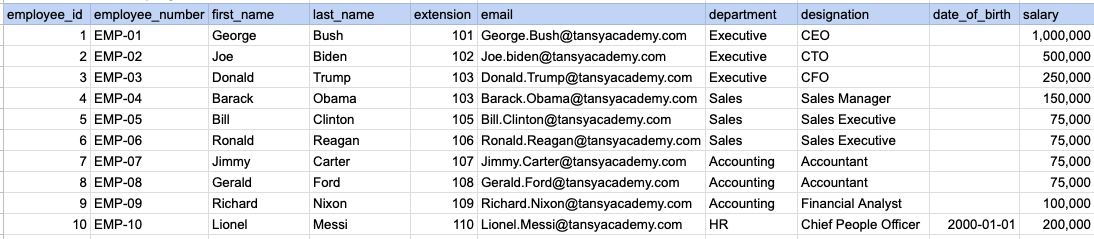
Let's explore the procedure of extracting information from a designated table using the BETWEEN SQL operator with currency data. In this instance, our goal is to fetch employee data where the salary falls between 100k and 250k.
Example 1 - Raw data from employee table
Example 1 - Query
SELECT *
FROM org_employee
WHERE salary BETWEEN 100000 AND 250000;
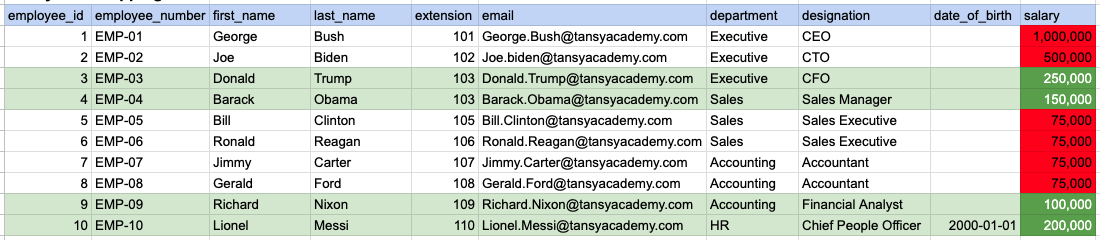
In the provided image, the green color signifies the data that has been selected or satisfies the conditions specified in our query. Data points in red indicate information that does not meet the criteria set by the query.
Example 1 - Query Output

Example 2:
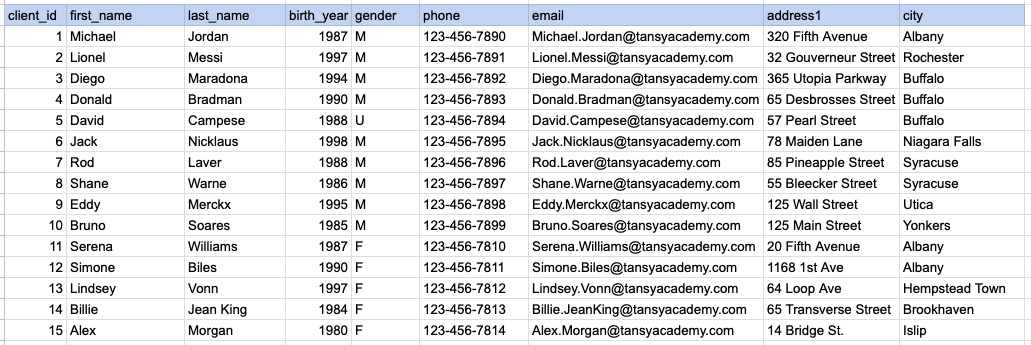
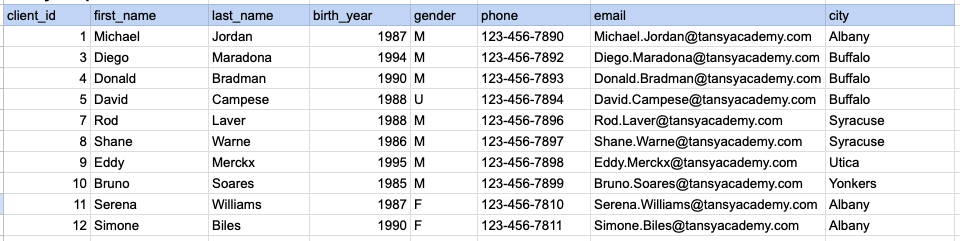
Let's explore the procedure for extracting information from a designated table using the BETWEEN SQL operator on integer data. In this instance, our goal is to fetch client data where the birth year falls between 1985 and 1995.
Example 2 - Raw data from client table
Example 2 - Query
SELECT *
FROM org_client
WHERE birth_year BETWEEN 1985 AND 1995;
Example 2 - Query data mapping
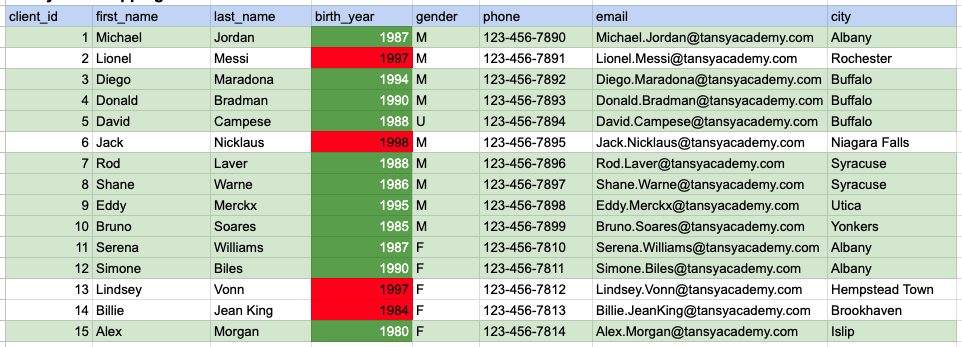
In the provided image, the green color signifies the data that has been selected or satisfies the conditions specified in our query. Data points in red indicate information that does not meet the criteria set by the query.
Example 2 - Query Output
Example 3:
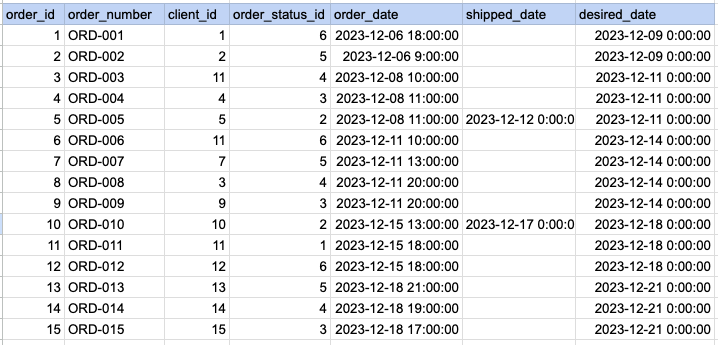
Let's explore the procedure for extracting information from a designated table using the BETWEEN SQL operator on date time data. In this instance, our goal is to fetch order data where the order date falls between Dec 12th and Dec 17th.
Example 3 - Raw data from order table
Example 3 - Query
SELECT *
FROM act_order
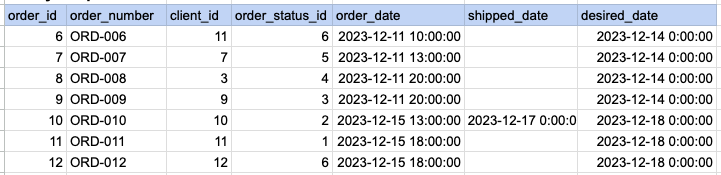
WHERE order_date BETWEEN '2023-12-10' AND '2023-12-17';
Example 3 - Query data mapping
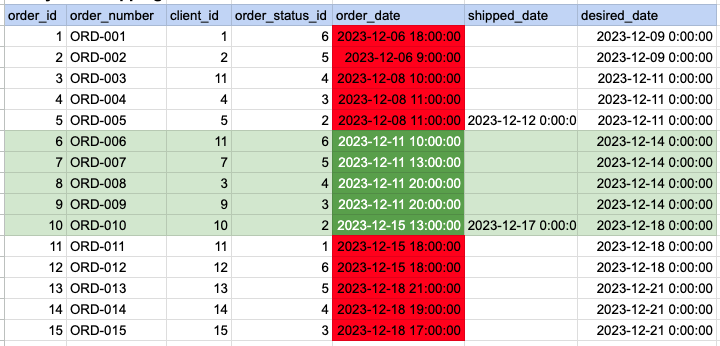
In the provided image, the green color signifies the data that has been selected or satisfies the conditions specified in our query. Data points in red indicate information that does not meet the criteria set by the query.
Example 3 - Query Output
Comments Not Found