
PostgreSQL
Chapter 7 - DQL (Data Query Language)
DQL ASSIGNMENT1 - Banking Management System
Objective:
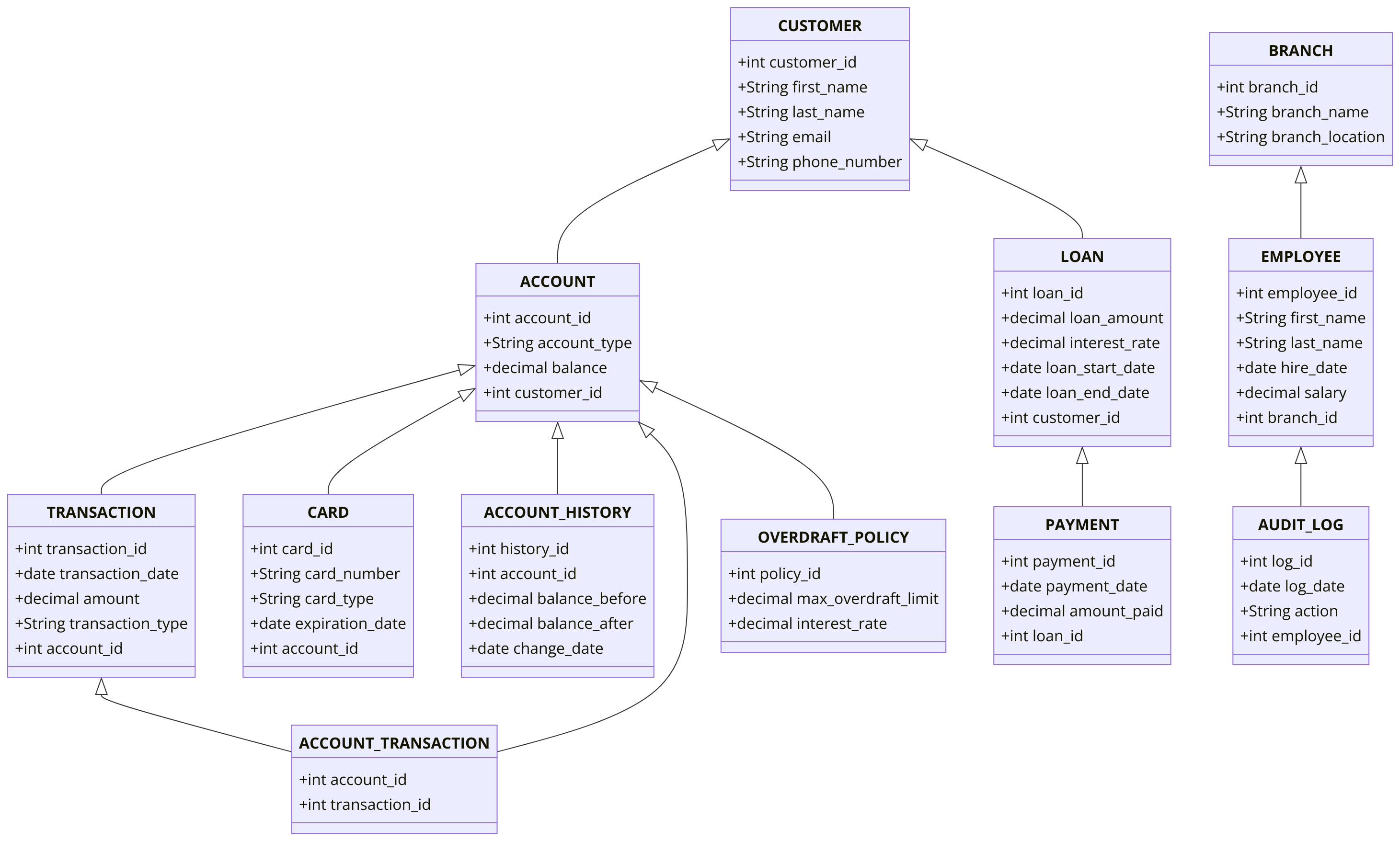
You are required to address a set of Data Query Language (DQL) tasks for a Banking Application System using the tables provided. Each task focuses on different aspects of querying data from the system using SELECT statements with a variety of conditions, functions, and joins.
1. SELECT Command
- Select all columns from the
CUSTOMERtable. - Select the
first_name,last_name, andemailof all customers. - Select all
account_typeandbalancefrom theACCOUNTtable. - Select the
transaction_dateandamountfrom theTRANSACTIONtable.
2. WHERE Command
- Select all customers where
balanceis greater than 5000 in theACCOUNTtable. - Select all transactions where the
amountis less than 100. - Select all customers whose
last_namestarts with 'S'. - Select all transactions where
transaction_typeis 'credit'.
3. ORDER BY Command
- Select all customers and order them by
last_namein ascending order. - Select all transactions and order them by
transaction_datein descending order. - Select all accounts and order them by
balancein ascending order. - Choose accounts ranked 5th through 10th based on account balance.
4. LIMIT Command
- Select the first 10 customers from the
CUSTOMERtable. - Select the top 5 transactions from the
TRANSACTIONtable. - Select the top 3 employees with the highest
salary. - Select the first 5 accounts ordered by
balancein descending order.
5. DISTINCT Command
- Select distinct
account_typefrom theACCOUNTtable. - Select distinct
branch_namefrom theBRANCHtable. - Select distinct
transaction_typefrom theTRANSACTIONtable. - Select distinct
last_namefrom theCUSTOMERtable.
6. GROUP BY Command
- Select the
account_typeand count the number of accounts per type, grouping byaccount_type. - Group the data by customer_name and compute the total balance for all of a customer's accounts in the ACCOUNT table.
- Provide the total number of transactions for each transaction_type in the
TRANSACTIONtable for every month of the current year. - Select
customer_idfrom theLOANtable and group bycustomer_idto count the total number of loans for each customer.
7. HAVING Command
- Select
account_typeand calculate the averagebalance, having an average balance greater than 1000. - Group by
branch_idandbranch_name, having more than 5 employees per branch. - Group by
customer_idand calculate the sum ofloan_amount, having a sum greater than 50000. - Group by
account_typeand filter accounts having a count greater than 10.
8. INNER JOIN Command
- Select all customers and their corresponding accounts using
INNER JOINbetweenCUSTOMERandACCOUNT. - Select all transactions along with their account types using
INNER JOINbetweenTRANSACTIONandACCOUNT. - Select all loans and their corresponding customers using
INNER JOINbetweenLOANandCUSTOMER. - List all scheduled loan payments for a specific loan, along with the consumer details, indicating whether each payment has been made and if it was paid on time, using an INNER JOIN between the
LOAN_PAYMENT,LOAN_INSTALMENTSandLOANtables.
9. LEFT JOIN Command
- Select all customers and their accounts using
LEFT JOIN, including customers without accounts. - Select all accounts and their transactions using
LEFT JOIN, including accounts without any transactions. - Select all employees and their branches using
LEFT JOIN, including employees without branch assignments. - Select all branches and their accounts using
LEFT JOIN, including branches without any accounts.
10. COUNT, SUM, AVG Command
- Count the total number of customers in the
CUSTOMERtable. - Count the number of distinct
account_typein theACCOUNTtable. - Calculate the sum of
balancefor all accounts grouped bybranch_id. - Calculate the average
loan_amountfor all loans in theLOANtable.
11. CASE Command
- Select all transactions and use a
CASEstatement to label them as 'High' if theamountis greater than 500 and 'Low' otherwise. - Select all customers and use a
CASEstatement to categorize them as 'Premium' if theirbalanceis greater than 5000, 'Standard' otherwise. - Select all loans and use a
CASEstatement to categorize them as 'Long-term' if theloan_end_dateis more than 5 years fromloan_start_date. - Use a
CASEstatement in thePAYMENTtable to show 'On Time' ifpayment_dateis before the due date and 'Late' otherwise.
12. EXISTS and NOT EXISTS Command
- Select all customers where an account exists in the
ACCOUNTtable usingEXISTS. - Select all customers who have a card assigned to them using the
EXISTSoperator. - Select all customers where no loans exist in the
LOANtable usingNOT EXISTS. - Select all branches where no employees exist using
NOT EXISTS.
13. SUBQUERY Command
- Select all customers whose
customer_idis in the result of a subquery selectingcustomer_idfromACCOUNTwherebalance> 5000. - Select all accounts where the
account_idis in the result of a subquery selectingaccount_idfrom theTRANSACTIONtable whereamount> 1000. - Select all customers with no transactions using a subquery.
- Select all branches where the number of employees is more than 5 using a subquery on the
EMPLOYEEtable.
14. RANK and DENSE_RANK Command
- Rank customers based on their
balanceusingRANK(). - Use
DENSE_RANK()to rank accounts by theirbalance. - Rank transactions by the
amountusingRANK(). - Use
DENSE_RANK()to rank employees by theirsalary.
15. PIVOT and UNPIVOT
- Pivot the
TRANSACTIONdata bytransaction_typeandaccount_id. - Unpivot the
ACCOUNTbalance data to show changes in balance over time. - Pivot account balances grouped by
branch_idandaccount_type. - Unpivot loan data by
loan_amountandloan_end_date.
16. UNION and UNION ALL Command
- Select the transfer date, amount, and label the row as "Fund Transfer" from FUND_TRANSFER table. UNION these records with transaction data, using the transaction date, amount, and labeling them as "Transaction."
- Select all accounts from different branches using
UNION ALL. - Use
UNIONto combine customers from two different branches. - Use
UNION ALLto select all transactions from two different years.
17. COALESCE, IFNULL, NULLIF Command
- Select all accounts and use
COALESCEto replace null balances with 0. - Use
IFNULLto replace nullphone_numbervalues in theCUSTOMERtable. - Use
NULLIFto list overdue loan payments from theLOAN_INSTALMENTStable by comparing the current system date, the loan due date, and the loan paid date. - Select all customers and use
COALESCEto replace nullemailwith 'Not Provided'.
18. STRING Functions
- Select all customers'
first_namein uppercase using theUPPER()function. - Select all accounts'
account_typein lowercase using theLOWER()function. - Use
CONCAT()to combine thefirst_nameandlast_nameof customers. - Select all customers'
last_nameand find the length of the name usingLENGTH().
19. DATE Functions
- Select all customers and show their
loan_start_dateformatted as 'Nov 2024' usingTO_CHAR(). - Add 1 year to all
loan_start_datevalues in theLOANtable usingAGE(). - Subtract 1 month from all
transaction_datevalues usingINTERVAL. - Select all accounts and extract the year from their
transaction_dateusingEXTRACT().
20. NUMERIC Functions
- Select the
balancefrom theACCOUNTtable and round them to the nearest integer usingROUND(). - Select all
loan_amountfrom theLOANtable and useCEIL()to round up. - Use
FLOOR()to round down thebalancein theACCOUNTtable. - Select the highest
balancefrom theACCOUNTtable usingMAX().
21. CAST and CONVERT Command
- Select all customers and cast the
customer_idas a string usingCAST(). - Convert
balancein theACCOUNTtable toDECIMALusingCONVERT(). - Cast
transaction_idin theTRANSACTIONtable toINTEGER. - Convert the
transaction_datefrom theTRANSACTIONtable intoTEXT.
22. JSON Select
- Select all JSON data from a column in the
CUSTOMERtable if it stores any JSON details. - Select specific keys from a JSON column in the
CUSTOMERtable. - Parse a JSON column from the
CUSTOMERtable to extract spouse name. - Use
JSON_EXTRACTto select a specific key from a JSON column in theCUSTOMERtable.
23. CONCAT and CONCAT_WS Functions
- Use
CONCAT()to joinfirst_nameandlast_namewith a space in between in theCUSTOMERtable. - Use
CONCAT_WS()to combine thebranch_nameandbranch_locationwith a separator.
26. JOIN Commands
- Select customers and their corresponding accounts using
INNER JOINbetweenCUSTOMERandACCOUNT. - Select all accounts and their transactions using
INNER JOINbetweenACCOUNTandTRANSACTION. - Select all employees and their branches using
LEFT JOINbetweenEMPLOYEEandBRANCH. - Select all branches and the accounts they are linked to using
LEFT JOIN.
27. BETWEEN Command
- Select all accounts where the
balanceis between 1000 and 5000. - Select all customers where the
loan_amountis between 10,000 and 50,000. - Select all transactions where the
transaction_dateis between '2022-01-01' and '2022-12-31'. - Select all employees where the
salaryis between 30,000 and 100,000.
28. IN and NOT IN Command
- Select all customers where the
account_typeis in ('Savings', 'Checking'). - Select all transactions where the
transaction_typeis in ('credit', 'debit'). - Select all branches where the
branch_locationis not in ('New York', 'Los Angeles'). - Select all accounts where the
balanceis in (1000, 2000, 5000).
29. ARRAY Command
- Select all
account_typeand convert it into an array usingARRAY_AGG(). - Use
UNNEST()to expand arrays from theACCOUNTtable. - Convert customer names into an array using
ARRAY_AGG(). - Use
ARRAYfunctions to select and manipulate data from theCARDtable.
GOOD LUCK WITH YOUR ASSIGNMENT!!!
Don't forget to contact us if you need any further assistance with your assignments, and most importantly, for a manual review and approval of your work.
Sample ERD Data Model for Banking System
Comments Not Found