
PostgreSQL
RIGHT JOIN
In PostgreSQL, a RIGHT JOIN is used to combine rows from two tables based on a related column between them, returning all rows from the right table and the matched rows from the left table. If there is no match, the result is NULL on the side of the left table. This is particularly useful when you want to retrieve all records from the right table regardless of whether there is a corresponding record in the left table.
How RIGHT JOIN Works
- Basic Syntax
SELECT columns FROM table1 RIGHT JOIN table2 ON table1.common_column = table2.common_column; - Example with Banking Tables Suppose we have two tables:
accountsandtransactions. We want to list all transactions along with their associated account information. If some transactions don't have associated account information, we still want to display those transactions.SELECT transactions.transaction_id, transactions.amount, accounts.account_number FROM transactions RIGHT JOIN accounts ON transactions.account_id = accounts.account_id; - Detailed Steps
- Step 1: Start with the
SELECTstatement to specify which columns you want to retrieve. - Step 2: Use the
RIGHT JOINkeyword to combinetransactions(left table) withaccounts(right table). - Step 3: Define the
ONclause to specify the columns used to match rows from both tables.
- Step 1: Start with the
- Key Points to Remember
- The
RIGHT JOINincludes all rows from the right table (accountsin this case). - If a row in the right table doesn't have a corresponding row in the left table, the result will show
NULLfor columns from the left table (transactionsin this case). - Useful for queries where you need to ensure that all records from the right table are included in the result.
- The
Feel free to let me know if you need more details or additional examples!
To gain complete access, login with gmail or outlook, no need of signup. click here

TEST CODE
To provide details for all products, including their product types, and include product types that do not have any assigned products using a RIGHT JOIN, you can use the following query:
SELECT prd_product.product_id,
prd_product.product_code,
prd_product.product_name,
prd_product.selling_price,
prd_product.purchase_price,
prd_product_type.product_type_id,
prd_product_type.product_type
FROM prd_product
RIGHT JOIN prd_product_type ON prd_product_type.product_type_id = prd_product.product_type_id;EXAMPLE 1 - SQL RIGHT JOIN
Here is a clear example of a RIGHT JOIN. Retrieve information of all products along with their respective product type, including product types that have not been associated with any products.
EXAMPLE 1 - Tansy Academy Data Model
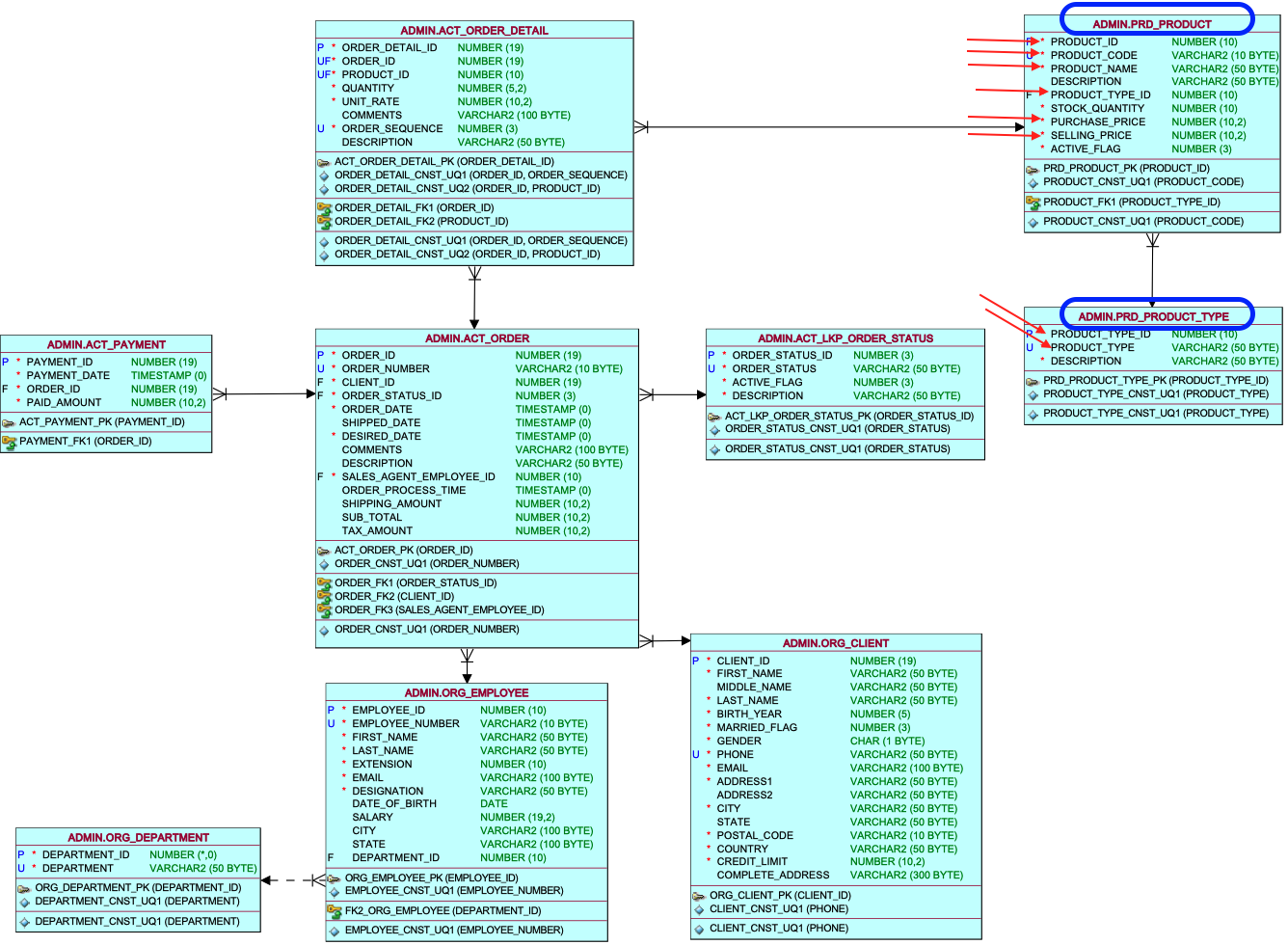
In this task, you will create a query involving two tables, named Products and ProductType, marked are the columns necessary for the query.
EXAMPLE 1 - RIGHT JOIN query
To achieve this, you need to execute a RIGHT JOIN between the product table and the product type detail table, utilizing the primary key and foreign key column, wherein the product type ID column serves as the joining column. In this scenario, the product table functions as the left table, and the product type detail table is considered the right table. The left table, which contains the essential primary business information, focuses on the product list as the primary requirement. At a secondary level, we seek prodcut type name, so we treat the product type as the secondary table, positioned on the right side of the join
SELECT
    prd_product.product_id,
    prd_product.product_code,
prd_product.product_name,prd_product.selling_price,
prd_product.purchase_price
    prd_product_type.product_type_id,
prd_product_type.product_type
FROM prd_product
RIGHT OUTER JOIN prd_product_type ON prd_product_type.product_type_id = prd_product.product_type_id
ORDER BY prd_product.product_id;
EXAMPLE 1 - Query Data Mapping
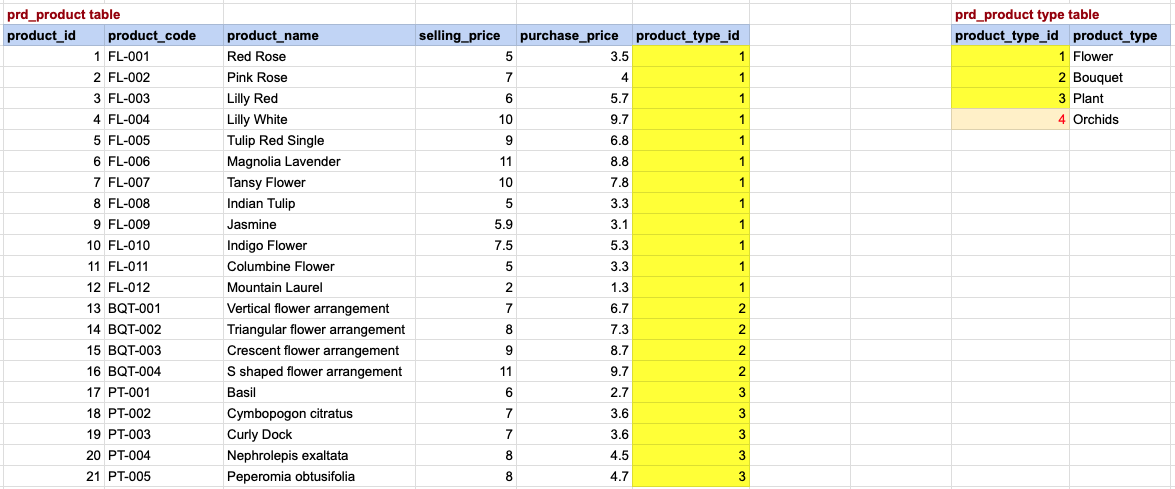
In this visual representation, a yellow background denotes a correspondence between the primary key and foreign key. Meanwhile, a light yellow background with red font on the right side signifies products lacking a corresponding row in the product type table. These product typess will be included in the final result, but with NULL values for product details. It's important to recognize that a RIGHT JOIN incorporates all rows from the right table, which, in this case, is the product type table.
EXAMPLE 1 - Final OUTput
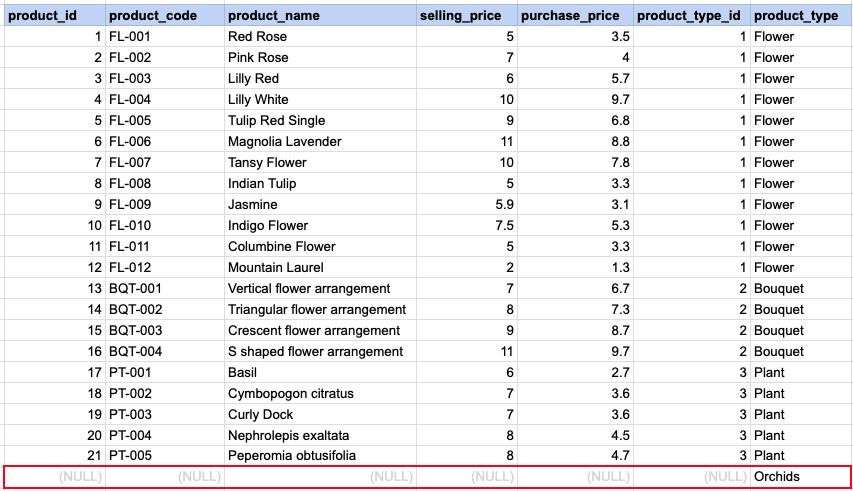
Please note that for rows in the left table that do not find a corresponding match in the right table, the values are marked as null.
Comments Not Found