
PostgreSQL
LIKE Operator
In PostgreSQL, the LIKE operator is a part of Data Query Language (DQL) and is used to match text values against a specified pattern. It is most commonly used with SELECT queries to filter rows where a specific column's value matches a pattern. The LIKE operator allows the use of two wildcard characters:
%: Represents zero or more characters._: Represents a single character.
Here’s a basic breakdown of how to use the LIKE operator in PostgreSQL.
Key Points on Using the LIKE Operator:
- Basic Syntax of
LIKE:SELECT column_name FROM table_name WHERE column_name LIKE 'pattern'; - Using
%to Match Multiple Characters:- This wildcard allows you to match zero or more characters in a string.
SELECT customer_name
FROM customers
WHERE customer_name LIKE 'John%';
In this query:
- It will return all customer names starting with "John" followed by any sequence of characters (or none).
- This wildcard allows you to match zero or more characters in a string.
- Using
_to Match a Single Character:- This wildcard allows you to match exactly one character at a particular position.
   SELECT account_number
   FROM accounts
   WHERE account_number LIKE '1234_';
In this query:
- It will return all account numbers that start with "1234" and have one additional character (e.g., "12345", "1234A").
- Case Sensitivity of
LIKE:- The
LIKEoperator in PostgreSQL is case-sensitive by default.SELECT transaction_id FROM transactions WHERE transaction_type LIKE 'Deposit%'; - Only rows where
transaction_typestarts with "Deposit" (capital "D") will be returned.
- The
- Case-Insensitive Match with
ILIKE:- If you want a case-insensitive match, you can use
ILIKEinstead ofLIKE.SELECT customer_email FROM customers WHERE customer_email ILIKE '%@bank.com';In this query:
- It will return all email addresses that contain "@bank.com", regardless of the case of the characters.
Advanced Usage:
- Combining
LIKEwith Other Conditions:- You can combine the
LIKEoperator with other conditions usingANDorOR.
SELECT customer_name FROM customers WHERE customer_name LIKE 'John%' AND city = 'New York'; - You can combine the
- Escape Special Characters in
LIKE:- If the pattern includes a literal
%or_, use theESCAPEkeyword.SELECT customer_name FROM customers WHERE customer_name LIKE 'John\_%' ESCAPE '\'; - This query will return customer names starting with "John_" (underscore as a literal).
- If the pattern includes a literal
This should give beginners a good start on using the
LIKEoperator in PostgreSQL queries for pattern matching in a flexible way! - If you want a case-insensitive match, you can use
To gain complete access, login with gmail or outlook, no need of signup. click here
TEST CODE
In PostgreSQL, to retrieve entries for clients with last names that begin with 'Me%', where '%' signifies the possibility of zero or more characters following 'Me', you can use the following query:
SELECT * FROM org_client WHERE last_name LIKE 'Me%';In PostgreSQL, to fetch records for clients whose first names conclude with '%ne', where '%' signifies the possibility of zero or more characters preceding 'ne', you can use the following query:
SELECT * FROM org_client WHERE first_name LIKE '%ne';In PostgreSQL, to fetch records for clients with the second character in their last name being 'a', you can use the following query:
SELECT * FROM org_client WHERE last_name LIKE '_a%';In PostgreSQL, to fetch records for clients with last names that include 'an' at any position. To ensure compatibility and avoid potential case-sensitive database issues, we will convert the entire last name column to lowercase before making the comparison.
SELECT * FROM org_client WHERE LOWER(last_name) LIKE '%an%';In PostgreSQL, to fetch records for clients whose last names have 'i' as the second character and 's' as the last character, you can use the following query:
SELECT * FROM org_client WHERE last_name LIKE '_i%s';In PostgreSQL, to retrieve entries for clients with first names that begin with 'D' and end with 'd', you can use the following query:
SELECT * FROM org_client WHERE first_name LIKE 'D%d';Example 1:
Let's delve into the process of extracting data from a specified table using the SQL LIKE operator. Retrieve entries for clients with last names that begin with 'Me%', where '%' signifies the possibility of zero or more characters following 'Me'.
Example 1 - Raw data from client table
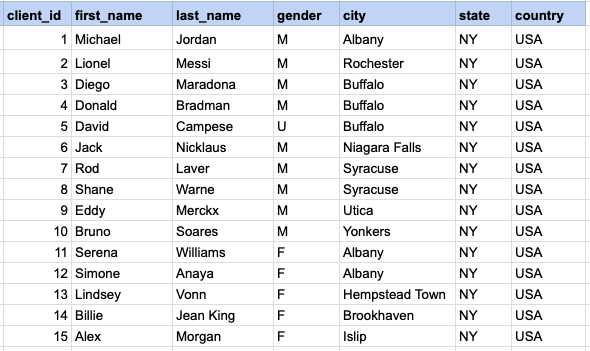
Example 1 - Query
SELECT *
FROM org_client
WHERE last_name LIKE 'Me%';
Example 1 - Query data mapping
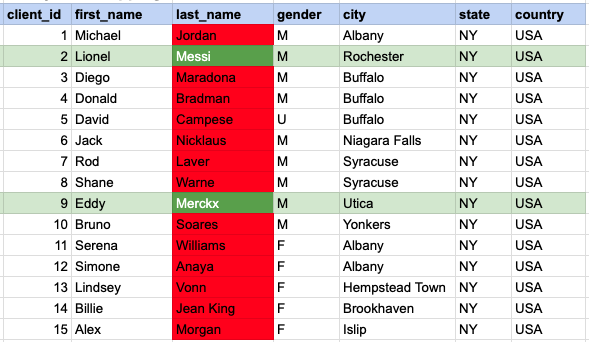
In the provided image, the green color signifies the data that has been selected or satisfies the conditions specified in our query. Data points in red indicate information that does not meet the criteria set by the query.
Example 1 - Query Output

Example 2:
Fetch records for clients whose first names conclude with '%ne'.
Example 2 - Query
SELECT *
FROM org_client
WHERE first_name LIKE '%ne';
Example 2 - Query data mapping
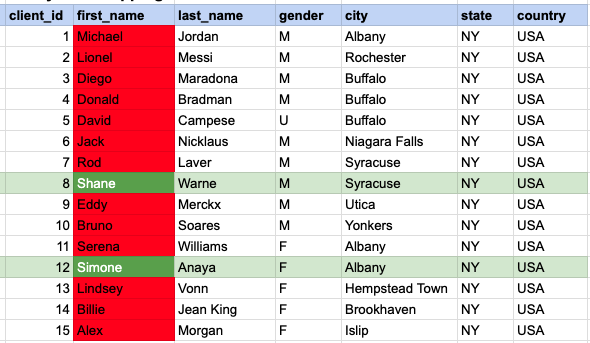
In the provided image, the green color signifies the data that has been selected or satisfies the conditions specified in our query. Data points in red indicate information that does not meet the criteria set by the query.
Example 2 - Query Output

Example 3:
Fetch records for clients with the second character in their last name being 'a'.
Example 3 - Query
SELECT *
FROM org_client
WHERE last_name LIKE '_a%';
Example 3 - Query data mapping
<img src="https://pub-289d5464a488491eafa41be08a4815ce.r2.dev/images/Postgresql/chapter-7/23b367cd-20a4-41d3-80fb-a708a32f5bca.png"alt="Image Description" style="display:block; width:100%; max-width:800px; height:auto; margin:20px 0;"In the provided image, the green color signifies the data that has been selected or satisfies the conditions specified in our query. Data points in red indicate information that does not meet the criteria set by the query.
Example 3 - Query Output

Example 4:
Fetch records for clients with last names that include 'an' at any position. To ensure compatibility and avoid potential case-sensitive database issues, we will convert the entire last name column to lowercase before making the comparison.
Example 4 - Query
SELECT *
FROM org_client
WHERE lower(last_name) LIKE '%an%';
Example 4 - Query data mapping
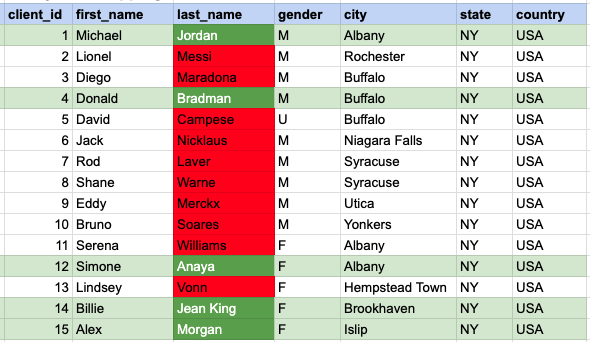
In the provided image, the green color signifies the data that has been selected or satisfies the conditions specified in our query. Data points in red indicate information that does not meet the criteria set by the query.
Example 4 - Query Output
Example 5:
Fetch records for clients whose last names have 'i' as the second character and 's' as the last character.
Example 5 - Query
SELECT *
FROM org_client
WHERE last_name LIKE '_i%s';
Example 5 - Query data mapping
<img src="https://pub-289d5464a488491eafa41be08a4815ce.r2.dev/images/Postgresql/chapter-7/b0310492-13ab-4d7a-b103-de23c49a3a8d.png"alt="Image Description" style="display:block; width:100%; max-width:800px; height:auto; margin:20px 0;"In the provided image, the green color signifies the data that has been selected or satisfies the conditions specified in our query. Data points in red indicate information that does not meet the criteria set by the query.
Example 5 - Query Output

Example 6:
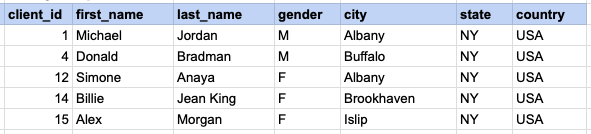
Retrieve entries for clients with first names that begin with 'D' and end with 'd'.
Example 6 - Query
SELECT *
FROM org_client
WHERE first_name LIKE 'D%d';
Example 6 - Query data mapping
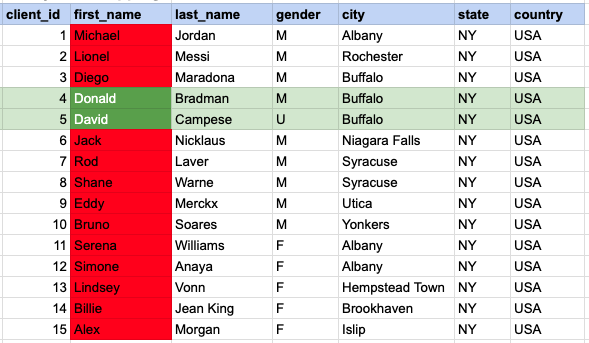
In the provided image, the green color signifies the data that has been selected or satisfies the conditions specified in our query. Data points in red indicate information that does not meet the criteria set by the query.
Example 6 - Query Output</2>


Comments Not Found