
PostgreSQL
SELECT *
In PostgreSQL, the SELECT statement is one of the most basic and widely used commands in the Data Query Language (DQL). It allows you to retrieve data from one or more tables in a database. The SELECT* query is often used to fetch all columns from a table. While it's a powerful command for quickly retrieving data, beginners should be cautious when using it in large tables, as it may return more information than needed.
Here's how you can get started with SELECT* in PostgreSQL:
- Basic Syntax of
SELECT*- The asterisk * is a wildcard that selects all columns in the table.
- The simplest form is:
SELECT * FROM table_name; - Example: Retrieving Data from a Customers Table
- Suppose you have a table
customersin a banking system, and you want to retrieve all data about customers:
SELECT * FROM customers;- This query returns all columns such as
customer_id,name,address, andphone_number.
- Suppose you have a table
- Using
SELECT* with Filters (Optional)- You can add a
WHEREclause to filter the rows returned. For example, retrieving all customers from a specific city:
SELECT * FROM customers WHERE city = 'New York'; - You can add a
- Fetching Data from Multiple Tables (JOIN)
- When working with related tables, such as
accountsandtransactions, you can useJOINto fetch data from multiple tables:
SELECT * FROM accounts JOIN transactions ON accounts.account_id = transactions.account_id;- This will retrieve all columns from both
accountsandtransactionswhere there is a matchingaccount_id.
- When working with related tables, such as
- Common Use Cases for
SELECT*- Testing: Useful during development to inspect the full table structure.
- Small Tables: Ideal for retrieving all columns when tables have limited data.
Considerations:
- For large tables, it's better to specify only the columns you need, as
SELECT* may impact performance.
By following these steps, you'll be able to use the SELECT* query effectively in PostgreSQL.
To gain complete access, login with gmail or outlook, no need of signup. click here

TEST CODE
Fetch all columns and rows from the org_employee table.
SELECT * FROM org_employee;Fetch all columns and rows from the org_client table.
SELECT * FROM org_client;Fetch all columns and rows from the act_payment table.
SELECT * FROM act_payment;Fetch specific columns and all rows from the org_client table.
SELECT client_id, first_name, last_name, gender, city
FROM org_client;Fetch specific columns and all rows from the org_client table. The order of columns in the result set may differ from the table definition.
SELECT city, gender, first_name, last_name, email, client_id
FROM org_client;Retrieve all rows from org_client table, selecting only specific columns.
SELECT city, gender, first_name, last_name, email FROM org_client;Select specific columns and retrieve all rows from org_client.
SELECT city
    gender,
    first_name,
    last_name,
    email
FROM org_client;Fetch all rows from org_client table, selecting specified columns.
SELECT city, gender, first_name, last_name, email
FROM org_client
ORDER BY first_name;Choose one column from the org_client table.
SELECT email
FROM org_client;Example 1:
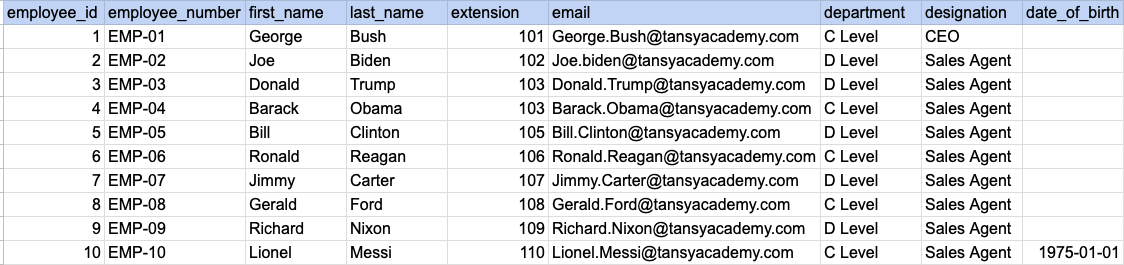
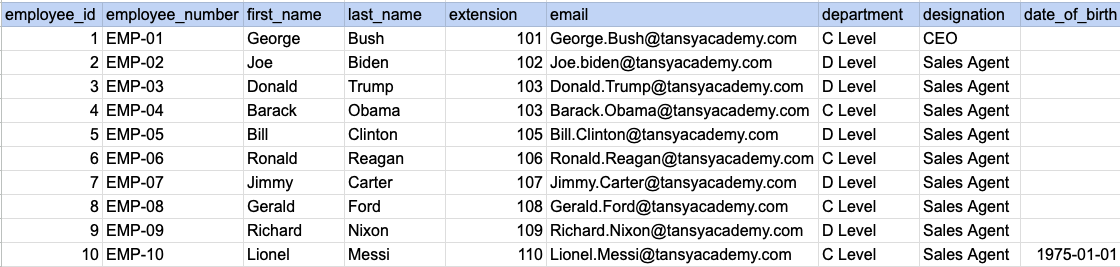
Let's understand the process of extracting data from a specified table. In this case, we aim to retrieve all rows and columns from the employee table.
Example 1 - Raw data from employee table
Example 1 - Query
SELECT *
FROM org_employee;
Example 1 - Query data mapping
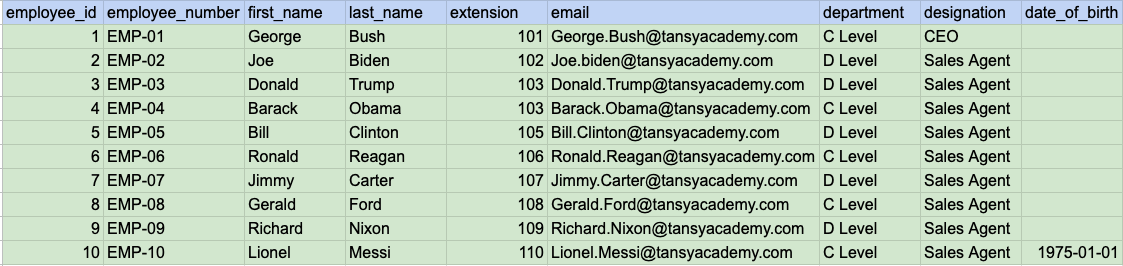
In above image, the color green signifies that the output for our query will include all rows and columns being selected.
Example 1 - Query Output
Example 2:
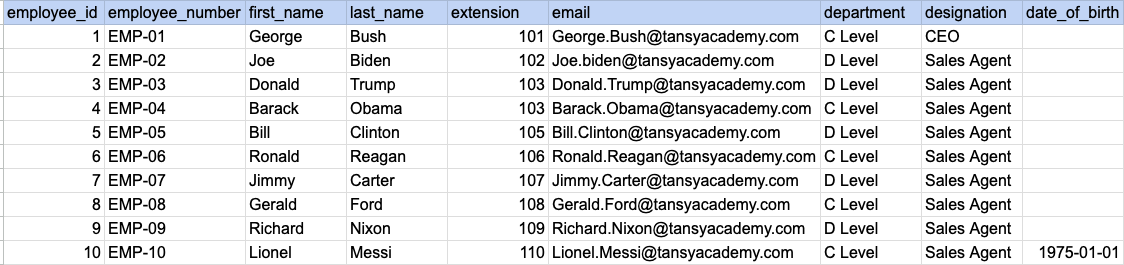
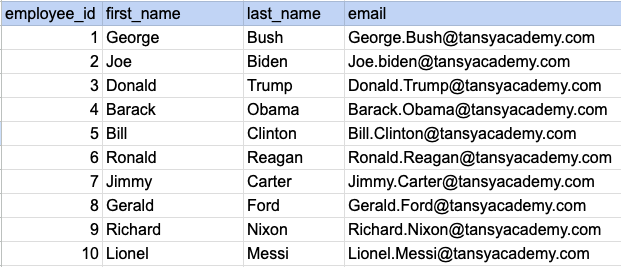
Let's understand the process of extracting desired columns from a specified table. In this case, we aim to retrieve 4 columns from the employee table.
Example 2 - Raw data from employee table
Example 2 - Query
SELECT employee_id, first_name, last_name, email
FROM org_employee;
Example 2 - Query data mapping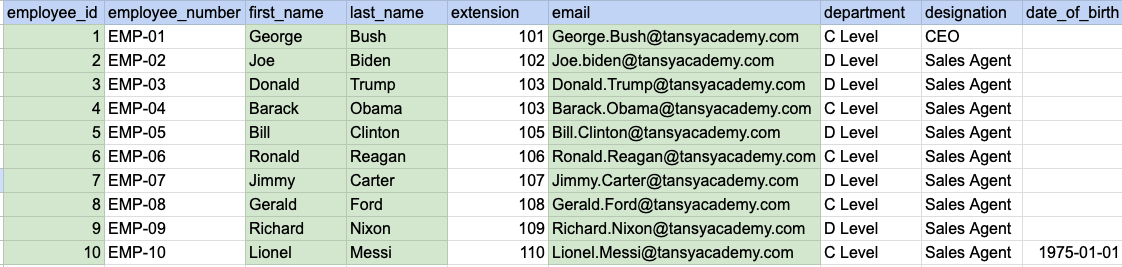
In above image, the color green signifies that the output for our query will include data from desired columns(employee_id, first_name, last_name and email).
Example 2 - Query Output
Comments Not Found