
PostgreSQL
UNION and UNION ALL
In PostgreSQL, UNION and UNION ALL are used to combine the results of two or more queries into a single result set. Understanding these operators is essential for effectively working with multiple datasets. While both operators serve a similar purpose, they differ in how they handle duplicate rows.
Here's a breakdown to help beginners understand the differences and usage of UNION and UNION ALL:
- UNION
The UNION operator combines the results of two or more SELECT statements and removes duplicate rows from the final result set.
- Each SELECT statement within the UNION must have the same number of columns.
- The columns must have compatible data types.
- The column names in the final result set are taken from the first SELECT statement.
Suppose you have two tables,
customersandbank_customers, both containing customer information.SELECT customer_id, customer_name FROM customers UNION SELECT customer_id, customer_name FROM bank_customers;This query will return a list of unique customers from both tables.
- UNION ALL
The UNION ALL operator also combines the results of two or more SELECT statements but includes all rows, including duplicates.
- Each SELECT statement within UNION ALL must have the same number of columns.
- The columns must have compatible data types.
- The column names in the final result set are taken from the first SELECT statement.
Using the same
customersandbank_customerstables, if you want to see all customers, including any duplicates:SELECT customer_id, customer_name FROM customers UNION ALL SELECT customer_id, customer_name FROM bank_customers;This query will return a list of all customers, including any duplicates that might exist between the two tables.
Key Points:
- UNION:
- Removes duplicates
- Slower performance due to duplicate removal
- UNION ALL:
- Includes duplicates
- Faster performance because it doesn’t remove duplicates
Using UNION ALL is generally more efficient if you do not need to remove duplicate rows from your result set.
To gain complete access, login with gmail or outlook, no need of signup. click here
TEST CODE
In PostgreSQL, to retrieve distinct values from the "state" column in both the "org_employee" and "org_client" tables using the UNION operator, you can use the following query:
SELECT state FROM org_employee UNION SELECT state FROM org_client;In PostgreSQL, to retrieve all values from the "state" column in both the "org_employee" and "org_client" tables using the UNION ALL operator, you can use the following query:
SELECT state FROM org_employee UNION ALL SELECT state FROM org_client;Example 1:
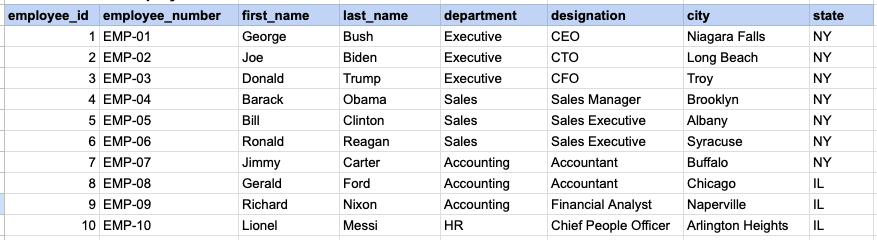
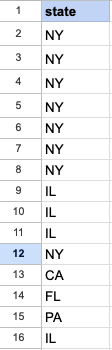
Let's delve into SQL's UNION and UNION ALL operators. This example will showcase the results obtained from both UNION and UNION ALL, simultaneously illustrating the distinctions between them.
Example 1 - Raw data from employee table
Example 1 - Raw data from client table

Example 1 - UNION query
SELECT state
FROM org_employee
UNION
SELECT state
FROM org_client;
Example 1 - Query data mapping for UNION
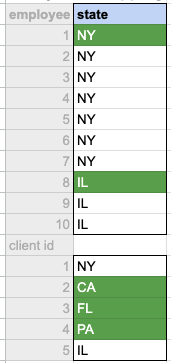
In the given image, the green hue indicates the data that has been chosen or meets the criteria specified in our query. It's evident that only unique values from both the employee and client tables are selected as the output.
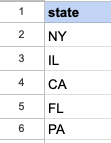
Example 1 - Query Output for UNION
Example 1 - UNION ALL query
SELECT state
FROM org_employee
UNION ALL
SELECT state
FROM org_client;
Example 1 - Query data mapping for UNION ALL
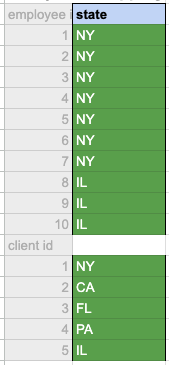
In the given image, the green hue indicates the data that has been chosen or meets the criteria specified in our query. It's evident that all values both the employee and client tables are selected as the output.
Example 1 - Query Output for UNION ALL

Comments Not Found