
PostgreSQL
Logical Operators
In PostgreSQL, Logical Operators are used to combine multiple conditions in a query, allowing for more complex and refined data retrieval. These operators are crucial for filtering data based on multiple criteria, making them an essential part of writing effective queries.
Here's a brief overview of logical operators and how they can be used with SQL queries:
- AND Operator
- The
ANDoperator is used to combine multiple conditions in aWHEREclause. All conditions connected byANDmust be true for a row to be included in the result set. - Example: Retrieve customers with a balance greater than $5000 and who have an active account.
SELECT * FROM customers
WHERE customer_id IN (
    SELECT customer_id FROM accounts
    WHERE balance > 5000
) AND EXISTS (
    SELECT 1 FROM accounts
    WHERE customer_id = customers.customer_id
    AND status = 'active'
);
- The
- OR Operator
- The
ORoperator is used to connect multiple conditions where at least one of them must be true for a row to be included. - Example: Find customers who either have a balance greater than $5000 or have made a transaction in the last month.
SELECT * FROM customers
WHERE customer_id IN (
    SELECT customer_id FROM accounts
    WHERE balance > 5000
) OR customer_id IN (
    SELECT customer_id FROM transactions
    WHERE transaction_date >= CURRENT_DATE - INTERVAL '1 month'
);
- The
- NOT Operator
- The
NOToperator negates a condition, returning rows where the condition is false. - Example: Retrieve customers who do not have any transactions in the past 6 months.
SELECT * FROM customers
WHERE customer_id NOT IN (
    SELECT customer_id FROM transactions
    WHERE transaction_date >= CURRENT_DATE - INTERVAL '6 months'
);
- The
- Combining Logical Operators
- Logical operators can be combined to form more complex conditions. Use parentheses to ensure the correct order of operations.
- Example: Find customers who have a balance greater than $5000 and either have an active account or made a transaction in the last 3 months.
SELECT * FROM customers
WHERE balance > 5000
AND (
    EXISTS (
        SELECT 1 FROM accounts
        WHERE customer_id = customers.customer_id
        AND status = 'active'
    ) OR customer_id IN (
        SELECT customer_id FROM transactions
        WHERE transaction_date >= CURRENT_DATE - INTERVAL '3 months'
    )
);
These examples demonstrate how logical operators can be used to refine and combine conditions in SQL queries, allowing for more tailored data retrieval.
To gain complete access, login with gmail or outlook, no need of signup. click here
TEST CODE
To choose male customers located in the state of New York, use the following query:
SELECT * FROM org_client WHERE gender = 'M' AND state = 'NY';To select customers either from the state of Pennsylvania or the city of Miami, use the following query:
SELECT * FROM org_client WHERE city = 'Miami' OR state = 'PA';To fetch customers who do not live in the state of New York, use the following query:
SELECT * FROM org_client WHERE state <> 'NY';To find married clients whose credit limit is higher than the credit limit of every unmarried client, use the following query:
SELECT * FROM org_client WHERE credit_limit > ALL (SELECT credit_limit FROM org_client WHERE married_flag = 0) AND married_flag = 1;To find single female clients born in the same year as any single male clients, use the following query:
SELECT * FROM org_client WHERE birth_year = ANY (SELECT birth_year FROM org_client WHERE gender = 'M' AND married_flag = 0) AND gender = 'F' AND married_flag = 0;To find all customers who have placed an order, use the following query:
SELECT * FROM org_client WHERE EXISTS (SELECT 1 FROM act_order WHERE org_client.client_id = act_order.client_id);To fetch all rows from the clients table where the birth year column matches any of the specified values (1990, 1980), use the following query:
SELECT *
FROM org_client
WHERE birth_year IN (1990, 1980);

AND operator
SELECT *
FROM org_client
WHERE gender = 'M'
AND state = 'NY';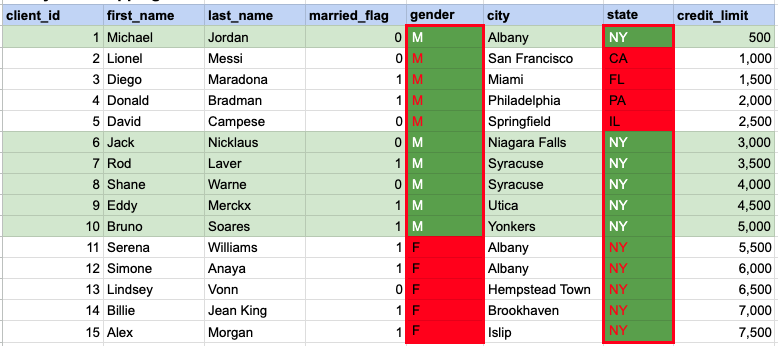
In the given image, the green hue indicates the data that has been chosen or meets the criteria specified in our query. When using the AND operator, both column values must satisfy the specified criteria.
OR operator
SELECT *
FROM org_client
WHERE city = 'Miami'
OR state = 'PA';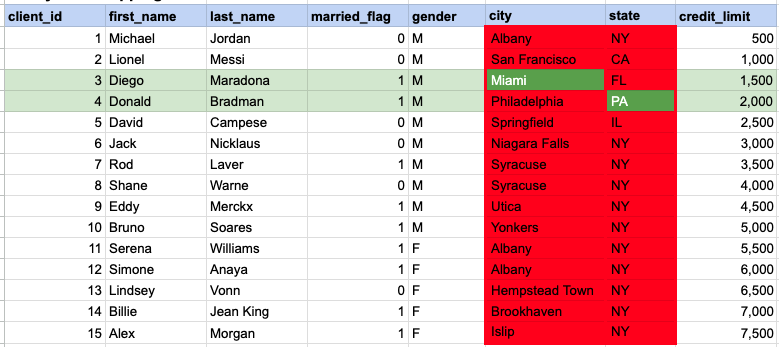
In the given image, the green hue indicates the data that has been chosen or meets the criteria specified in our query. In the case of the OR operator, at least one of the column values needs to meet the specified criteria.
SQL ALL Clause
SELECT * FROM org_client
WHERE credit_limit > ALL (SELECT credit_limit FROM org_client WHERE married_flag = 0)
AND married_flag = 1;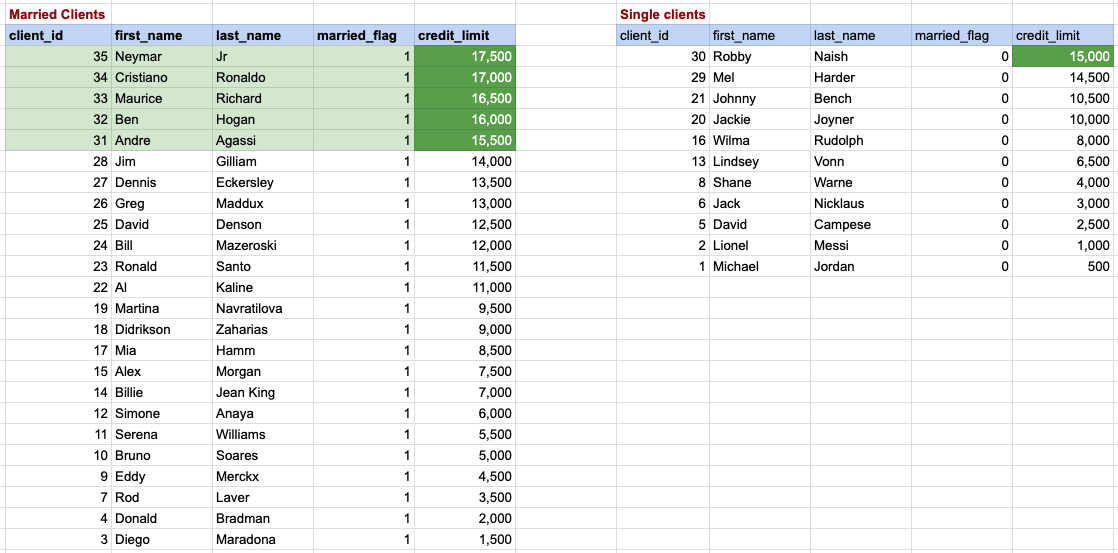
In this context, we are focused on identifying married couples whose credit limit is higher than the highest credit limit among bachelors. The bachelors and their respective credit limits are displayed on the right side, arranged in descending order with the top credit limit being 15,000. Therefore, for married clients to have a higher credit rating than all bachelors, they must exceed this top credit limit. Rows with a green background on the left represent the data of married couples that fulfill our criteria.
SQL ANY Clause
SELECT * FROM org_client
WHERE birth_year = ANY (SELECT birth_year FROM org_client WHERE gender = 'M' AND married_flag = 0)
AND gender = 'F'
AND married_flag = 0;
In this case, our goal is to find single female clients who share the same birth year as any of the single male clients. The data for single females, along with their birth years, is displayed on the left, while the information for single males is listed on the right. Single female clients whose data is highlighted with a green background are those whose birth year matches with that of a single male from the right side.
SQL EXISTS Clause
SELECT * FROM org_client
WHERE EXISTS (SELECT 1 FROM act_order WHERE org_client.client_id = act_order.client_id);
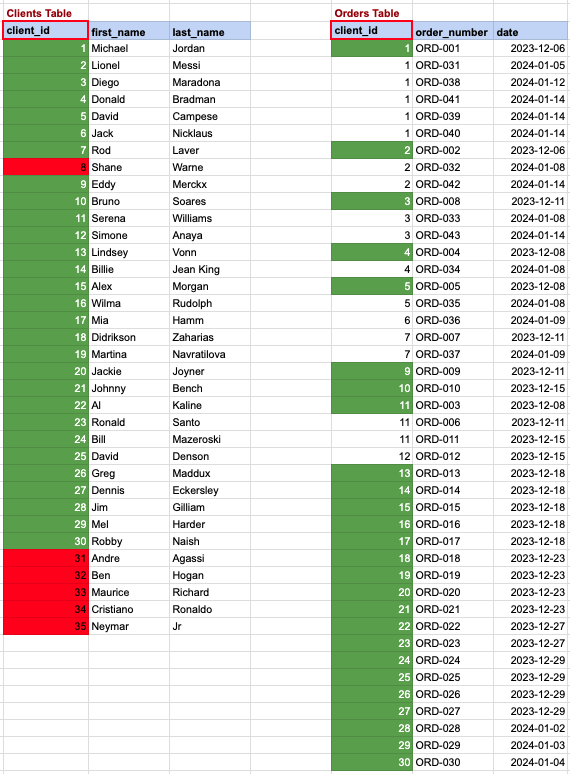
In this scenario, we aim to list clients who have made at least one order. Referring to the image, the clients from the 'clients' table, highlighted with a green background, meet our criteria, as they have placed one or more orders in the 'orders' table on the right. Conversely, clients marked with a red background are those who haven't placed any orders in the table on the right.
IN OPERATOR
SELECT * FROM org_employee
WHERE designation IN ('Sales Manager', 'Financial Analyst', 'CFO');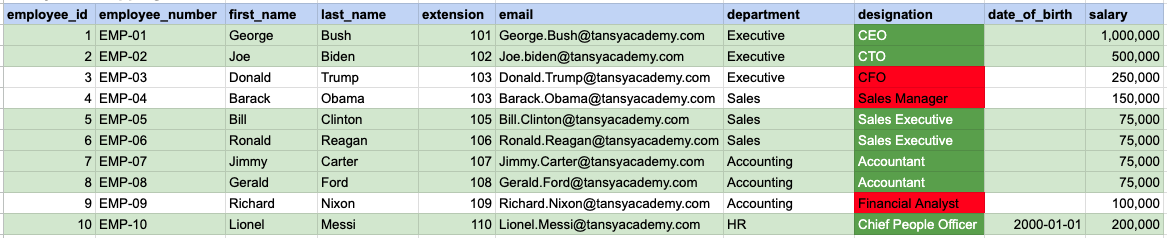
In the provided image, the green color signifies the data that has been selected or satisfies the conditions specified in our query. Data points in red indicate information that does not meet the criteria set by the query.
Comments Not Found