
PostgreSQL
NOT IN Operator
In PostgreSQL, the NOT IN operator is used to filter records by excluding rows that match a set of values. It returns rows where the value in the specified column does not match any value from a given list. This is particularly useful when you need to find data that doesn't correspond to a certain subset. For example, if you want to find customers who do not have a certain set of accounts or transactions, the NOT IN clause would be ideal. Below is a step-by-step guide with examples to help you understand how to use NOT IN effectively.
Usage of NOT IN in PostgreSQL
- Basic Syntax of
NOT IN- The general syntax for using
NOT INis as follows:
SELECT column_name FROM table_name WHERE column_name NOT IN (value1, value2, value3, ...); - The general syntax for using
- Example with Banking Database Let's say you have two tables:
customersandaccounts. You want to find customers who do not have any accounts associated with them. Here's an example query usingNOT IN:SELECT customer_id, customer_name FROM customers WHERE customer_id NOT IN (SELECT customer_id FROM accounts);- This query selects all customers who do not have an account by excluding those who are present in the
accountstable.
- This query selects all customers who do not have an account by excluding those who are present in the
- Step-by-Step Explanation of the Query
- The outer query retrieves the
customer_idandcustomer_namefrom thecustomerstable. - The subquery inside the
NOT INclause retrieves allcustomer_idvalues from theaccountstable. - The
NOT INensures that only customers whosecustomer_iddoes not exist in theaccountstable are included in the final result.
- The outer query retrieves the
- Using
NOT INwith Multiple ColumnsNOT INcan be combined with multiple columns as well. For example, if you wanted to filter based on customer transactions that did not happen in certain branches, you could use something like:
SELECT transaction_id, customer_id, branch_id FROM transactions WHERE branch_id NOT IN (101, 102, 103); - Important Considerations
- Null Values: If any value returned by the subquery or present in the list is
NULL, theNOT INwill not return any rows. Be cautious when usingNOT INwith data that may contain NULL values. - Optimization Tip: For large datasets, using
NOT EXISTScan sometimes be more efficient thanNOT IN, especially if the subquery or list contains a large number of items.
- Null Values: If any value returned by the subquery or present in the list is
By following these examples, beginners can easily get started with NOT IN in PostgreSQL, which is a powerful tool in filtering out unwanted data in queries.
To gain complete access, login with gmail or outlook, no need of signup. click here

TEST CODE
In PostgreSQL, the NOT IN operator is used to exclude rows based on specified string values. This query retrieves all rows from the "org_employee" table where the designation column does not match any of the specified values ('Sales Manager', 'Financial Analyst', 'CFO'):
SELECT *
FROM org_employee
WHERE designation NOT IN ('Sales Manager', 'Financial Analyst', 'CFO');In PostgreSQL, the NOT IN operator is used to exclude rows based on specified numeric values. This query retrieves all rows from the "org_client" table where the birth year column does not match any of the specified values (1990, 1980):
SELECT *
FROM org_client
WHERE birth_year NOT IN (1990, 1980);In PostgreSQL, the NOT IN operator is used to exclude rows based on specified datetime values. This query retrieves all rows from the "act_order" table where the desired_date column does not match any of the specified values ('2023-12-09', '2023-12-10', '2023-12-18', '2023-12-25'):
SELECT *
FROM act_order
WHERE desired_date NOT IN ('2023-12-09'::DATE, '2023-12-10'::DATE, '2023-12-18'::DATE, '2023-12-25'::DATE);Example 1:
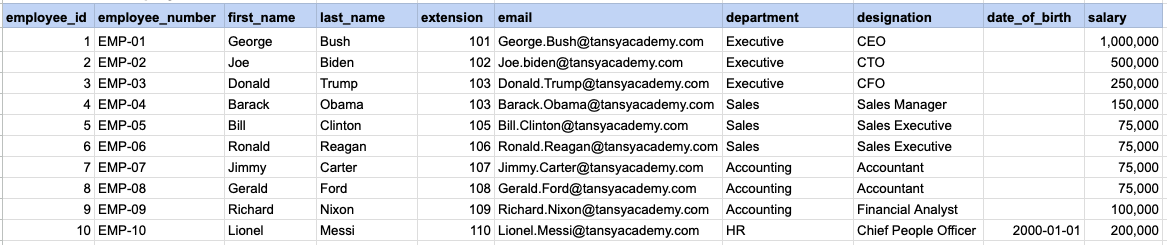
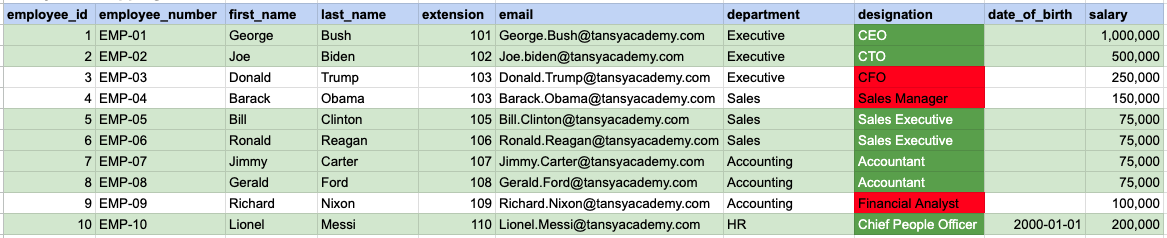
Let's explore the procedure of extracting information from a designated table using the NOT IN SQL operator with string data. This query retrieves all rows from the employees table where the designation column does not corresponds to any of the specified values ('Sales Manager', 'Financial Analyst', 'CFO').
Example 1 - Raw data from employee table
Example 1 - Query
SELECT *
FROM org_employee
WHERE designation NOT IN ('Sales Manager', 'Financial Analyst', 'CFO');
Example 1 - Query data mapping
In the provided image, the green color signifies the data that has been selected or satisfies the conditions specified in our query. Data points in red indicate information that does not meet the criteria set by the query.
Example 1 - Query Output

Example 2:
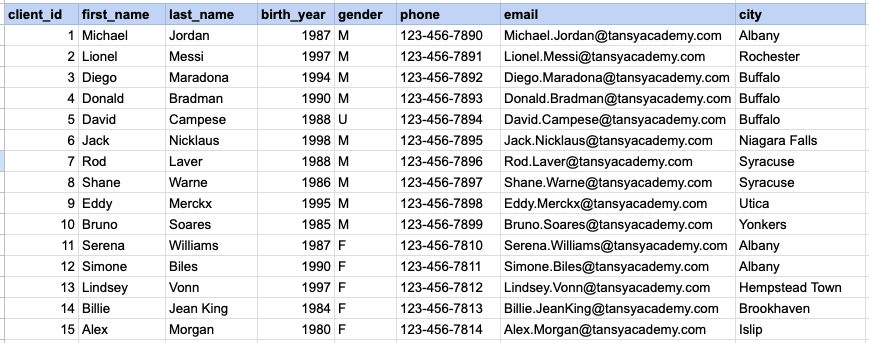
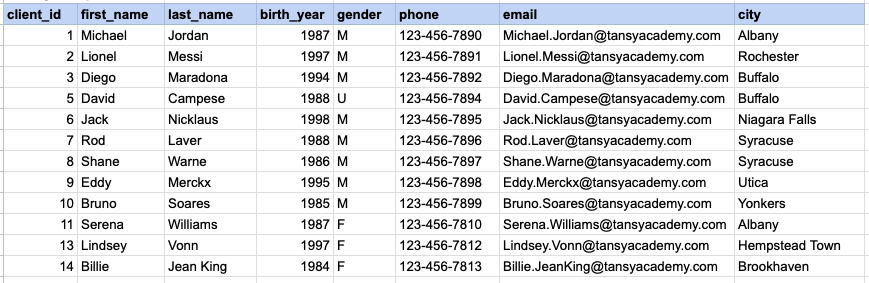
Let's explore the procedure for extracting information from a designated table using the NOT IN SQL operator on integer data. The query fetches all rows from the clients table where the birth year column do not match any of the specified values (1990, 1980).
Example 2 - Raw data from client table
Example 2 - Query
SELECT *
FROM org_client
WHERE birth_year NOT IN (1990, 1980);
Example 2 - Query data mapping
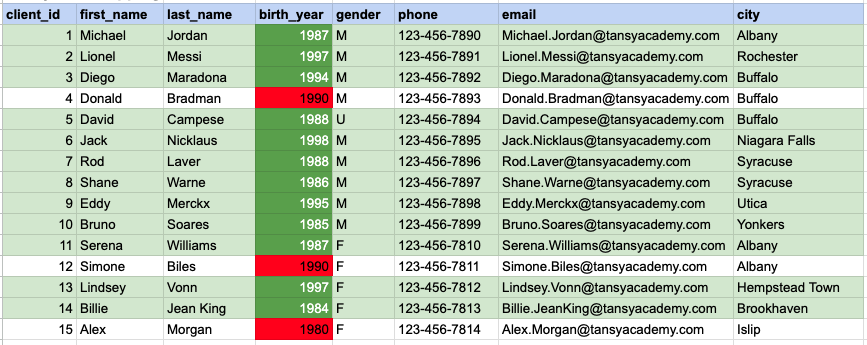
In the provided image, the green color signifies the data that has been selected or satisfies the conditions specified in our query. Data points in red indicate information that does not meet the criteria set by the query.
Example 2 - Query Output
Example 3:
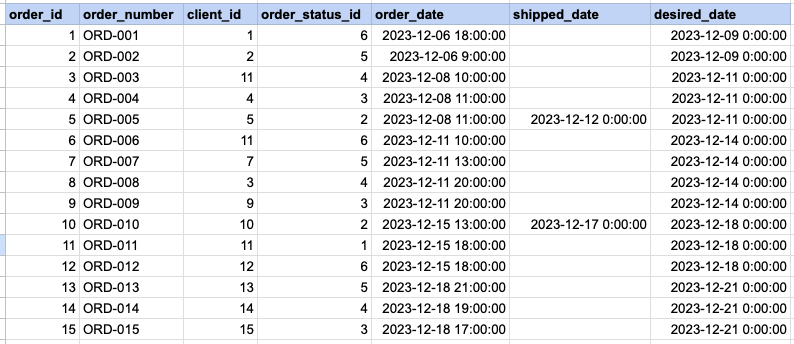
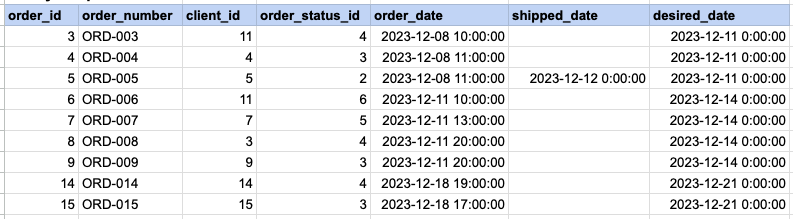
Let's explore the procedure for extracting information from a designated table using the NOT IN SQL operator on date time data. This query retrieves all rows from the orders table where the desired ship date column does not corresponds to any of the specified values ('2023-12-09', '2023-12-10', '2023-12-18', '2023-12-25').
Example 3 - Raw data from order table
Example 3 - Query
SELECT *
FROM act_order
WHERE desired_date NOT IN ('2023-12-09', '2023-12-10', '2023-12-18', '2023-1
Example 3 - Query data mapping
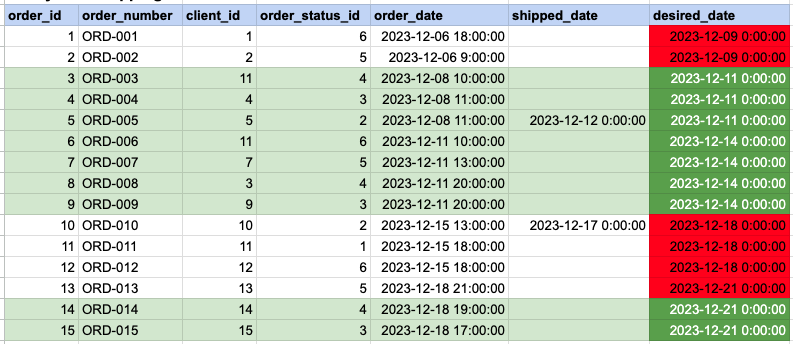
In the provided image, the green color signifies the data that has been selected or satisfies the conditions specified in our query. Data points in red indicate information that does not meet the criteria set by the query.
Example 3 - Query Output
Comments Not Found