
PostgreSQL
'=' (equal to) Operator
In PostgreSQL, the "=" (equal to) operator is part of the Data Query Language (DQL) and is used to compare values in SQL queries. It checks if two expressions (such as column values or literals) are equal. This operator is commonly used in the SELECT statement to retrieve data from tables based on a condition. When a condition with = is true, the query returns the matching rows. For example, if you want to fetch records of customers with a specific account number, you would use the = operator.
Here is a step-by-step breakdown for beginners on how to use the = operator:
- Basic Usage of
=Operator- The
=operator is used in theWHEREclause of theSELECTstatement. - It compares the value of a column with a specific value and returns rows where the condition is true.
Example:
  SELECT * FROM customers
  WHERE customer_id = 101;
In this example, the query retrieves all the details of the customer whose
customer_idequals 101. - The
- Using the
=Operator with String Values- The
=operator can also compare string values in columns. - Ensure the value you are comparing is enclosed in single quotes when using string data types.
Example:
  SELECT * FROM customers
  WHERE customer_name = 'John Doe';
This query fetches all rows where the
customer_nameis "John Doe". - The
- Using the
=Operator with Numerical Values- When comparing numerical values, you can directly use the
=operator without quotes.
Example:
  SELECT * FROM accounts
  WHERE balance = 5000;
This query retrieves all accounts where the balance is exactly 5000.
- When comparing numerical values, you can directly use the
- Combining
=Operator with Other Conditions- You can combine the
=operator with other logical operators likeAND,ORfor more complex queries.
Example:
  SELECT * FROM transactions
  WHERE account_id = 200 AND amount = 1000;
This query returns transactions where the
account_idis 200 and theamountis 1000. - You can combine the
- Using
=with Multiple Columns- The
=operator can also be used in joins or multiple column comparisons.
Example:
  SELECT customers.customer_name, accounts.balance
  FROM customers
  JOIN accounts ON customers.customer_id = accounts.customer_id
  WHERE accounts.balance = 10000;
This query retrieves customer names and their account balances where the balance is 10000, joining the
customersandaccountstables.By following these steps, you can effectively use the
=operator in PostgreSQL to query data from your database. - The
To gain complete access, login with gmail or outlook, no need of signup. click here
TEST CODE
In PostgreSQL, to fetch records for clients identified as female, you can use the following query:
SELECT * FROM org_client WHERE gender = 'F';In PostgreSQL, to fetch orders where the order status is equal to 5, you can use the following query:
SELECT * FROM act_order WHERE order_status_id = 5;In PostgreSQL, to retrieve orders with shipping dates matching December 12th, 2023, you can use the following query:
SELECT * FROM act_order WHERE shipped_date = '2023-12-12';Example 1:
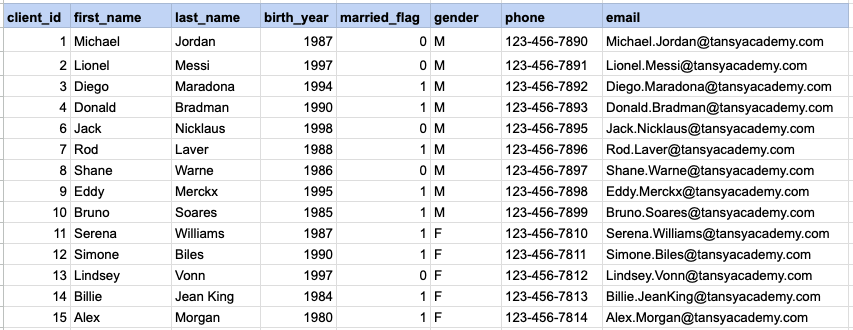
Let's explore the procedure of retrieving information from a designated table using the SQL '=' (equal to) operator with string data. Fetch records for clients identified as females.
Example 1 - Raw data from client table
Example 1 - Query
SELECT *
FROM org_client
WHERE gender = 'F';
Example 1 - Query data mapping
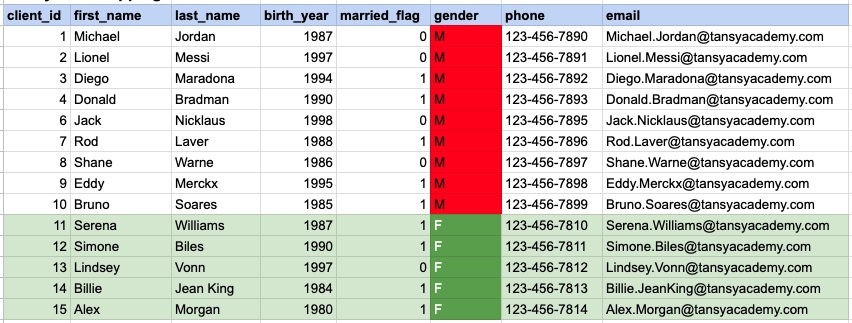
In the provided image, the green color signifies the data that has been selected or satisfies the conditions specified in our query. Data points in red indicate information that does not meet the criteria set by the query.
Example 1 - Query Output

Example 2:
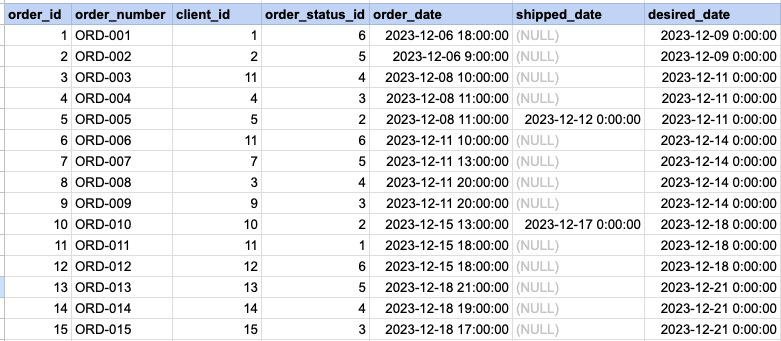
Let's delve into the process of retrieving information from a specified table using the SQL '=' (equal) operator with numeric data. Retrieve orders with statuses that match the value 5.
Example 2 - Raw data from orders table
Example 2 - Query
SELECT *
FROM act_order
WHERE order_status_id = 5;
Example 2 - Query data mapping
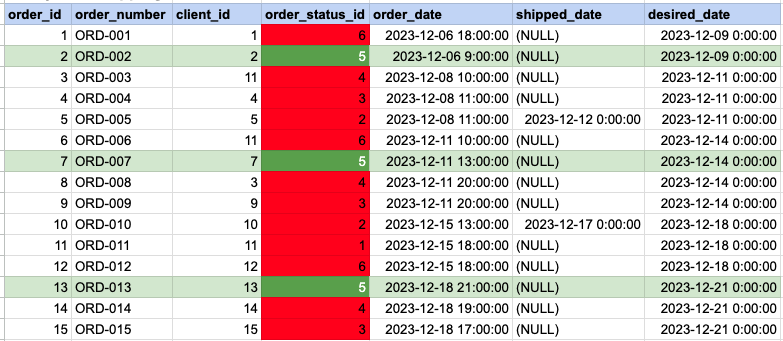
In the provided image, the green color signifies the data that has been selected or satisfies the conditions specified in our query. Data points in red indicate information that does not meet the criteria set by the query.
Example 2 - Query Output

Example 3:
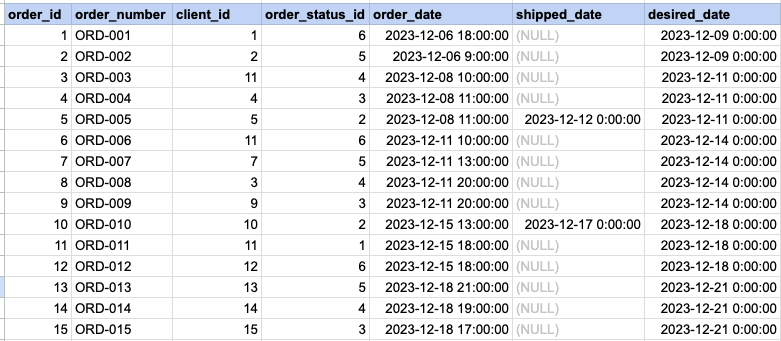
Let's explore the process of retrieving information from a designated table using the SQL '=' (equal) operator with date data. Fetch orders with shipping dates that match December 12th.
Example 3 - Raw data from orders table
Example 3 - Query
SELECT *
FROM act_order
WHERE shipped_date = '2023-12-12';
Example 3 - Query data mapping
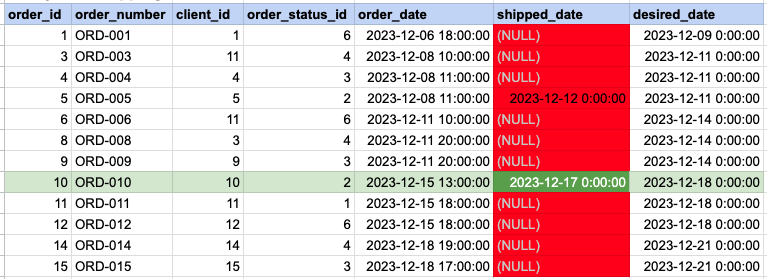
In the provided image, the green color signifies the data that has been selected or satisfies the conditions specified in our query. Data points in red indicate information that does not meet the criteria set by the query. Please be aware that the query will attempt to filter based on the value of December 12th. Since many records have NULL for the shipped date value, NULL cannot be compared as it is not an actual value. Consequently, these null records will be excluded from the results as well.
Example 3 - Query Output


Comments Not Found