
PostgreSQL
Arithmetic Operators
In PostgreSQL, arithmetic operators allow you to perform mathematical calculations on your data. These operators are essential for manipulating numerical data within your queries, making it possible to compute values, analyze data, and generate reports. Below are the key arithmetic operators supported by PostgreSQL, along with examples using a banking database context.
- Addition (
+)Adds two numbers together.
SELECT amount + 100 AS new_balance FROM transactions WHERE account_id = 1;- In this example,
amountfrom thetransactionstable is increased by 100.
- In this example,
- Subtraction (
-)Subtracts one number from another.
SELECT balance - 50 AS adjusted_balance FROM accounts WHERE customer_id = 123;- Here,
balancefrom theaccountstable is reduced by 50.
- Here,
- Multiplication (
*)Multiplies two numbers.
SELECT amount * 1.05 AS updated_amount FROM transactions WHERE transaction_type = 'deposit';- This query calculates a 5% increase on the
amountfordeposittransactions.
- This query calculates a 5% increase on the
- Division (
/)Divides one number by another.
SELECT amount / 2 AS half_amount FROM transactions WHERE transaction_date > '2024-01-01';- This query halves the
amountfor transactions made after January 1, 2024.
- This query halves the
- Modulus (
%)Returns the remainder of a division operation.
SELECT amount % 100 AS remainder FROM transactions WHERE amount > 500;- This query provides the remainder when
amountis divided by 100 for transactions over 500.
- This query provides the remainder when
These operators help you perform a variety of calculations directly within your SQL queries, making data analysis and manipulation more effective in PostgreSQL.
To gain complete access, login with gmail or outlook, no need of signup. click here

TEST CODE
To create a new column named "total_amount" by summing the amounts from the "sub_total", "tax_amount", and "shipping_amount" columns, you can use the following query:
SELECT order_number, client_id, order_status_id, order_date,
sub_total, tax_amount, shipping_amount,
(sub_total + tax_amount + shipping_amount) AS total_amount
FROM act_order
ORDER BY order_number;To create a new column titled "profit_per_unit" by subtracting the purchase price from the selling price, use the following query:
SELECT product_id, product_code, product_name,
purchase_price, selling_price,
(selling_price - purchase_price) AS profit_per_unit
FROM prd_product;To add a new column that calculates the subtotal for each product by multiplying the quantity by the unit rate, use the following query:
SELECT order_id, product_id,
quantity, unit_rate,
(quantity * unit_rate) AS sub_total
FROM act_order_detail;RAW DATA FOR ADDITION OPERATOR
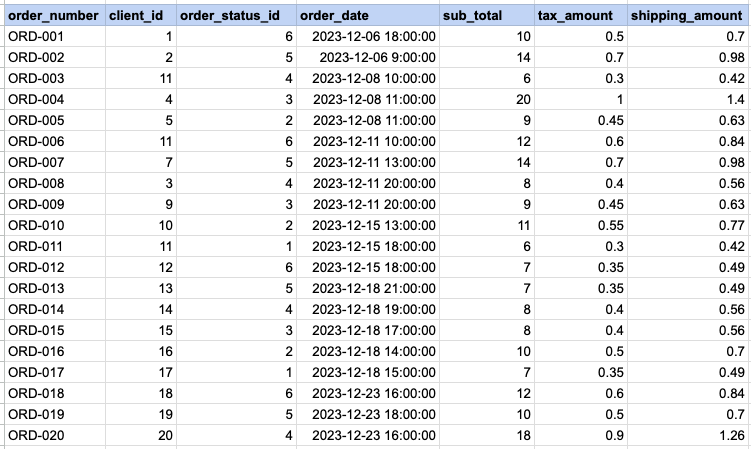
SELECT
    order_number, client_id, order_status_id, order_date,
    sub_total, tax_amount, shipping_amount,
    (sub_total + tax_amount + shipping_amount) AS total_amount
FROM act_order
ORDER BY order_number;
Data Mapping for ADDITION OPERATOR
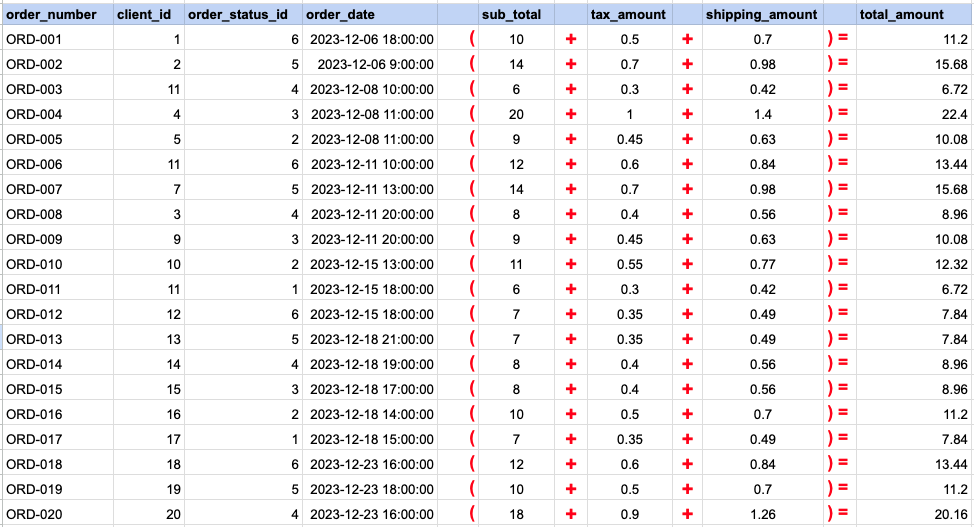
In this data mapping illustration, it's shown how the 'Total Amount' column, which does not originally exist in the raw data, is generated. This is accomplished by using an addition arithmetic operator within an SQL SELECT statement. This operation effectively adds values from existing columns to compute the total amount for each record.
RAW DATA FOR SUBSTRACTION OPERATOR
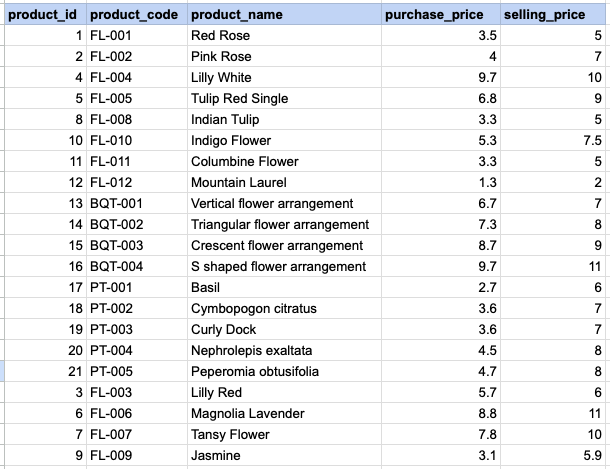
SELECT product_id, product_code,
product_name,purchase_price, selling_price
    (selling_price - purchase_price) as profit_per_unit
FROM prd_product;
Data Mapping for SUBSTRACTION OPERATOR
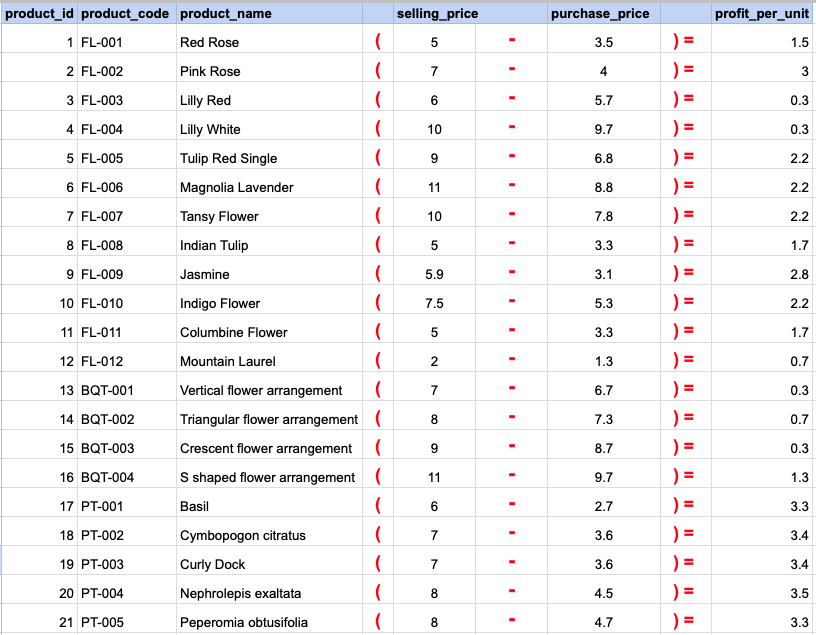
In this data mapping illustration, it's shown how the 'Profit' column, which does not originally exist in the raw data, is generated. This is accomplished by using an substraction arithmetic operator within an SQL SELECT statement. This operation effectively subtracts values from existing columns to compute the profit amount for each record.
RAW DATA FOR MULTIPLICATION OPERATOR
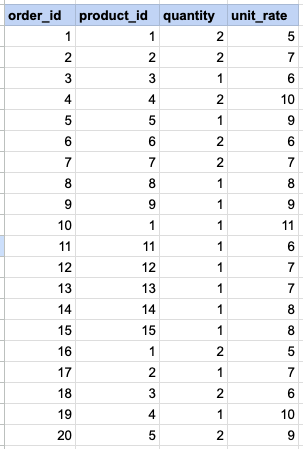
SELECT
    order_id, product_id,quantity, unit_rate,
    ( quantity * unit_rate) as sub_total
FROM act_order_detail;
Data Mapping for MULTIPLICATION OPERATOR
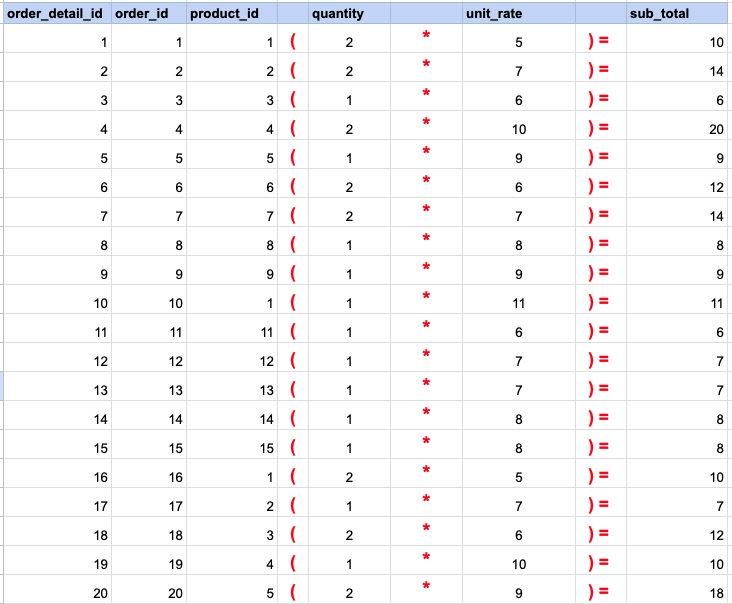
In this data mapping illustration, it's shown how the 'Sub Total' column, which does not originally exist in the raw data, is generated. This is accomplished by using an multiplication arithmetic operator within an SQL SELECT statement. This operation effectively multiplies values from existing columns to compute the total amount for each record.
Comments Not Found